14
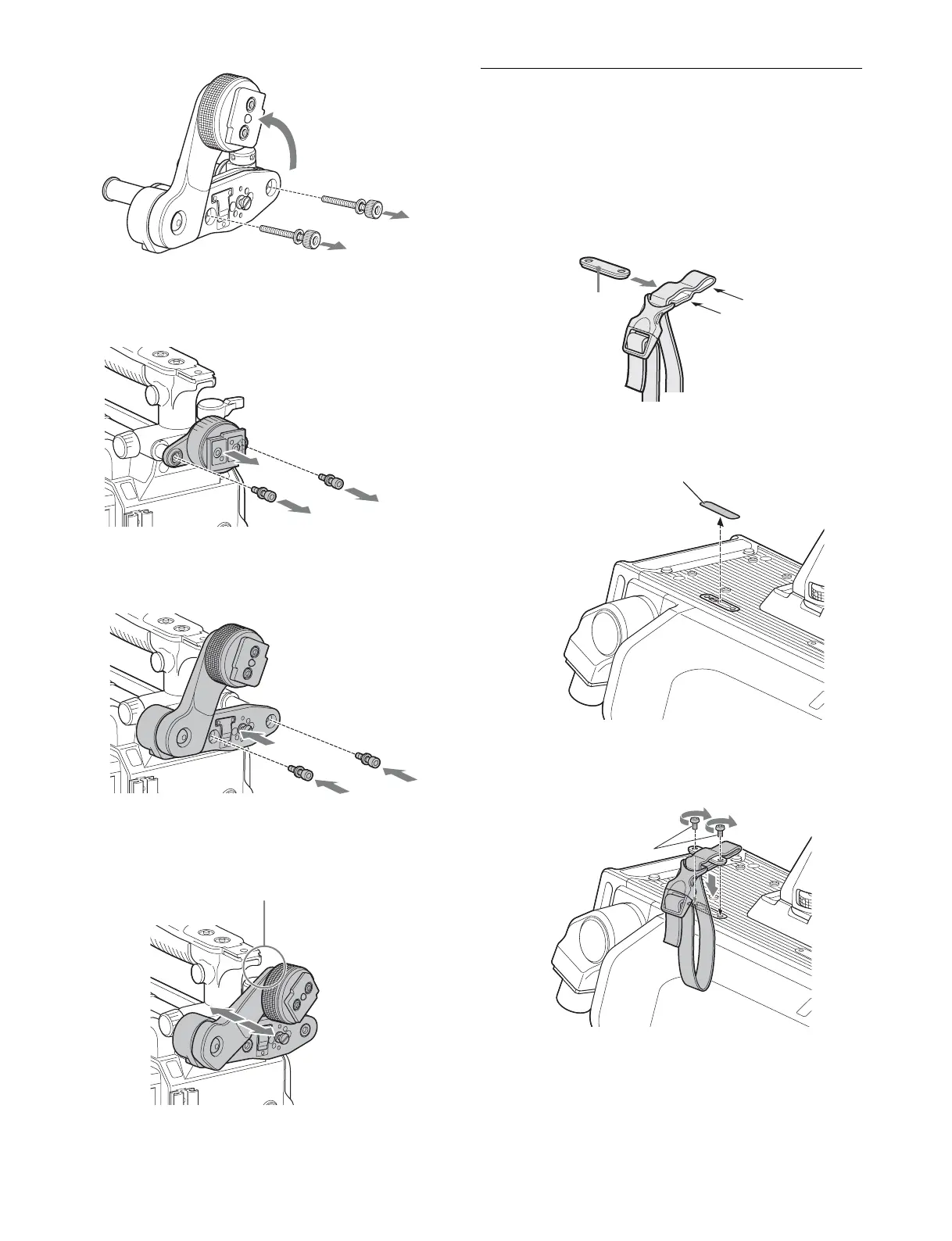
2 In the same manner as step 1, remove the viewfinder
shoe of the camera from the front-rear positioning
mechanism assembly.
3 Using the two bolts (M4×8) and the washers removed
from the camera in step 2, attach the rotation
mechanism assembly of the BKW-401 to the camera.
4 Adjust the front-rear position so that the camera
handle does not interfere when you rotate the BKW-
401 arm upwards.
Attaching the Cable Clamp Belt
(Supplied)
You can secure the optical/electrical multi cable, connected to
the BPU connector, to the side of the camera by attaching the
supplied cable clamp belt.
1 Insert the belt bracket into hole A or B of the cable
clamp belt.
2 Remove the cover seal from the camera as shown in
the following diagram.
3 Secure the cable clamp belt to the camera, using the
two supplied +B3×8 screws.
4 1 Release the buckle, 2 bundle the cable with the
belt,
3 then lock the buckle again.
Bolt
M4×8
Not interfering with handle
A
B
Belt bracket
Cover seal
Screws (+B3×8)



 To Next Page