7
GB
Getting Started
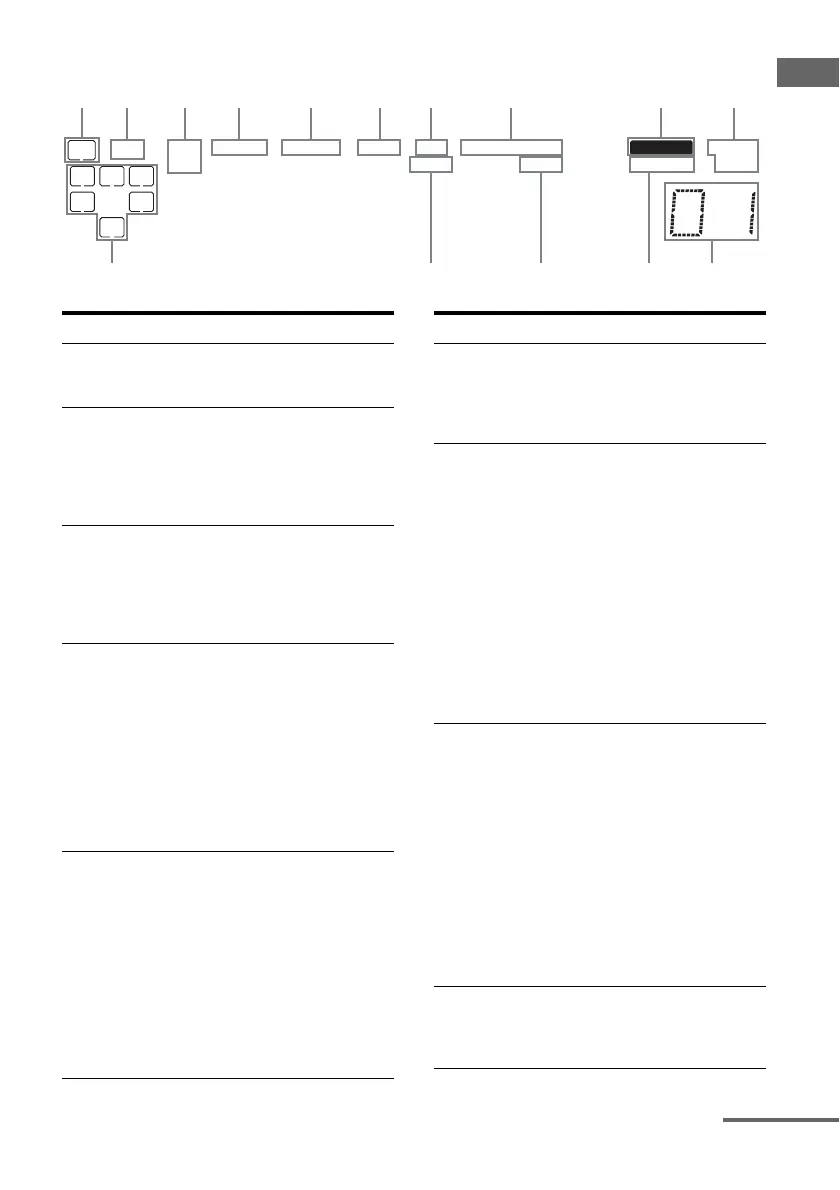
About the indicators on the display
SW
LFE
SP A
SP B
LC
SL S
;
D EX
;
PL IIx
;
PL OPT DTS
-ES 96/24 MEMORY RDS ST
MONOD.RANGECOAX NEO:6
SB
R
SR
;
qaqsqg qf qd
Name Function
A SW Lights up when the audio signal
is output from the SUB
WOOFER jack.
B LFE Lights up when the disc being
played back contains an LFE
(Low Frequency Effect)
channel and the LFE channel
signal is actually being
reproduced.
C SP A/SP B Lights up according to the
speaker system used (page 30).
However, these indicators do
not light up if the speaker output
is turned off or if a headphone is
connected.
D ; D (EX) Lights up when the receiver is
decoding Dolby Digital signals.
“; D EX” lights up when the
receiver is decoding Dolby
Digital Surround EX signals.
Note
When playing a Dolby Digital
format disc, be sure that you
have made digital connections
and that INPUT MODE is not
set to “ANALOG” (page 61).
E ; PL II (x) Lights up when the Pro Logic II
Movie/Music/Game decoder is
activated.
“; PL IIx” lights up when the
Pro Logic IIx Movie/Music/
Game decoder is activated.
Note
Dolby Pro Logic IIx decoding
does not function for DTS
format signals or for signals
with a sampling frequency of
more than 48 kHz.
Name Function
F ; PL Lights up when the receiver
applies Pro Logic processing to
2 channel signals in order to
output the center and surround
channel signals.
G OPT Lights up when VIDEO 2 input
is selected. However,
“UNLOCK” appears on the
display if no digital signal is
input through the OPTICAL
jack.
“OPT” also lights up when SAT
input is selected if
– INPUT MODE is set to
“AUTO IN” and the source
signal is a digital signal being
input through the OPTICAL
jack.
– INPUT MODE is set to “OPT
IN” (page 61).
H DTS (-ES)/
(96/24)
Lights up when the receiver is
decoding DTS signals.
“DTS-ES” lights up when the
receiver is decoding DTS-ES
signals.
“DTS 96/24” lights up when the
receiver is decoding DTS 96
kHz/24 bit signals.
Note
When playing a DTS format
disc, be sure that you have made
digital connections and that
INPUT MODE is not set to
“ANALOG” (page 61).
I MEMORY Lights up when a memory
function, such as Preset
Memory (page 56), etc., is
activated.
continued



 To Next Page