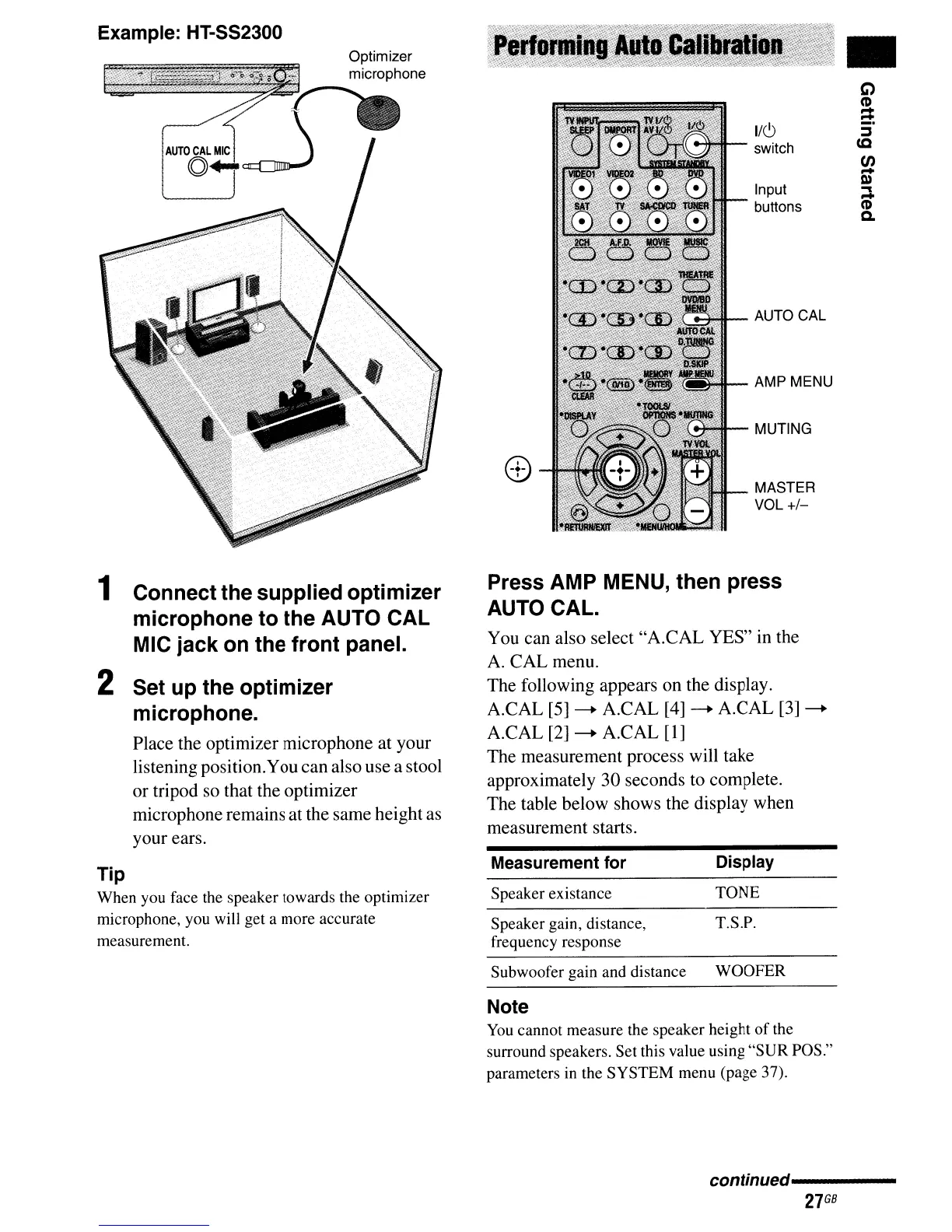
Example: HT-SS2300
1 Connect the supplied optimizer
microphone to the AUTO CAL
MIC jack on the front panel.
2 Set up the optimizer
microphone.
Place the optimizer microphone at your
listening position.You can also use a stool
or tripod so that the optimizer
microphone remains at the same height as
your ears.
Tip
When you face the speaker towards the optimizer
microphone, you will get a more accurate
measurement.
I/C)
switch
Input
buttons
~I--
AUTO CAL
AMP MENU
MUTING
I$,,:~IH-
MASTER
VOL
+/-
Press AMP MENU, then press
AUTO CAL.
You can also select "A.CAL YES" in the
A.
CAL menu.
The following appears on the display.
A.CAL
[5]
---+ A.CAL
[4]
---+ A.CAL
[3]
---+
A.CAL
[2]
---+ A.CAL
[1]
The measurement process will take
approximately 30 seconds to complete.
The table below shows the display when
measurement starts.
Measurement
for
Display
Speaker existance
TONE
Speaker gain, distance, T.S.P.
frequency response
Subwoofer gain and distance WOOFER
Note
You
cannot measure the speaker height
of
the
surround speakers. Set this value using
"SUR
POS."
parameters in the SYSTEM menu (page 37).
•
C)
CD
-
-
conffnued'----------
27
GB



 To Next Page