EasyManua.ls Logo

Sony HT-SS2300 - Getting Started; Description and Location of Parts

Sony HT-SS2300
83 pages
Print Icon
To Next Page IconTo Next Page
To Previous Page IconTo Previous Page
Loading...
Getting
Started
Description
and
location
of
parts
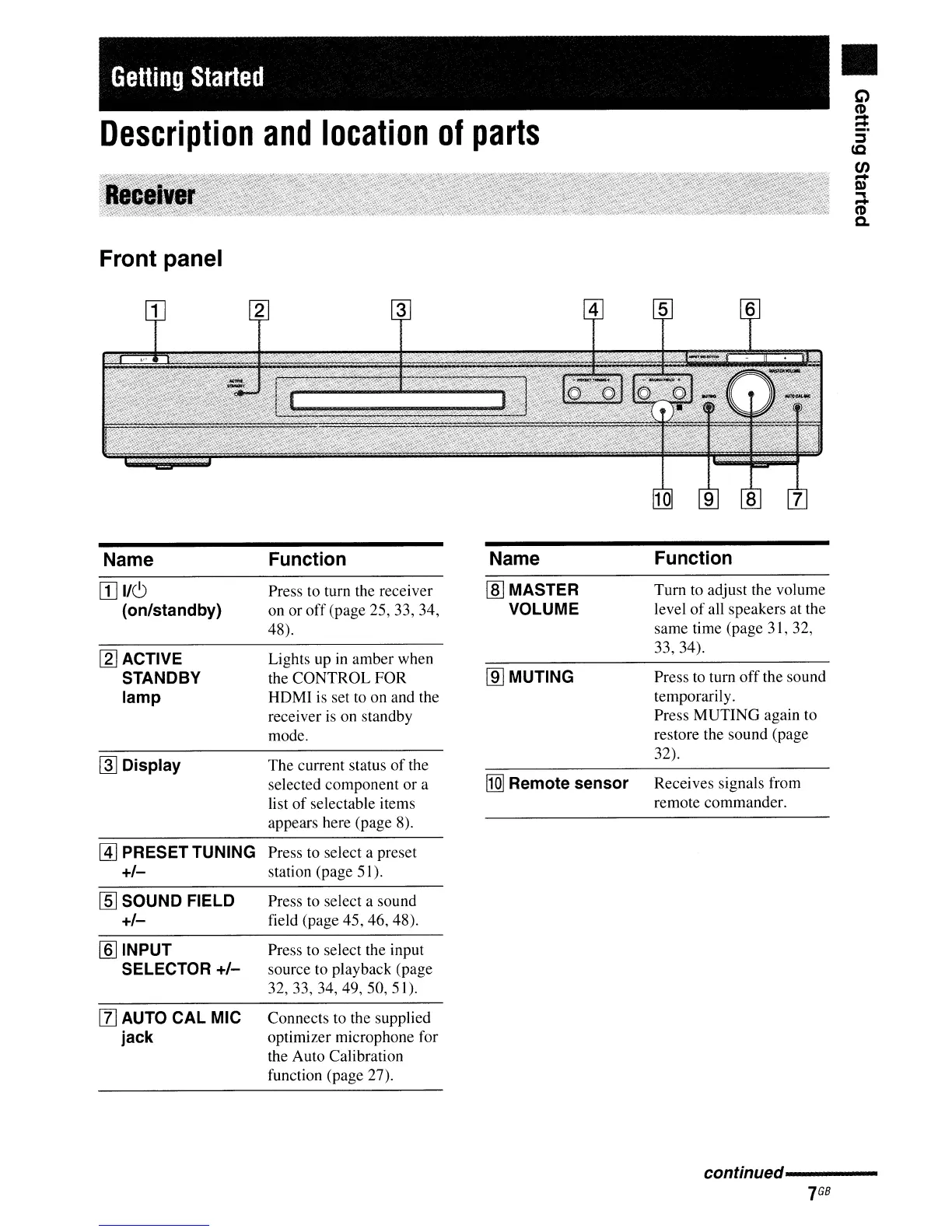
Front panel
c;)
C'D
:;
~
c.c
en
-
Q)
"'"
-
C'D
Q.
Name
[I]
I/C)
(on/standby)
[2]
ACTIVE
STANDBY
lamp
~
Display
Function
Press to turn the receiver
on or
off
(page 25, 33, 34,
48).
Lights up in amber when
the CONTROL FOR
HOMl
is
set to on and the
receiver
is
on standby
mode.
The current status
of
the
selected component or a
list
of
selectable items
appears here (page 8).
Name
lID
MASTER
VOLUME
lID
MUTING
[Q]
Remote sensor
Function
Tum
to adjust the volume
level
of
all speakers at the
same
ti
me (page 3 I, 32,
33,34).
Press
to
turn
off
the sound
temporarily.
Press MUTING again to
restore the sound (page
32).
Receives signals from
remote commander.
@]
PRESET TUNING Press to select a preset
+/-
station (page 51).
lID
SOUND FIELD
+/-
[§] INPUT
SELECTOR
+/-
[l]
AUTO CAL MIC
jack
Press to select a sound
field (page 45, 46, 48).
Press to select the input
source to playback (page
32,33,34,49,50,51).
Connects to the supplied
optimizer microphone for
the Auto Calibration
function (page 27).
conffnued---------
7
GB

Table of Contents

Other manuals for Sony HT-SS2300

Related product manuals