16
HVR-A1E/A1P 2-639-668-11(1)
Step 6: Setting the date and time
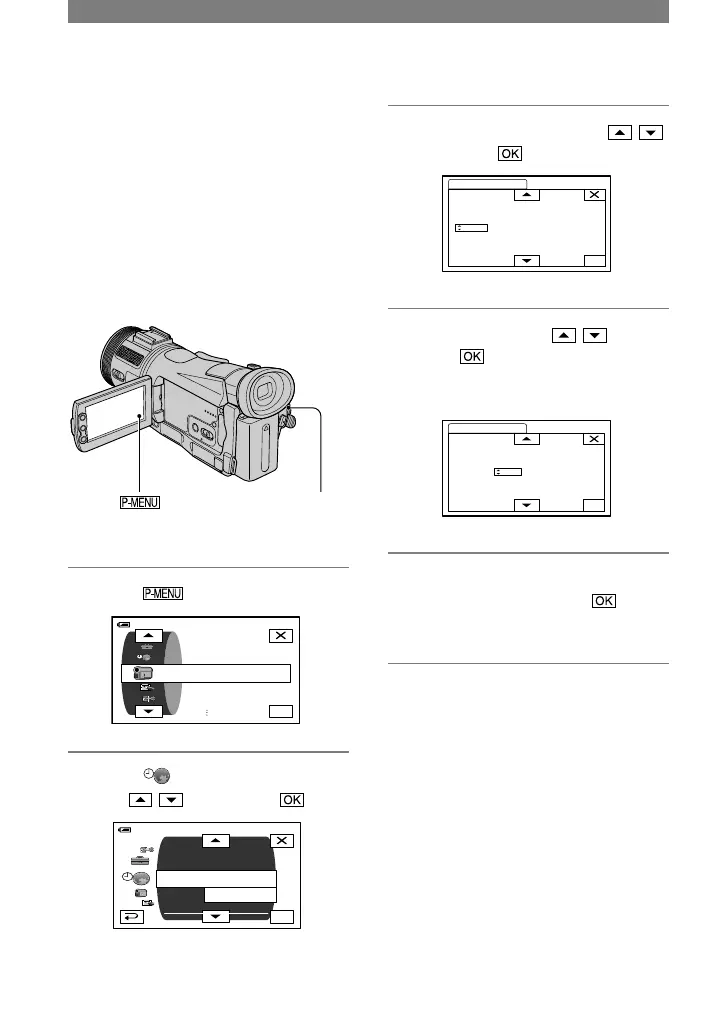
Set the date and time when using this
camcorder for the first time. If you do not
set the date and time, the [CLOCK SET]
screen appears every time you turn on your
camcorder or change the POWER switch
position.
• If you do not use your camcorder for about
3 months, the built-in rechargeable battery
gets discharged and the date and time settings
may be cleared from the memory. In that case,
charge the rechargeable battery and then set the
date and time again (p. 112).
POWER switch
Skip to step
4
when you set the clock for
the first time.
1 Touch
[MENU].
4 Set [Y] (year) with / , then
touch .
You can set any year up to the year
2079.



 To Next Page