10
HVR-A1E/A1P 2-639-668-11(1)
Step 2: Charging the battery pack
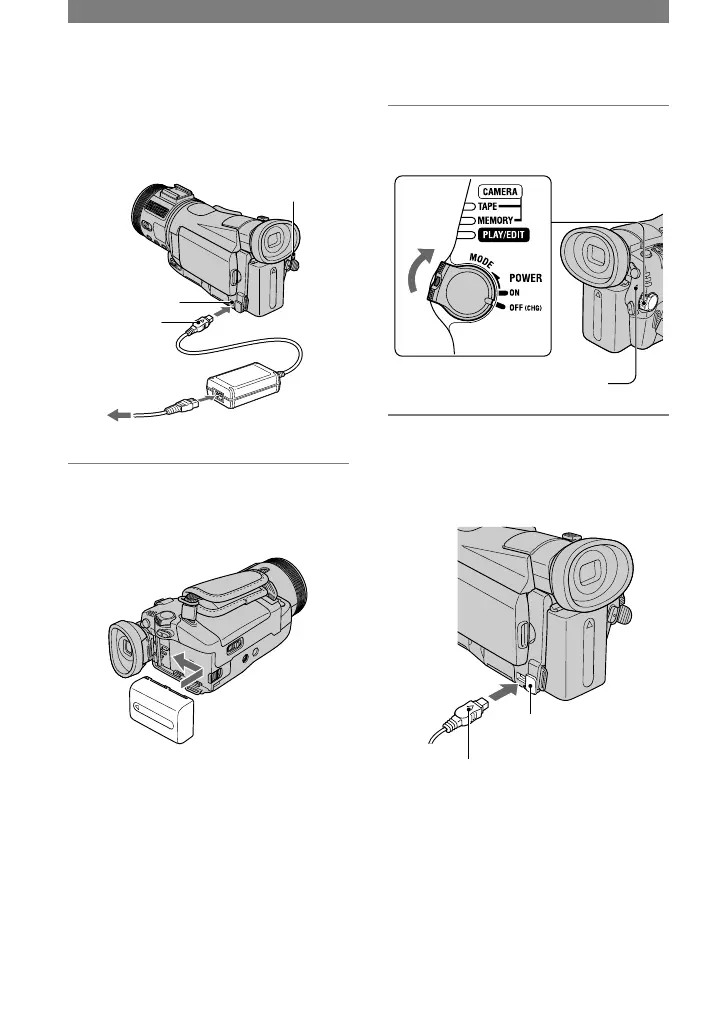
You can charge the “InfoLITHIUM”
battery pack (M series) (p. 108) after
attaching it to your camcorder.
POWER
switch
DC IN jack
DC plug
AC Adaptor
To the wall socket
Mains lead
1 Attach the battery pack by sliding
it in the direction of the arrow
until it clicks.
2 Slide the POWER switch up to
OFF (CHG) . (The default setting.)
CHG (charge) lamp
3 Connect the AC Adaptor to the
DC IN jack of your camcorder. Be
sure that the mark on the DC
plug is facing up.
The mark faces up.
Open the
DC IN jack cover.



 To Next Page