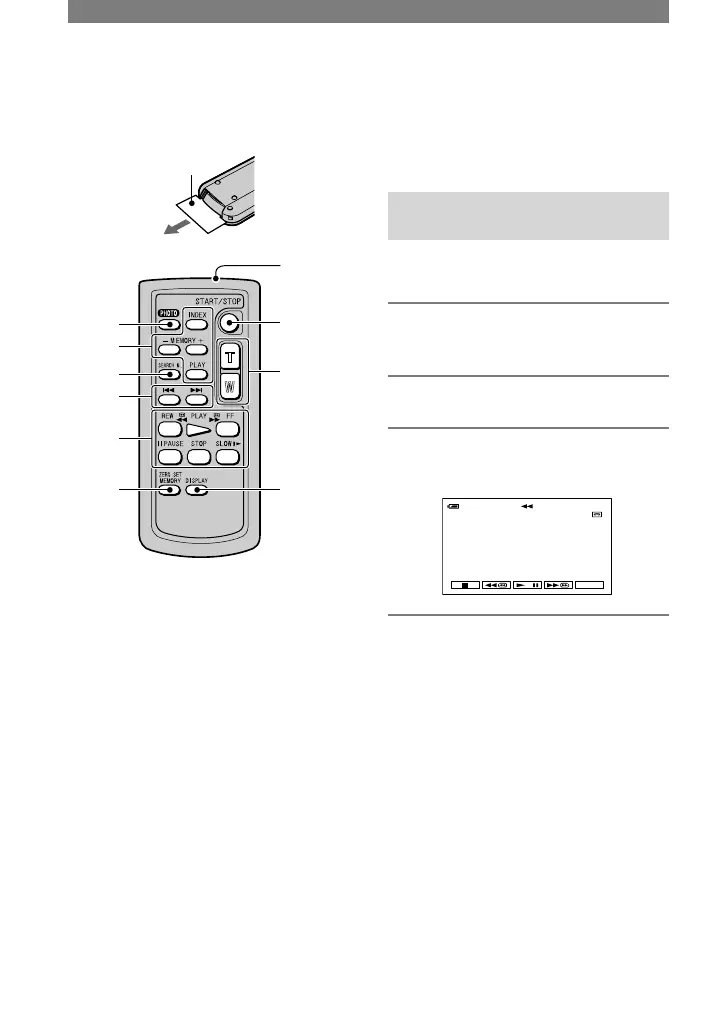
PHOTO (p. 22)
The on-screen image when you press this
button will be recorded as a still image.
SEARCH M. (p. 32)
Video control buttons (Rewind,
Playback, Fast-forward, Pause, Stop,
Slow) (p. 23)
ZERO SET MEMORY
This button is invalid with your camcorder.
Transmitter
REC START/STOP (p. 22)
Power zoom (p. 24)
DISPLAY (p. 15)
Memory control buttons (Index, –/+,
Memory playback) (p. 23)
• Aim the Remote Commander towards the
remote sensor to operate your camcorder (p.
27).
• To change the battery, see page 113.
Searching for a scene by date of
recording (Date search)
You can locate the point where the
recording date changes.
1 Slide the POWER switch down to
turn on the PLAY/EDIT lamp.
2 Press SEARCH M.
.
3 Press (previous)/(next)
to select a recording date.



 To Next Page