71
Dubbing/Editing
HVR-A1E/A1P 2-639-668-11(1)
Recording pictures from a
VCR
You can record pictures from a VCR on
a tape. You can record a scene as a still
image on a “Memory Stick Duo.”
Be sure to insert a cassette or a “Memory
Stick Duo” for recording in your camcorder
beforehand.
• You need an i.LINK cable (optional) for this
operation. You cannot record pictures from any
jack other than HDV/DV Interface (i.LINK)
jack.
• Your camcorder can only record from a
PAL source. For example, French video or
TV programs (SECAM) cannot be recorded
correctly. See page 101 for details on TV color
systems.
• If you use a 21-pin adaptor to input PAL source,
you need a dual direction 21-pin adaptor
(optional).
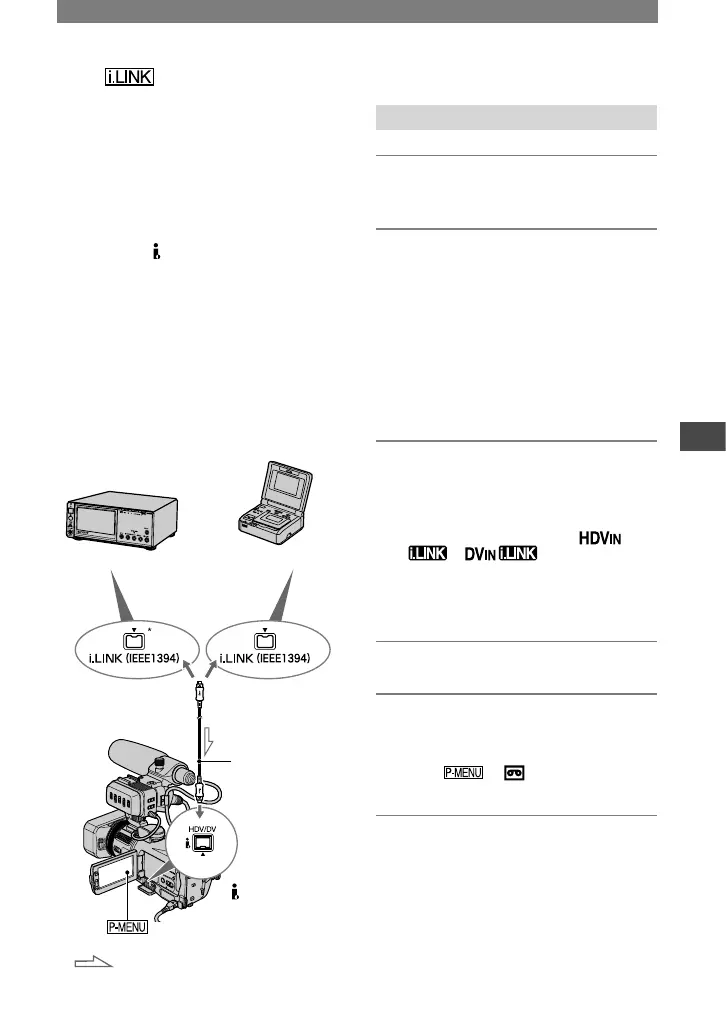
i.LINK cable
(optional)
to i.LINK (IEEE1394)
connector
to HDV/DV
Interface (i.LINK)
jack
:Signal flow
HDV1080i
compatible device
AV device with
i.LINK jack
HD quality
SD quality
* i.LINK jack which is compatible with
HDV1080i specification is required.
Recording movies
1 Slide the POWER switch down to
turn on the PLAY/EDIT lamp.
2 Set the input signal of your
camcorder.
Set [VCR HDV/DV] to [AUTO] when
recording from an HDV1080i format
compatible device.
Set [VCR HDV/DV] to [DVCAM
(DV)] or [AUTO] when recording from
a DVCAM (DV) format compatible
device (p. 57).
3 Connect your VCR as a player to
your camcorder.
• When i.LINK cable (optional) is connected,
the format of the input signal (
or ) will be indicated on
the LCD screen of your camcorder. (This
indicator may appear on the screen of the
playback device, however, they will not be
recorded.)
4 Insert the cassette into the VCR.
5 Operate your camcorder to
record movies.
Touch [
REC CTRL]
[REC PAUSE].
6 Start playing the cassette on your
VCR.
The picture played on the connected
device appears on the LCD screen of
your camcorder.
Continued



 To Next Page