33
HVR-A1E/A1P 2-639-668-11(1)
Recording/Playback
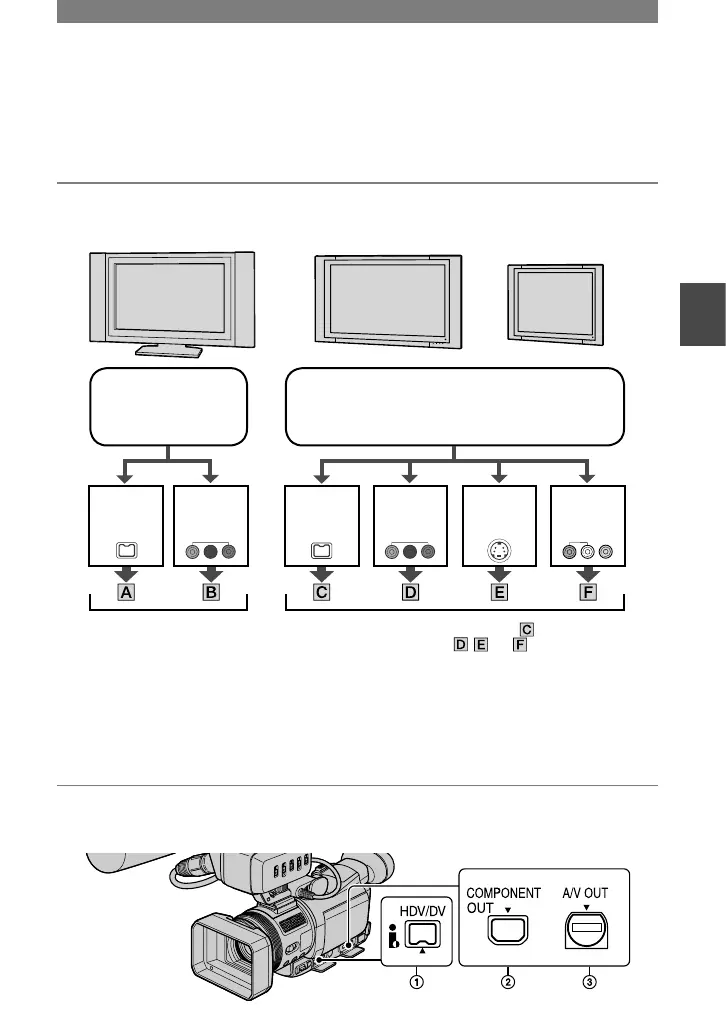
Connecting to a TV for viewing
Connection methods and image quality will differ depending on what TV to be connected
and connectors used.
Use the supplied AC Adaptor as the power source (p. 10).
See page 36 for “Notes on Connection” and refer also to the instruction manuals supplied
with the devices to be connected.
Select connection method depending on what TV to be connected with and
connectors the TV is equipped with.
COMPO-
NENT IN
i.LINK (
for
HDV1080i)
COMPO-
NENT IN
i.LINK S VIDEO VIDEO/
AUDIO
See page 34 for connecting
methods.
See page 36 for notes on
connection.
See page 34 for connecting method and 35
for connecting method ,
and
.
See page 36 for notes on connection.
high definition TV
HD (high definition)
image quality *
16:9 TV or 4:3 TV
SD (standard definition) image quality *
• Set the menu on your camcorder before connection. The TV may not recognize the video signal properly
when changing [VCR HDV/DV] and [i.LINK CONV] settings after connecting with an i.LINK cable
(optional).
* Pictures recorded in the DVCAM (DV) format is played back as SD (standard definition) images
regardless of connection.
Jacks on your camcorder
Open the jack cover and connect the cable.
Continued



 To Next Page