4
HVR-A1E/A1P 2-639-668-11(1)
On using the camcorder
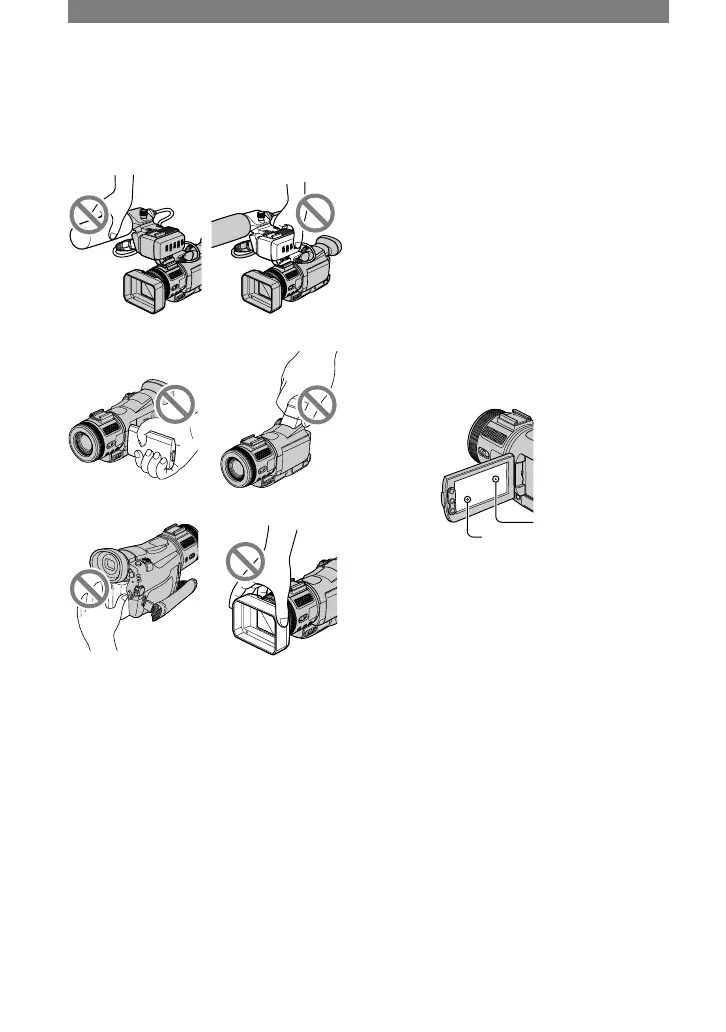
• Do not hold the camcorder by the
following parts.
Microphone XLR Adaptor
LCD panel Viewfinder
Battery pack Lens hood with lens
cover
• The camcorder is not dustproofed,
dripproofed or waterproofed.
See “Maintenance and precautions” (p.
110).
• Before connecting your camcorder to
another device with a component video
cable, USB or i.LINK cable, be sure to
insert the connector plug in the proper
direction. If you insert the connector
plug forcibly in the wrong direction, the
terminal may be damaged, or this may
cause a malfunction of your camcorder.
On the menu items, LCD panel,
viewfinder, and lens
• A menu item that is grayed out is not
available under the current recording or
playback conditions.
• The LCD screen and the viewfinder are
manufactured using extremely high-
precision technology, so over 99.99% of
the pixels are operational for effective
use. However, there may be some tiny
black points and/or bright points (white,
red, blue, or green in color) that appear
constantly on the LCD screen and the
viewfinder. These points are normal
results of the manufacturing process and
do not affect the recording in any way.
White, red, blue or
green point
Black point
• Exposing the LCD screen, the viewfinder,
or the lens to direct sunlight for long
periods of time may cause malfunctions.
• Do not aim at the sun. Doing so might
cause your camcorder to malfunction.
Take pictures of the sun only in low light
conditions, such as at dusk.
On recording
• Before starting to record, test the
recording function to make sure the
picture and sound are recorded without
any problems.
• Compensation for the contents of
recordings cannot be provided, even if
recording or playback is not possible
due to a malfunction of the camcorder,
storage media, etc.
• TV color systems differ depending on
the countries/regions. To view your
recordings on a TV, you need a PAL
system-based TV.
Read this first (Continued)



 To Next Page