EasyManua.ls Logo

Sony HVR-A1E - Page 67

Sony HVR-A1E
124 pages
Print Icon
To Next Page IconTo Next Page
To Previous Page IconTo Previous Page
Loading...
67
Using the Menu
HVR-A1E/A1P 2-639-668-11(1)
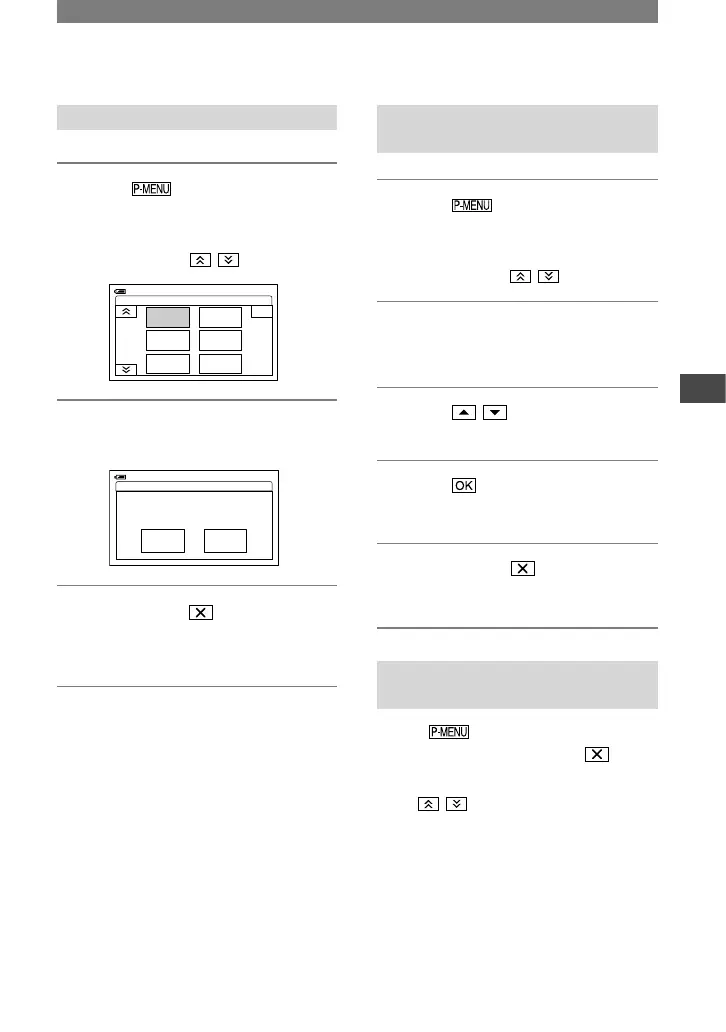
Deleting a menu item
1 Touch
[P-MENU SET UP]
[DELETE].
If the desired menu item is not
displayed, touch / .
Select button to delete.
1/ 3
00 : 00: 00: 0060 min
END
STBY
MENU
TC/UB
DISP
4:3
MARKER
TC
PRESET
ALL
SCAN
STATUS
CHECK
2 Touch the menu item that you
want to delete.
Delete this from
CAMERA-TAPE mode's
P-MENU?
DELETE
YES NO
00 : 00: 00: 0060 min
STBY
3 Touch [YES]
.
You cannot delete [MENU] and [P-MENU
SET UP].
Arranging the order of menu items
displayed on Personal Menu
1 Touch
[P-MENU SET UP]
[SORT].
If the desired menu item is not
displayed, touch / .
2 Touch the menu item you want to
move.
3 Touch / to move the menu
item to the desired place.
4 Touch .
To sort more items, repeat steps 2 to 4.
5 Touch [END]
.
You cannot move [P-MENU SET UP].
Initializing the Personal Menu
settings (Reset)
Touch [P-MENU SET UP]
[RESET][YES][YES] .
If the desired menu item is not displayed,
touch / .

Table of Contents

Related product manuals