Overview
Configuring Windows Firewall
8
When using Windows Vista
Configuring Windows Firewall
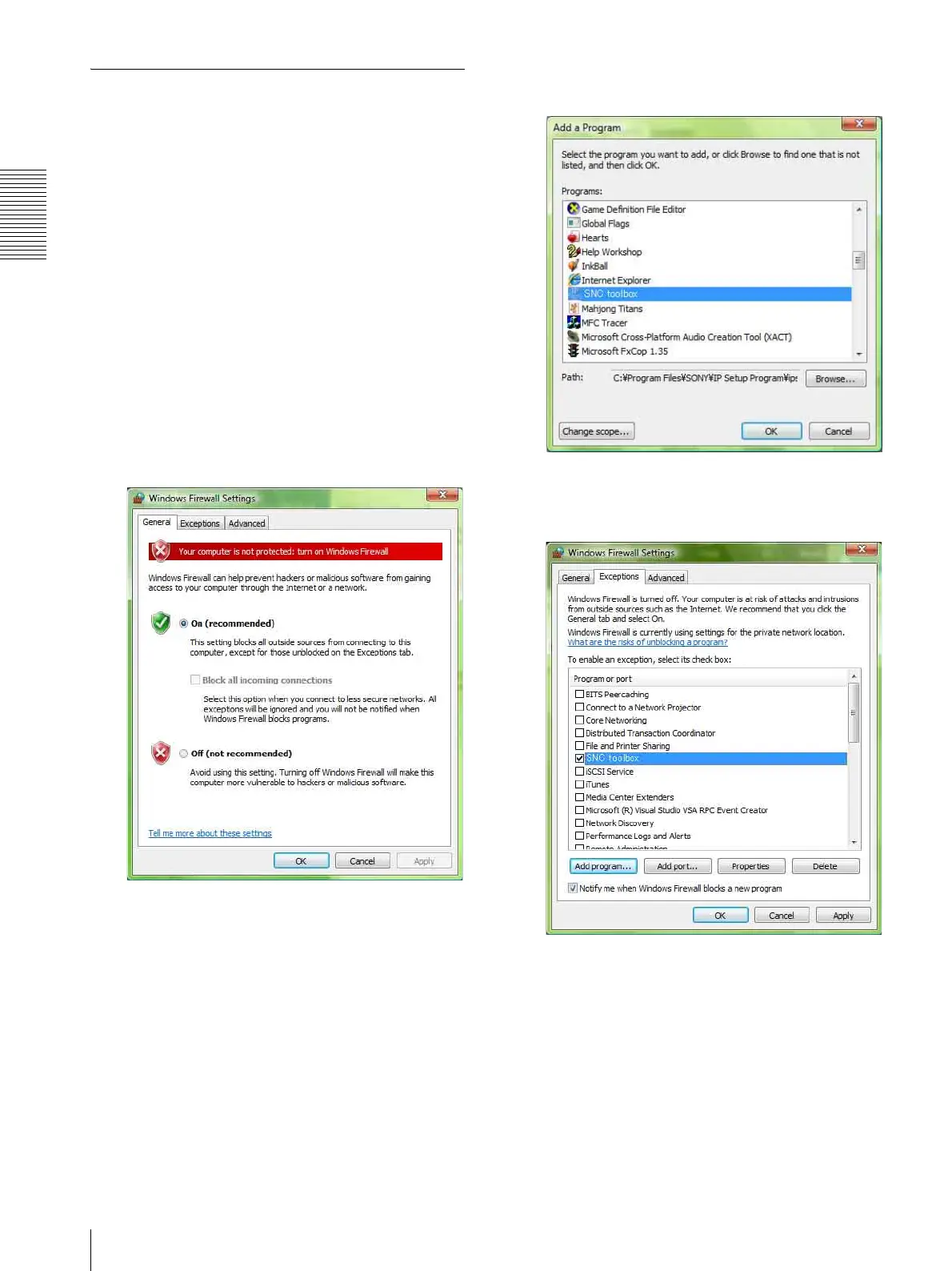
SNC easy IP setup may not operate correctly depending
on the configuration of Windows Firewall. (No cameras
are shown in the list even if they are detected.) In this
case, confirm the Windows Firewall configuration as
follows:
1
Select Control Panel from the Start menu of
Windows.
2
Click Windows Firewall.
3
Select Turn Windows Firewall on or off.
“User Account Control – Windows needs your
permission to continue” may appear. In this case,
click Continue.
4
Select Off in the General tab.
The cameras will be displayed in the list.
If you want to keep Windows Firewall On, continue
with the following steps.
5
Select the Exceptions tab.
6
Click Add Program….
7
If the Add Program dialog appears, select SNC easy
IP setup and click OK.
SNC easy IP setup is added to the Program or port
list.
8
Click OK.
When the above procedure is completed, the
cameras connected in the local network are
displayed in SNC easy IP setup.








 To Next Page