EasyManua.ls Logo

Sony IT-ID80 - Setting the Date and Time

Sony IT-ID80
55 pages
Print Icon
To Next Page IconTo Next Page
To Previous Page IconTo Previous Page
Loading...
Setting
the
date
and
time
If
you
have
subscribed
to
the
Caller
ID
service,
the
date
and
time
are
automatically
set
when
you
received
a
call.
If
you
want
to
set
the
date
and
time
manually,
do
as
described
below.
a)
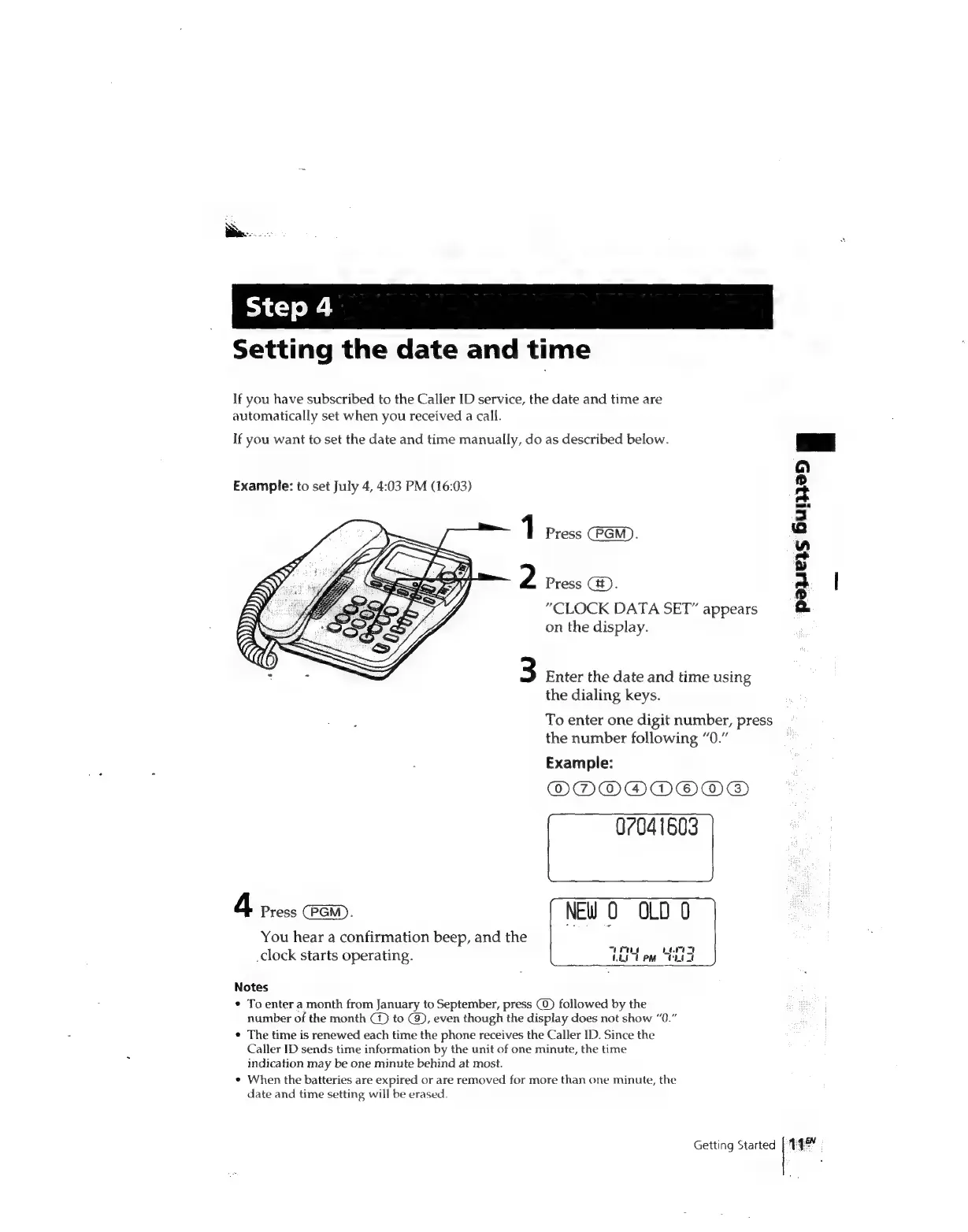
Example:
to
set
July
4,
4:03
PM
(16:03)
Es
3
1
Press
(PGM).
-
a
2
Press
Gt).
Ps
|
“CLOCK
DATA
SET”
appears
a
on
the
display.
3
Enter
the
date
and
time
using
the
dialing
keys.
To
enter
one
digit
number,
press
the
number
following
“0.”
Example:
ODNDOADOOMEG)
07041603
4
ress
Pa.
NEW
O
OLD
0
=
You
hear
a
confirmation
beep,
and
the
-
a
clock
starts
operating.
Lt
em
Wt
Notes
*
To
enter
a
month
from
January
to
September,
press
(0)
followed
by
the
number
of
the
month
C1)
to
(9),
even
though
the
display
does
not
show
“0.”
*
The
time
is
renewed
each
time
the
phone
receives
the
Caller
ID.
Since
the
Caller
ID
sends
time
information
by
the
unit
of
one
minute,
the
time
indication
may
be
one
minute
behind
at
most.
When
the
batteries
are
expired
or
are
removed
for
more
than
one
minute,
the
date
and
time
setting
will
be
erased.
Getting
Started
[44
-

Related product manuals