EasyManua.ls Logo

Sony IT-ID80 - Additional Information; Mounting the Telephone on a Wall

Sony IT-ID80
55 pages
Print Icon
To Next Page IconTo Next Page
To Previous Page IconTo Previous Page
Loading...
Additional
Information
Mounting
the
telephone
on
a
wall
1
1
Hang-up
~
tab
&
?
Telephone
line
cord
4
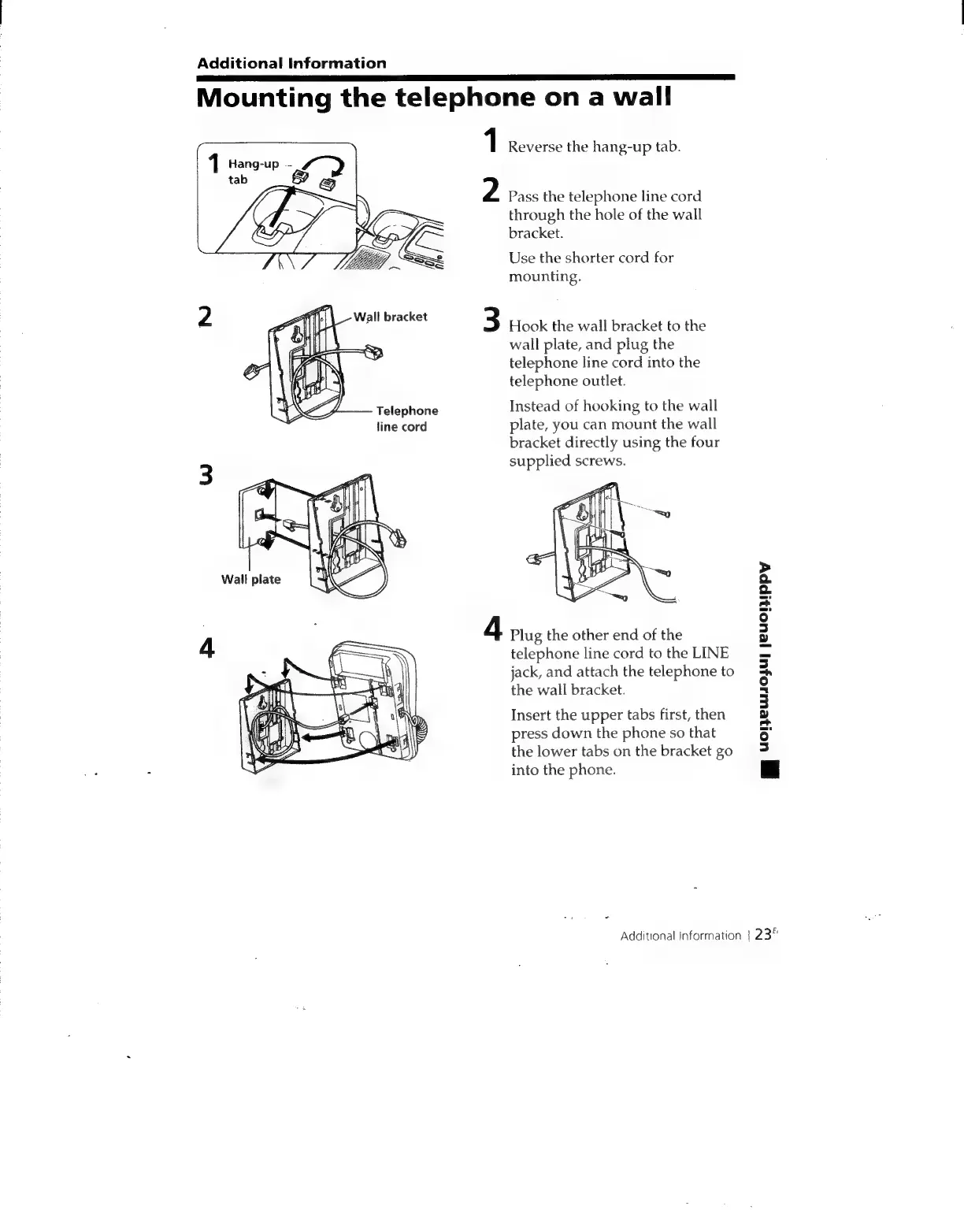
Reverse
the
hang-up
tab.
Pass
the
telephone
line
cord
through
the
hole
of
the
wall
bracket.
Use
the
shorter
cord
for
mounting.
Hook
the
wall
bracket
to
the
wall
plate,
and
plug
the
telephone
line
cord
into
the
telephone
outlet.
Instead
of
hooking
to
the
wall
plate,
you
can
mount
the
wall
bracket
directly
using
the
four
supplied
screws.
Plug
the
other
end
of
the
telephone
line
cord
to
the
LINE
jack,
and
attach
the
telephone
to
the
wall
bracket.
Insert
the
upper
tabs
first,
then
press
down
the
phone
so
that
the
lower
tabs
on
the
bracket
go
into
the
phone.
gy
Yopewojul
jeuonippy
Additional
information
|
23"

Related product manuals