EasyManua.ls Logo

Sony IT-ID80 - Viewing and Navigating the Caller ID List

Sony IT-ID80
55 pages
Print Icon
To Next Page IconTo Next Page
To Previous Page IconTo Previous Page
Loading...
«-
Ss
a.
Looking
at
the
Caller
ID
list
(he
phone
stores
the
data
of
the
last
35
calls
received
including
“OUT
DF
AREA”
and
“PRIVATE”
calls.
It
keeps track
of
all
calls
received;
oven
if
they
were
not
answered.
Viewing
the
Caller
ID
list
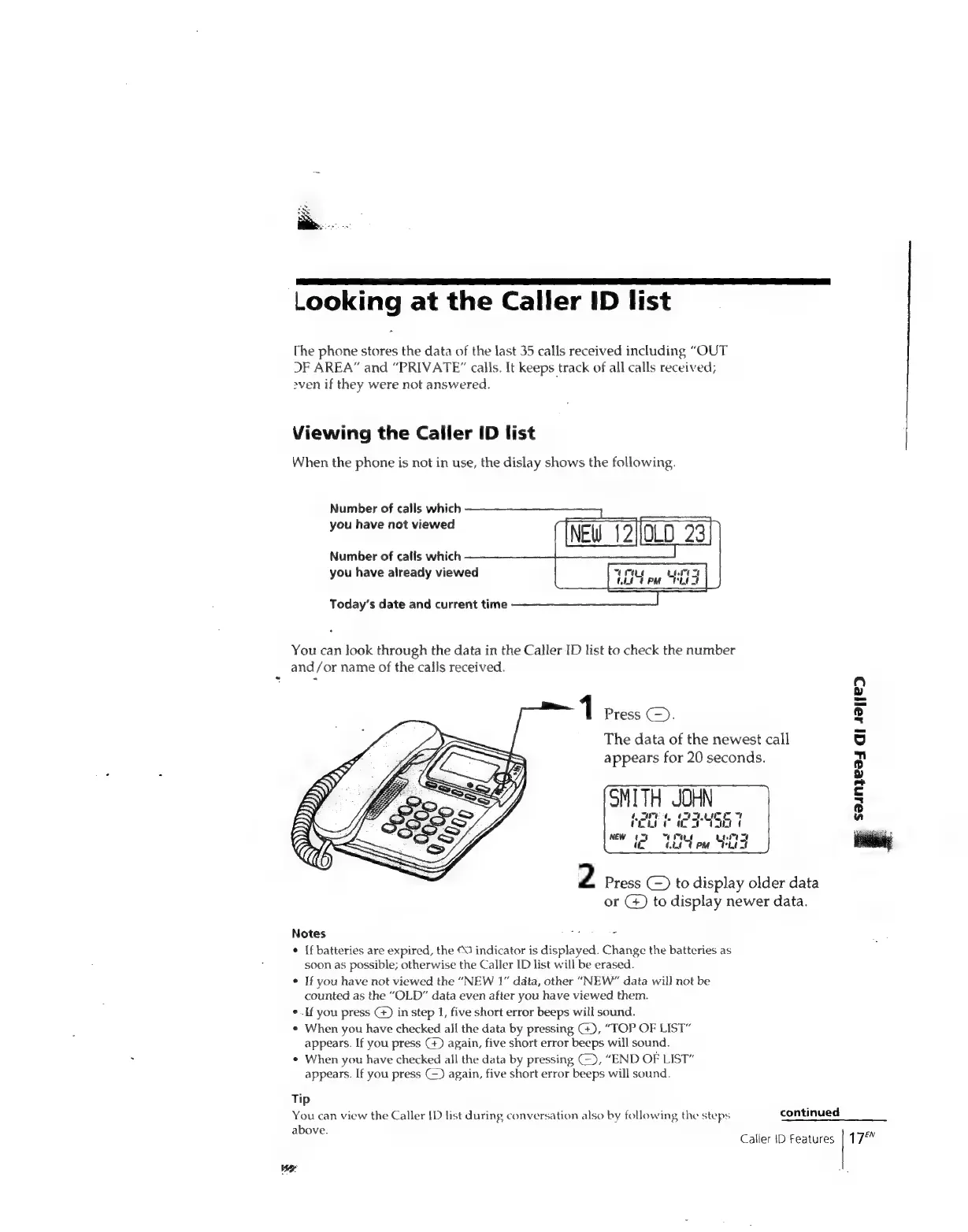
When
the
phone
is
not
in
use,
the
dislay
shows
the
following.
Number
of
calls
which
you
have
not
viewed
Number
of
calls
which
you
have
already
viewed
Today’s
date
and
current
time
You
can
look
through
the
data
in
the
Caller
ID
list
to
check
the
number
and/or
name
of
the
calls
received.
1
Press
(-).
The
data
of
the
newest
call
appears
for
20
seconds.
OMITH
JOHN
[pe
0g
ae
a
ee
el
el
Mow
07
bs
bt)
(
NEW
tt
“COLE
Pal
ee
Bc
2
Press
(~)
to
display
older
data
or
G)
to
display
newer
data.
Notes
N:
o
¢
[f
batteries
are
expired,
the
©O
indicator
is
displayed.
Change
the
batteries
as
soon
as
possible;
otherwise
the
Caller
ID
list
will
be
erased.
*
If
you
have
not
viewed
the
“NEW
1”
data,
other
“NEW”
data
wil]
not
be
counted
as
the
“OLD”
data
even
after
you
have
viewed
them.
¢.If
you
press
G)
in
step
1,
five
short
error
beeps
will
sound.
¢
When
you
have
checked
all
the
data
by
pressing
G),
“TOP
OF
LIST”
appears.
If
you
press
G+)
again,
five
short
error
beeps
will
sound.
¢
When
you
have
checked
all
the
data
by
pressing
(),
“END
OF
LIST”
appears.
If
you
press
(~)
again,
five
short
error
beeps
will
sound.
Tip
You
can
view
the
Caller
{D
list
during
conversation
also
by
following
the
steps
continued
above.
Caller
JD
Features
I
saunzeay
Qi
431/28
1
7

Related product manuals