EasyManua.ls Logo

Sony IT-ID80 - Troubleshooting; Making and Receiving Calls Troubleshooting; Memory Dialing Troubleshooting

Sony IT-ID80
55 pages
Print Icon
To Next Page IconTo Next Page
To Previous Page IconTo Previous Page
Loading...
ey
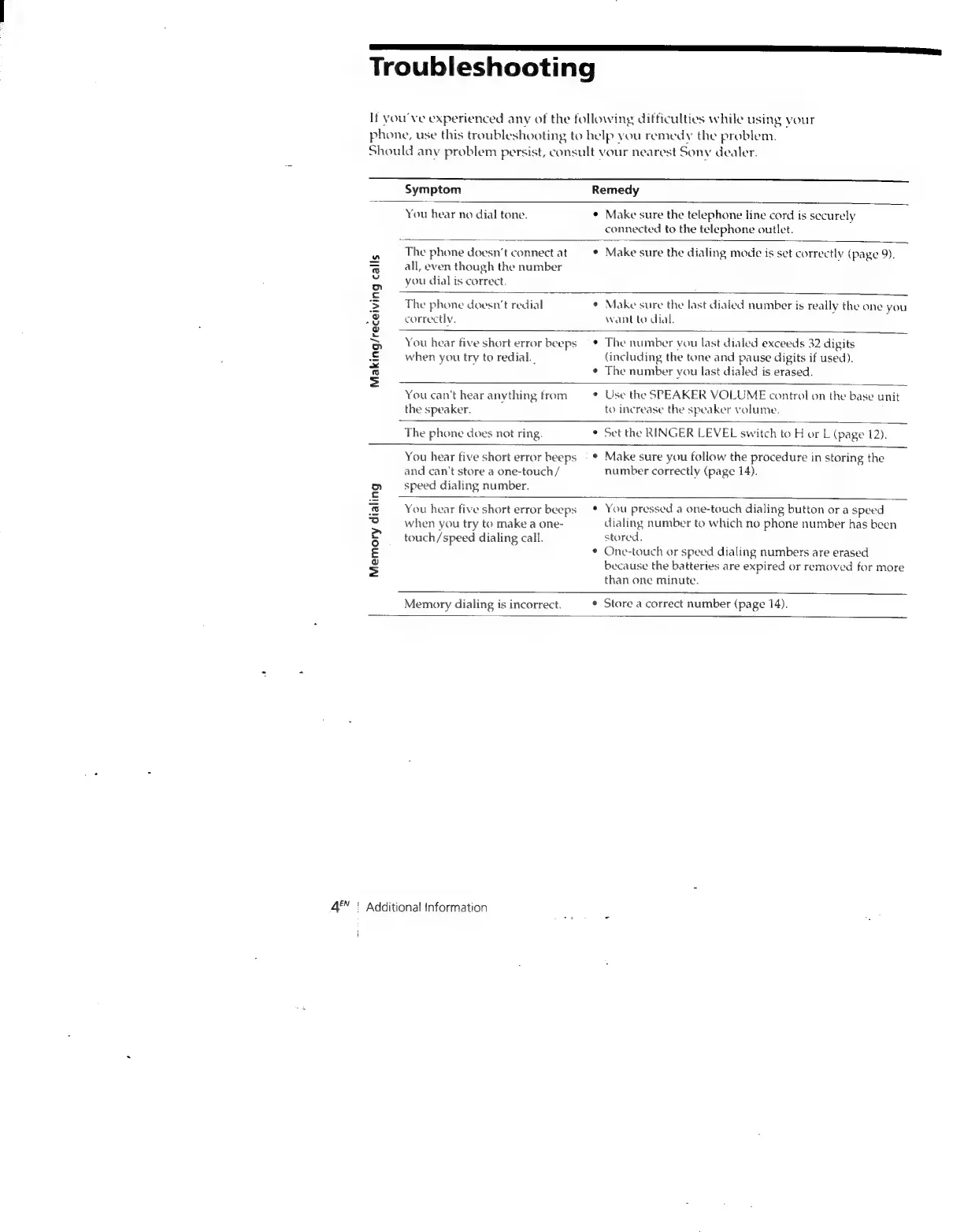
Troubleshooting
If
you've
experienced
any
of
the
following
difficulties
while
using
your
phone,
use
this
troubleshooting
to
help
you
remedy
the
problem.
Should
any
problem
persist,
consult
vour
nearest
Sony
dealer.
Symptom
Remedy
You
hear
no
dial
tone.
*
Make
sure
the
telephone
line
cord
is
securely
connected
to
the
telephone
outlet.
The
phone
doesn’t
connect
at
¢
Make
sure
the
dialing
mode
is
set
correctly
(page
9).
“al
on
all,
even
though
the
number
o
aus
&
o
you
dial
is
correct.
S$
The
phone
doesn’t
redial
¢
Make
sure
the
last
dialed
number
is
really
the
one
you
e
correctly.
want
to
dial.
¥
,
oe
.
soe
You
hear
five
short
error
beeps
¢
The
number
you
last
dialed
exceeds
32
digits
&
when
you
try
to
redial.
(including
the
tone
and
pause
digits
if
used).
-
¢
The
number
vou
last
dialed
is
erased.
=
You
can't
hear
anything
from
¢
Use
the
SPEAKER
VOLUME
control
on
the
base
unit
the
speaker.
to
increase
the
speaker
volume.
The
phone
does
not
ring.
¢
Set
the
RINGER
LEVEL
switch
to
H
or
L
(page
12).
You
hear
five
short
error
beeps
*
Make
sure
you
follow
the
procedure
in
storing
the
and
can't
store
a
one-touch/
number
correctly
(page
14).
Dn
speed
dialing
number.
¢
@
You
hear
five
short
error
beeps
You
pressed
a
one-touch
dialing
button
or
a
speed
fe
when
you
try
to
make
a
one-
dialing
number
to
which
no
phone
number
has
been
5
__
touch/speed
dialing
call.
stored.
¢
One-touch
or
speed
dialing
numbers
are
erased
s
because
the
batteries
are
expired
or
removed
for
more
Memory
dialing
is
incorrect.
than
one
minute.
*
Store
a
correct
number
(page
14).
4®"
|
Additional
information

Related product manuals