Getting Started
12
US
Step 2: Setting up the phone (continued)
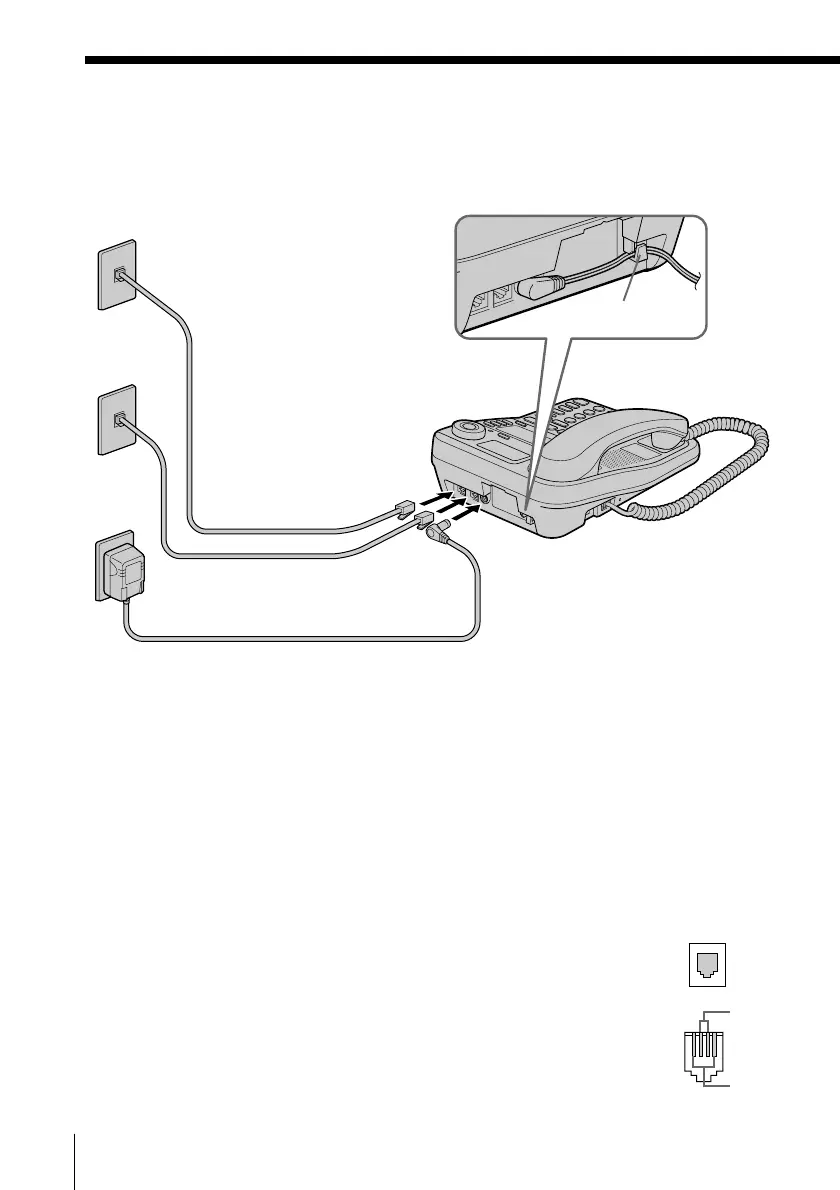
To connect the phone to two outlets having two lines
1 Connect the telephone line cords to the “LINE
1/LINE 1+2” and “LINE 3/LINE 3+4” jacks
and to the telephone outlets.
2 Connect the AC power adaptor to the DC IN
12V jack and to an AC outlet.
Tips
• If your telephone outlet is not modular, contact your telephone service
company for assistance.
• L1 is the first phone line connected to center pair of wires. L2 is the second
phone line connected to outer pair of wires.
To DC IN 12V
AC power adaptor
(supplied AC-T71)
Telephone line
cords (supplied)
To the telephone outlets
To an AC outlet
2
1
To “LINE 1/
LINE 1+2”
Hook the cord.
To “LINE 3/
LINE 3+4”
Line 3, 4
Line 1, 2
Modular
L1
L2



 To Next Page