Getting Started
25
US
Getting Started
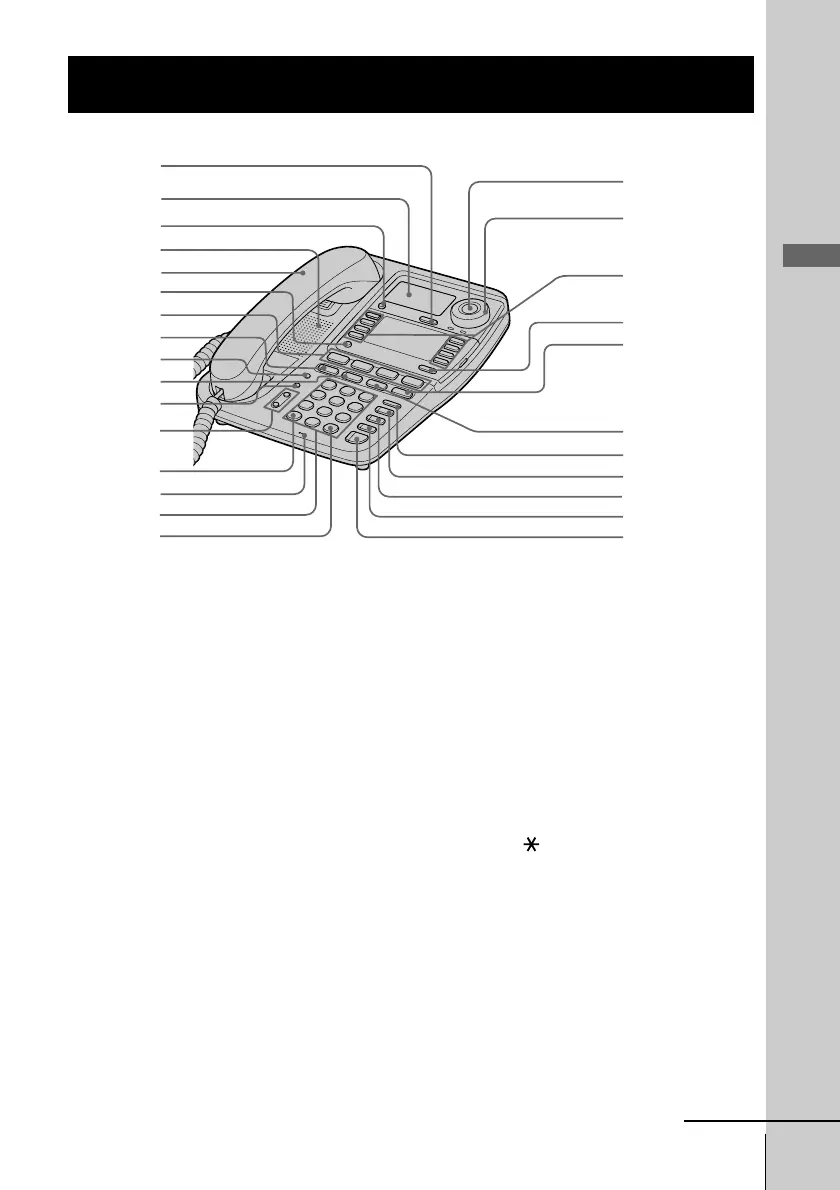
Identifying the parts
Refer to the pages indicated in parentheses for details.
1 CALL WAITING/FLASH button
(p. 34, 60)
Switches to a second call if you
have “call waiting” service, or lets
you make a new call.
2 Display window (p. 37, 51)
3 ERASE/CLEAR button
(p. 40, 44, 53, 61)
Used to erase a stored one-touch
dialing and Phone Directory
memory or Caller ID data, end the
operation during the procedure.
4 Speaker
5 Handset (p. 11, 28, 33)
6 PROGRAM button
(p. 16, 37, 52)
Used to access the menu.
7 LINE buttons (1, 2, 3, 4)
(p. 28, 33)
Lets you make or receive a call.
8 INTERCOM button (p. 63, 67)
Used to make an intercom call.
9 ALL PAGE button (p. 66)
Used to page all phones through
the speakerphone.
0 CONF (conference) button
(p. 48, 67)
Lets you talk with two parties at the
same time.
qa PAGE button (p. 65)
Used to page the other phone.
qs VOLUME +/- button (p. 29, 34)
qd TONE button (p. 29)
Allows you to switch temporarily to
tone dialing.
qf MIC (microphone)
qg Dialing keys (p. 28)
qh # button (p. 58)
Used to change the number of
digits of the phone number in the
Caller ID list.
qj Jog Button (p. 16)
qk Jog dial (p. 16, 51)
continued
1
2
3
ql
w;
wa
ws
wd
wf
wg
wh
wj
qk
4
6
7
8
9
0
qa
qs
5
qf
qd
qg
qj
qh



 To Next Page