Getting Started
9
Setting cable TV on or off
If you have connected the Video/TV to a cable TV system, set CABLE to
ON (the Settingfactory setting). If not, set CABLE to OFF to watch VHF or
UHF channels.
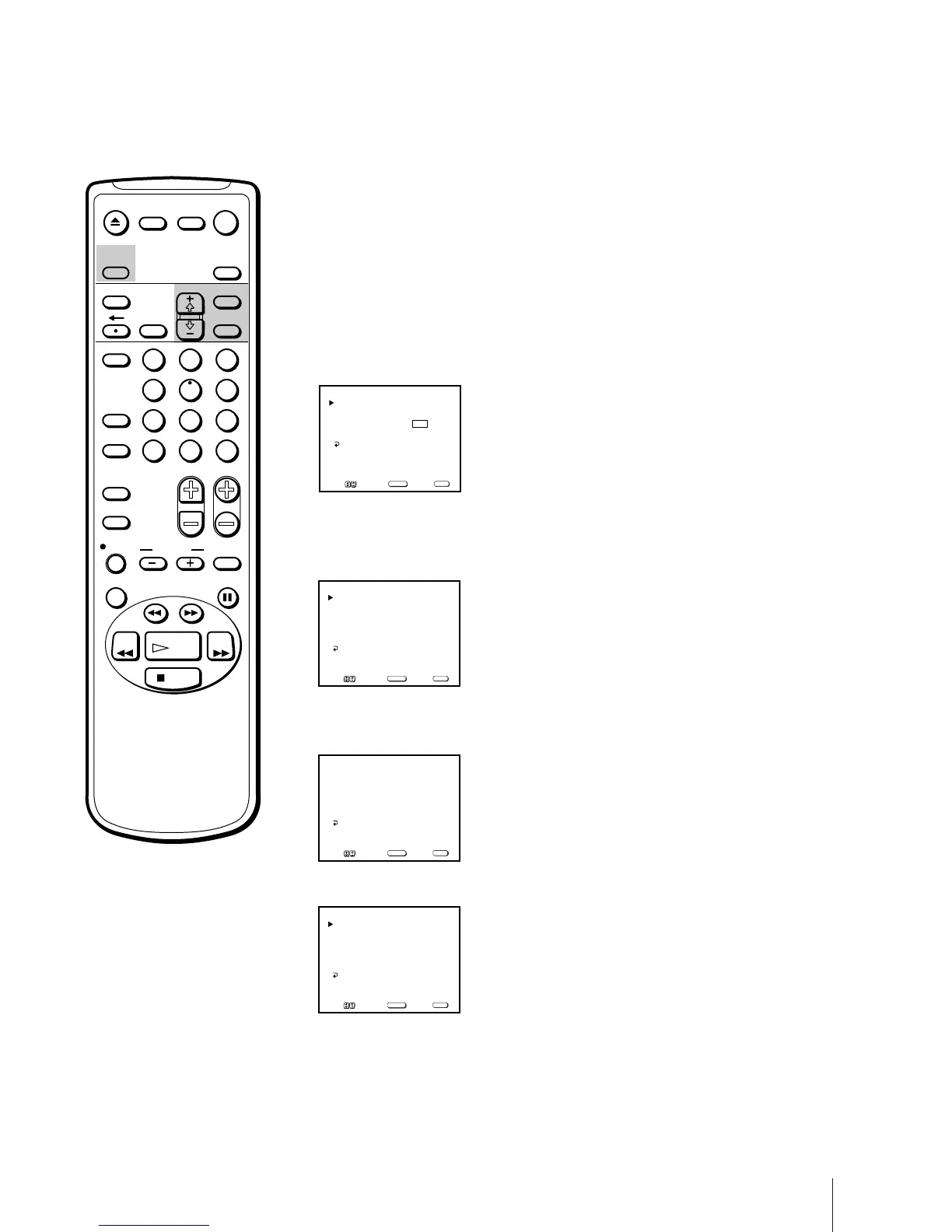
1 Press MENU to display the main menu.
2 Move the cursor (z) to “SET UP” with + ◊ or – √ and press SELECT.
The SET UP menu appears.
3 Move the cursor (z) to “CHANNEL SET UP” with + ◊ or – √ and press
SELECT.
The CHANNEL SET UP menu appears.
4 Move the cursor (z) to “CABLE” with + ◊ or – √ and press SELECT.
The selected position turns red.
5 Using + ◊ or – √, select “ON” or “OFF” and press SELECT.
6 Press MENU to return to the original screen.
Note
If CABLE appears in black, the Video/
TV is set to receive a video input signal
through the input jacks and you cannot
select CABLE. Press INPUT SELECT so
that a channel number appears on the
screen.
CABLE: OFF
CHANNEL FIX: OFF
AUTO PROGRAM
CHANNEL SKIP/ADD
VCR P lus+ SET UP
CHANNEL SET UP
MENU
Move Select Exit
SELECT
MENU
CABLE: OFF
CHANNEL FIX: OFF
AUTO PROGRAM
CHANNEL SKIP/ADD
VCR P l us+ SET UP
CHANNEL SET UP
MENU
Move Select Exit
SELECT
MENU
CABLE: ON
CHANNEL FIX: OFF
AUTO PROGRAM
CHANNEL SKIP/ADD
VCR P l us+ SET UP
CHANNEL SET UP
MENU
Move Select Exit
SELECT
MENU
CHANNEL SET UP
FAVORITE CHANNEL
CAPTION VISION: CC 1
LANGUAGE: ENGLISH
SET UP
MENU
Move Select Exit
SELECT
MENU
EJECT
COUNTER/
REMAIN
COUNTER
RESET
SLEEP
MENU
CHVOL
SELECTRESET
INDEX
JUMP ENTER
TAPE SPEED
X2 PAUSE
SEARCH
REC
SLOW
VCR Plus
MUTING DISPLAY
POWER
TV
1
2
3
4
5
6
7
8
9
0
&7
STOP
PLAY
REW FF
TIMER ON SCREEN
INPUT
SELECT



 To Next Page