EasyManua.ls Logo

Sony LBT-D117CD - Tape Recording; Recording a Tape; Dolby NR Recording

Sony LBT-D117CD
31 pages
Print Icon
To Next Page IconTo Next Page
To Previous Page IconTo Previous Page
Loading...
-
-
'
'
'
>
*
*
n'
r
i
*
*
f
i
*
v’
>
|
f
-
j
i
;
r
ry
?
>
ify
i
»
**
;
;
i
f
r
;'
|
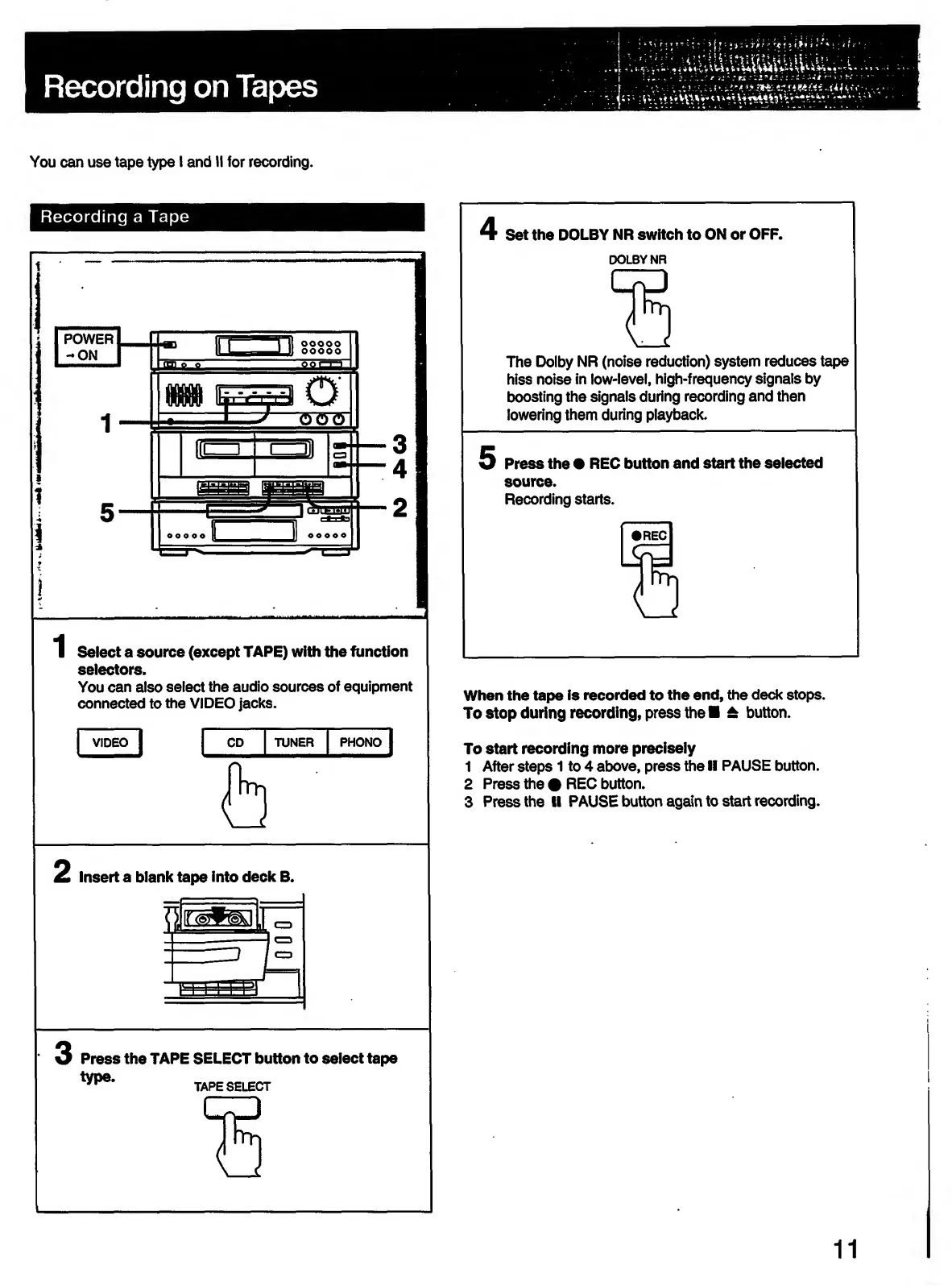
Recording
on
Tapes
--.ur.
|
You
can
use
tape
type
I
and
II
for
recording.
Recording
a
Tape
Select
a
source
(except
TAPE)
with
the
function
selectors.
You
can
also
select
the
audio
sources
of
equipment
connected
to
the
VIDEO
jacks.
|
video
|
2
Insert
a
blank
tape
into
deck
B.
3
Press
the
TAPE
SELECT
button
to
select
tape
TAPE
SELECT
4
Set
the
DOLBY
NR
switch
to
ON
or
OFF.
DOLBY
NR
The
Dolby
NR
(noise
reduction)
system
reduces
tape
hiss
noise
in
low-level,
high-frequency
signals
by
boosting
the
signals
during
recording
and
then
lowering
them
during
playback.
5
Press
the
REC
button
and
start
the
selected
source.
Recording
starts.
When
the
tape
is
recorded
to
the
end,
the
deck
stops.
To
stop
during
recording,
press
the
±
button.
To
start
recording
more
precisely
1
After
steps
1
to
4
above,
press
the
II
PAUSE
button.
2
Press
the
REC
button.
3
Press
the
II
PAUSE
button
again
to
start
recording.
11

Related product manuals