EasyManua.ls Logo

Sony LBT-D117CD - Random Playback; Shuffle Play Setup; Managing Shuffle Play

Sony LBT-D117CD
31 pages
Print Icon
To Next Page IconTo Next Page
To Previous Page IconTo Previous Page
Loading...
Playing
in
a
Random
Order
You
can
have
the
selections
played
in
a
random
order.
The
unit
will
play
all
the
selections,
or
just
the
selections
you
desire.
Shuffle
Play
To
stop
playing
Press
the
button.
POWER
-ON
»
'
I
II
§§§§§
3
0
o
a)
3
1
2
1
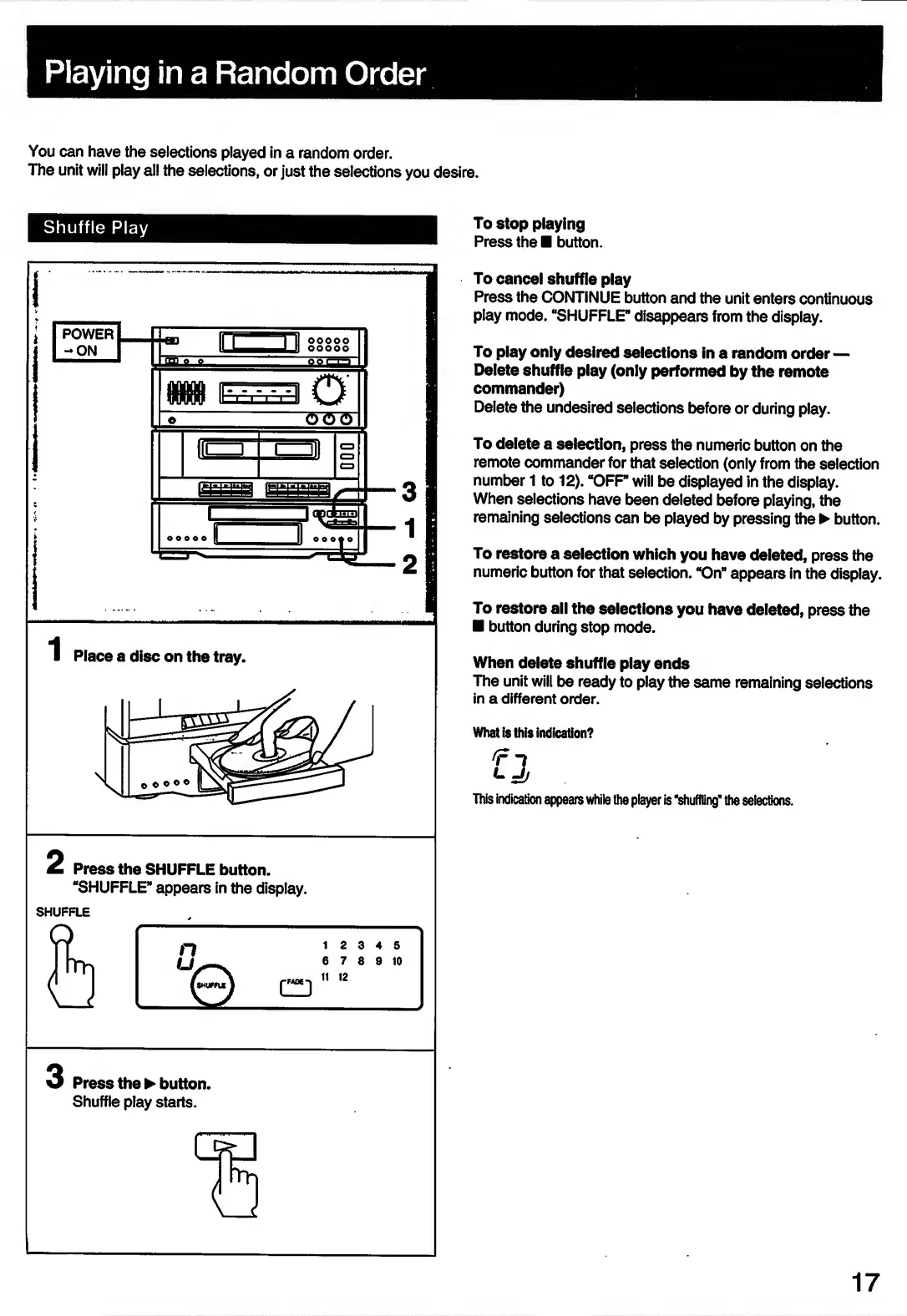
Place
a
disc
on
the
tray.
2
Press
the
SHUFFLE
button.
“SHUFFLE”
appears
in
the
display.
SHUFFLE
3
Press
the
button.
Shuffle
play
starts.
To
cancel
shuffle
play
Press
the
CONTINUE
button
and
the
unit
enters
continuous
play
mode.
“SHUFFLE”
disappears
from
the
display.
To
play
only
desired
selections
in
a
random
order
Delete
shuffle
play
(only
performed
by
the
remote
commander)
Delete
the
undesired
selections
before
or
during
play.
To
delete
a
selection,
press
the
numeric
button
on
the
remote
commander
for
that
selection
(only
from
the
selection
number
1
to
12).
“OFF
will
be
displayed
in
the
display.
When
selections
have
been
deleted
before
playing,
the
remaining
selections
can
be
played
by
pressing
the
button.
To
restore
a
selection
which
you
have
deleted,
press
the
numeric
button
for
that
selection.
“On”
appears
in
the
display.
To
restore
all
the
selections
you
have
deleted,
press
the
button
during
stop
mode.
When
delete
shuffle
play
ends
The
unit
will
be
ready
to
play
the
same
remaining
selections
in
a
different
order.
What
is
this
indication?
This
indication
appears
while
the
player
is
‘shuffling*
the
selections.
17

Related product manuals