EasyManua.ls Logo

Sony LBT-D117CD - Program Recording Features; Recording Programs for Both Sides; Checking Remaining Time

Sony LBT-D117CD
31 pages
Print Icon
To Next Page IconTo Next Page
To Previous Page IconTo Previous Page
Loading...
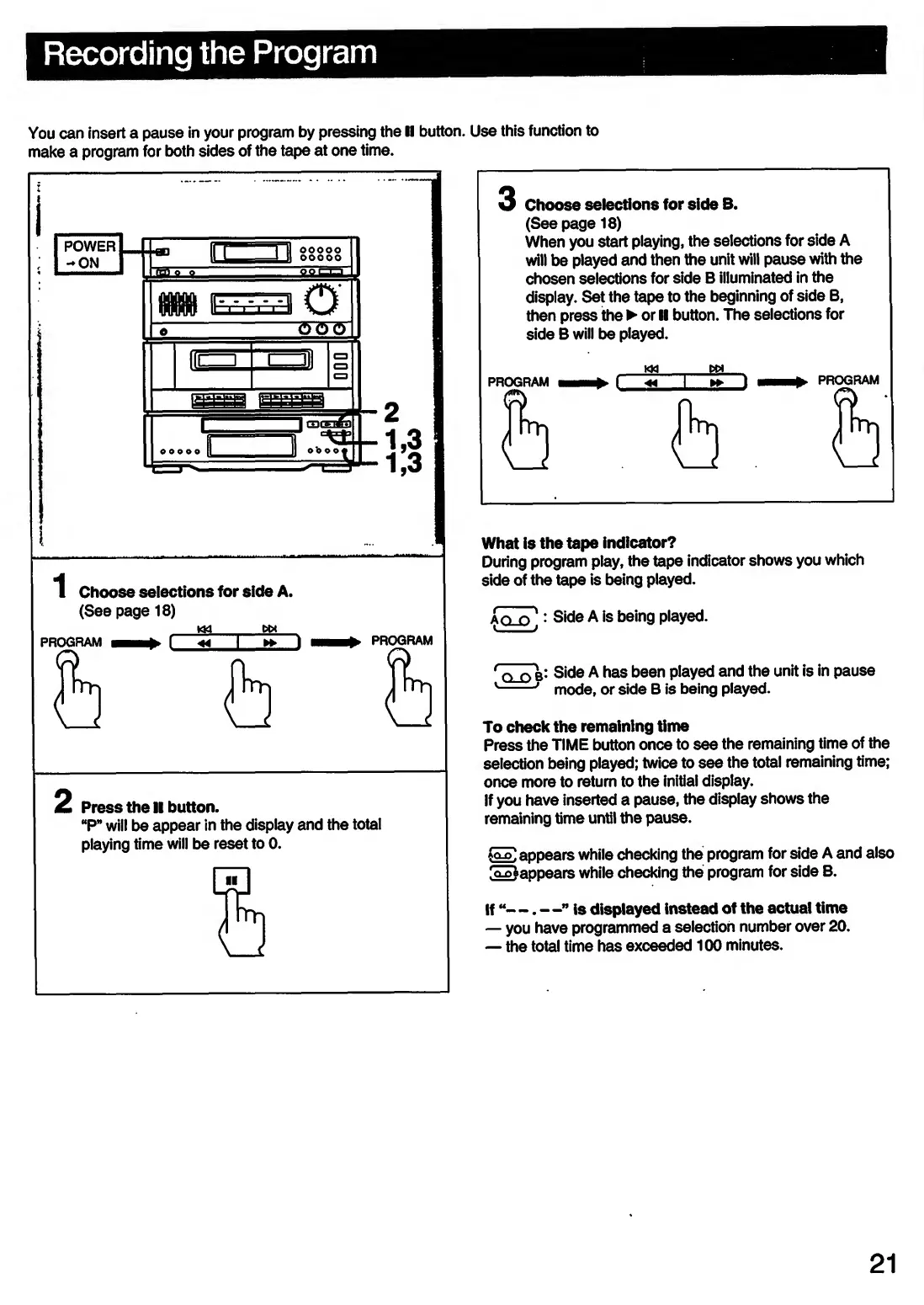
Recording
the
Program
You
can
insert
a
pause
in
your
program
by
pressing
the
II
button.
Use
this
function
to
make
a
program
for
both
sides
of
the
tape
at
one
time.
3
Choose
selections
for
side
B.
(Seepage
18)
When
you
start
playing,
the
selections
for
side
A
will
be
played
and
then
the
unit
will
pause
with
the
chosen
selections
for
side
B
illuminated
in
the
display.
Set
the
tape
to
the
beginning
of
side
B,
then
press
the
or
II
button.
The
selections
for
side
B
will
be
played.
What
is
the
tape
indicator?
During
program
play,
the
tape
indicator
shows
you
which
side
of
the
tape
is
being
played.
An
r>
1
:
Side
A
is
being
played.
'
n
n
b:
Side
A
has
been
played
and
the
unit
is
in
pause
v
-'
mode,
or
side
B
is
being
played.
To
check
the
remaining
time
Press
the
TIME
button
once
to
see
the
remaining
time
of
the
selection
being
played;
twice
to
see
the
total
remaining
time;
once
more
to
return
to
the
initial
display.
If
you
have
inserted
a
pause,
the
display
shows
the
remaining
time
until
the
pause.
foP.
appears
while
checking
the
program
for
side
A
and
also
ItLot
a
opears
while
checking
the
program
for
side
B.
If
“—.
—”
is
displayed
instead
of
the
actual
time
you
have
programmed
a
selection
number
over
20.
the
total
time
has
exceeded
100
minutes.
21

Related product manuals