EasyManua.ls Logo

Sony LBT-D117CD - Time Edit Function; Designating Tape Side Duration; Adjusting Seconds

Sony LBT-D117CD
31 pages
Print Icon
To Next Page IconTo Next Page
To Previous Page IconTo Previous Page
Loading...
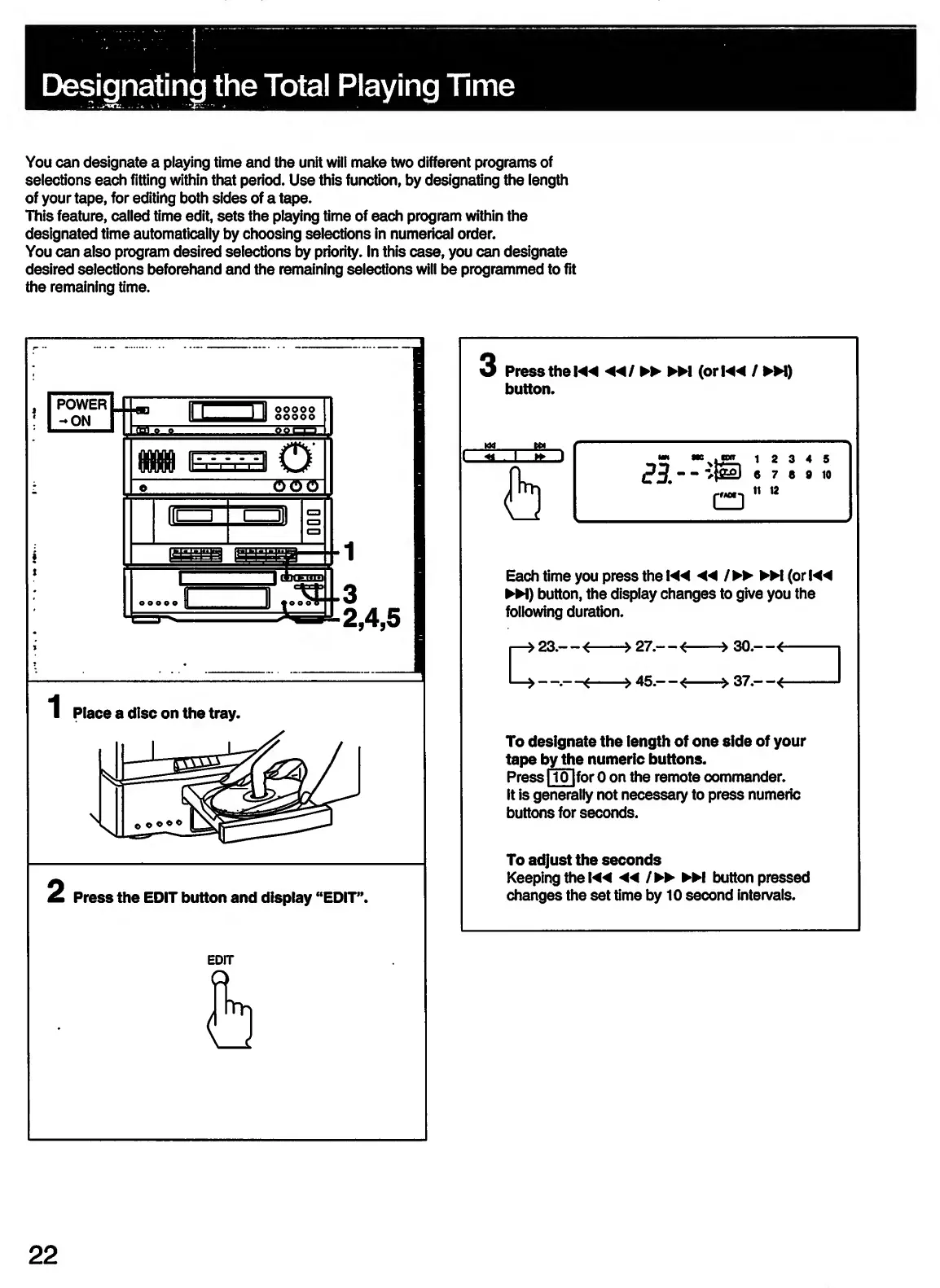
You
can
designate
a
playing
time
and
the
unit
will
make
two
different
programs
of
selections
each
fitting
within
that
period.
Use
this
function,
by
designating
the
length
of
your
tape,
for
editing
both
sides
of
a
tape.
This
feature,
called
time
edit,
sets
the
playing
time
of
each
program
within
the
designated
time
automatically
by
choosing
selections
in
numerical
order.
You
can
also
program
desired
selections
by
priority.
In
this
case,
you
can
designate
desired
selections
beforehand
and
the
remaining
selections
will
be
programmed
to
fit
the
remaining
time.
I
2
3
4
5
«
7
e
9
10
II
12
Each
time
you
press
the
◄◄
/
M
(orK4
H)
button,
the
display
changes
to
give
you
the
following
duration.
23
.—<
->27.—i
c:
,
45.—
<
->
37.—
Press
the
EDIT
button
and
display
“EDIT”.
To
designate
the
length
of
one
side
of
your
tape
by
the
numeric
buttons.
Press
1101
for
0
on
the
remote
commander.
It
is
generally
not
necessary
to
press
numeric
buttons
for
seconds.
To
adjust
the
seconds
Keeping
the
M*
◄◄
/
button
pressed
changes
the
set
time
by
10
second
intervals.
22

Related product manuals