EasyManua.ls Logo

Sony LBT-D117CD - General and Tuner Issues; Cassette Deck Issues

Sony LBT-D117CD
31 pages
Print Icon
To Next Page IconTo Next Page
To Previous Page IconTo Previous Page
Loading...
■■
-V.
Tr
oubleshoot
i
n
g
Guide
Before
going
through
the
check
list
below,
first
refer
back
to
the
connections
and
operating
procedures.
Should
any
problem
persist
after
you
have
made
these
checks,
consult
your
nearest
Sony
service
facility.
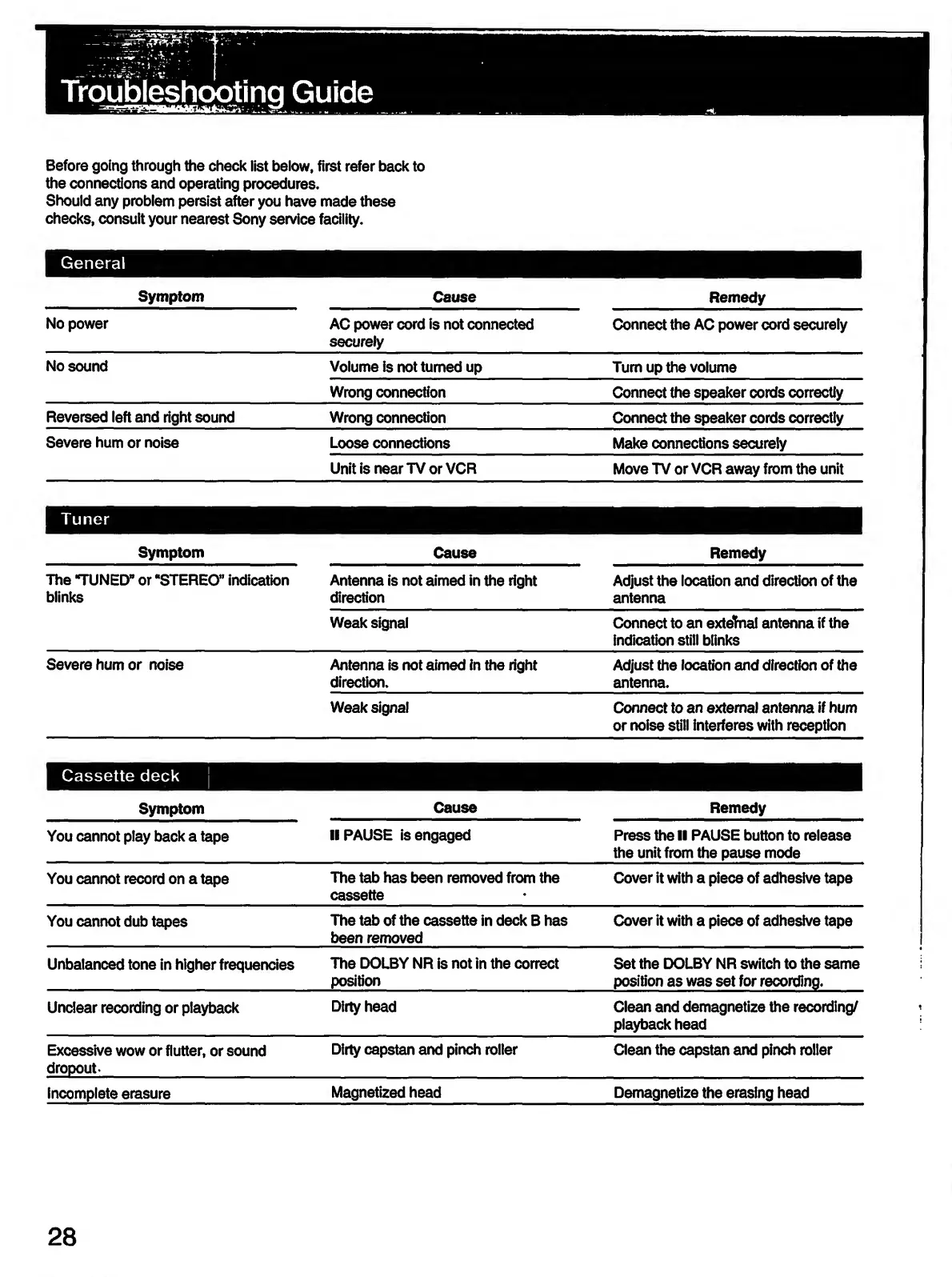
General
Symptom
Cause
Remedy
No
power
AC
power
cord
is
not
connected
securely
Connect
the
AC
power
cord
securely
No
sound
Volume
is
not
turned
up
Turn
up
the
volume
Wrong
connection
Connect
the
speaker
cords
correctly
Reversed
left
and
right
sound
Wrong
connection
Connect
the
speaker
cords
correctly
Severe
hum
or
noise
Loose
connections
Make
connections
securely
Unit
is
near
TV
or
VCR
Move
TV
or
VCR
away
from
the
unit
Tuner
Symptom
Cause
Remedy
The
TUNED”
or
“STEREO”
indication
blinks
Antenna
is
not
aimed
in
the
right
direction
Adjust
the
location
and
direction
of
the
antenna
Weak
signal
Connect
to
an
external
antenna
if
the
indication
still
blinks
Severe
hum
or
noise
Antenna
is
not
aimed
in
the
right
direction.
Adjust
the
location
and
direction
of
the
antenna.
Weak
signal
Connect
to
an
external
antenna
if
hum
or
noise
still
interferes
with
reception
Cassette
deck
Symptom
Cause
Remedy
You
cannot
play
back
a
tape
II
PAUSE
is
engaged
Press
the
II
PAUSE
button
to
release
the
unit
from
the
pause
mode
You
cannot
record
on
a
tape
The
tab
has
been
removed
from
the
cassette
Cover
it
with
a
piece
of
adhesive
tape
You
cannot
dub
tapes
The
tab
of
the
cassette
in
deck
B
has
been
removed
Cover
it
with
a
piece
of
adhesive
tape
Unbalanced
tone
in
higher
frequencies
The
DOLBY
NR
is
not
in
the
correct
position
Set
the
DOLBY
NR
switch
to
the
same
position
as
was
set
for
recording.
Unclear
recording
or
playback
Dirty
head
Clean
and
demagnetize
the
recording/
playback
head
Excessive
wow
or
flutter,
or
sound
dropout-
Dirty
capstan
and
pinch
roller
Clean
the
capstan
and
pinch
roller
Incomplete
erasure
Magnetized
head
Demagnetize
the
erasing
head
28

Related product manuals