EasyManua.ls Logo

Sony LBT-D117CD - Selection Playback Features; Music Scan Play; Program Control; Program Checking and Modification

Sony LBT-D117CD
31 pages
Print Icon
To Next Page IconTo Next Page
To Previous Page IconTo Previous Page
Loading...
Playing
the
Beginning
o
Each
Selection
This
function
can
be
used
in
any
play
mode.
To
play
the
program
Press
the
button.
To
stop
playing
Press
the
button.
To
cancel
program
play
Press
the
CONTINUE
button,
the
unit
enters
continuous
play
mode.
The
program
will
be
erased.
To
erase
the
entire
program
Press
the
button
once
during
stop;
twice
during
play.
The
program
is
also
erased
when
the
unit
is
turned
off.
If
you
press
the
PROGRAM
button
during
play
You
can
make
a
program.
The
selection
being
played
will
be
the
first
one
in
the
program.
To
check
your
program
Press
the
CHECK
button.
The
first
selection
in
the
program
will
be
displayed.
Each
time
you
press
the
CHECK
button,
the
next
selection
in
the
program
will
be
displayed.
After
the
last
selection,
“End”
will
be
indicated
and
the
display
will
soon
return
to
the
initial
status.
To
change
your
program
You
can
make
the
following
changes
before
starting
play.
To
erase
the
last
selection,
press
the
CLEAR
button.
Each
time
you
press
the
CLEAR
button,
the
last
selection
in
the
program
will
be
erased.
To
add
a
selection
to
the
end
of
the
program,
just
press
the
numeric
button
for
that
selection.
You
can
also
add
a
selection
during
play
or
pause.
To
delete
a
selection,
press
the
CHECK
button
repeatedly
until
the
undesired
selection
is
displayed.
Then
press
the
CLEAR
button.
To
change
the
order,
press
the
button
during
stop
to
erase
the
program.
Then
repeat
the
programming
procedure
from
the
beginning.
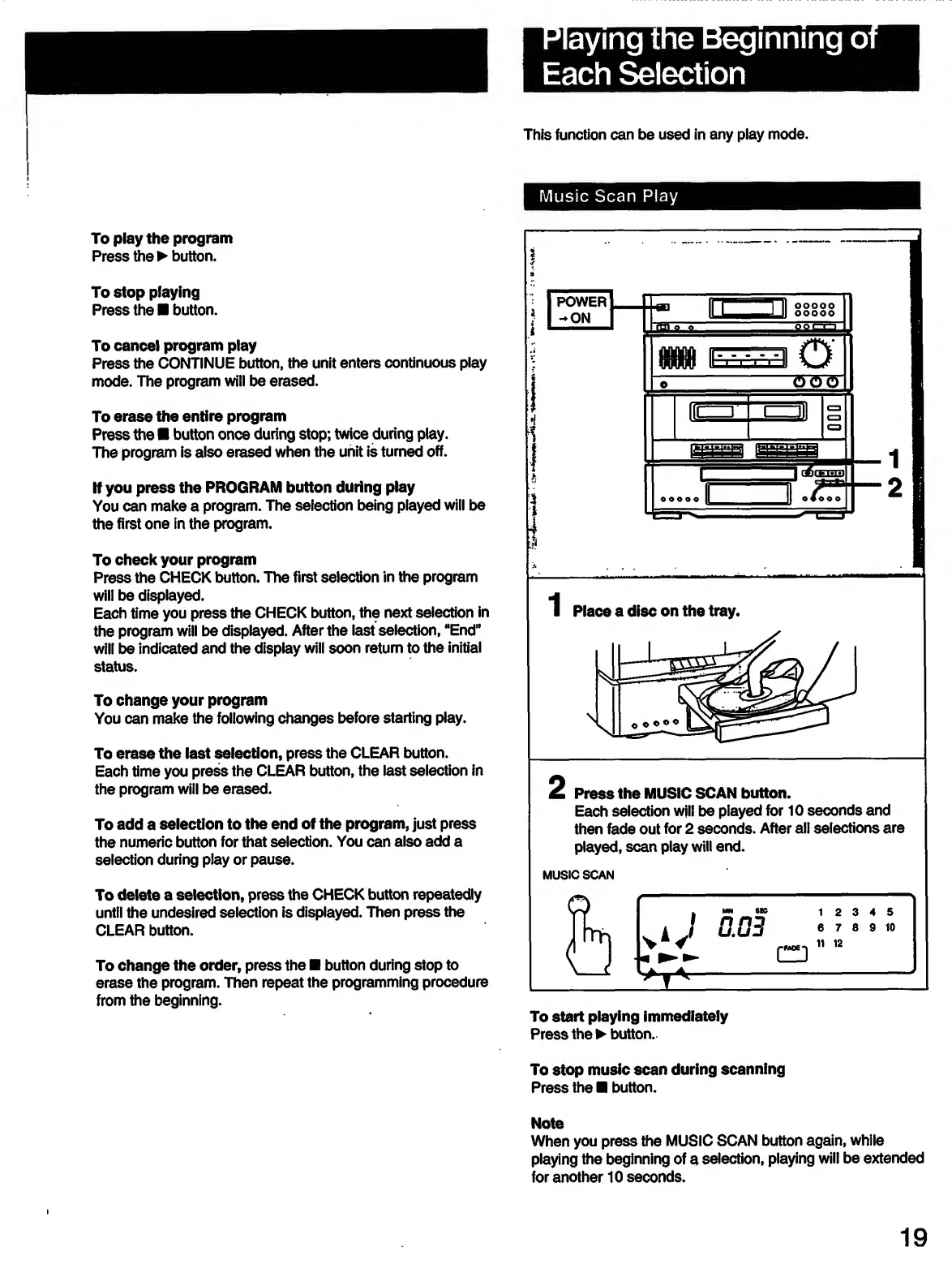
Music
Scan
Play
POWER
-ON
Ed
ooooo
U
ooooo
flMftt
rrrr
0
1
o
<50011
lo*
"i—
m
C3
i
(j5(
s
be)
o
o
OOO
ll
©Zoo©
3
1
2
Press
the
MUSIC
SCAN
button.
Each
selection
will
be
played
for
10
seconds
and
then
fade
out
for
2
seconds.
After
all
selections
are
played,
scan
play
will
end.
MUSIC
SCAN
To
start
playing
immediately
Press
the
button.
To
stop
music
scan
during
scanning
Press
the
button.
Note
When
you
press
the
MUSIC
SCAN
button
again,
while
playing
the
beginning
of
a
selection,
playing
will
be
extended
for
another
10
seconds.
19

Related product manuals