EasyManua.ls Logo

Sony LBT-D117CD - Time Edit Operation; Executing Program Playback; Canceling and Erasing Programs; Program Limitations and Side Designation

Sony LBT-D117CD
31 pages
Print Icon
To Next Page IconTo Next Page
To Previous Page IconTo Previous Page
Loading...
I
i
i
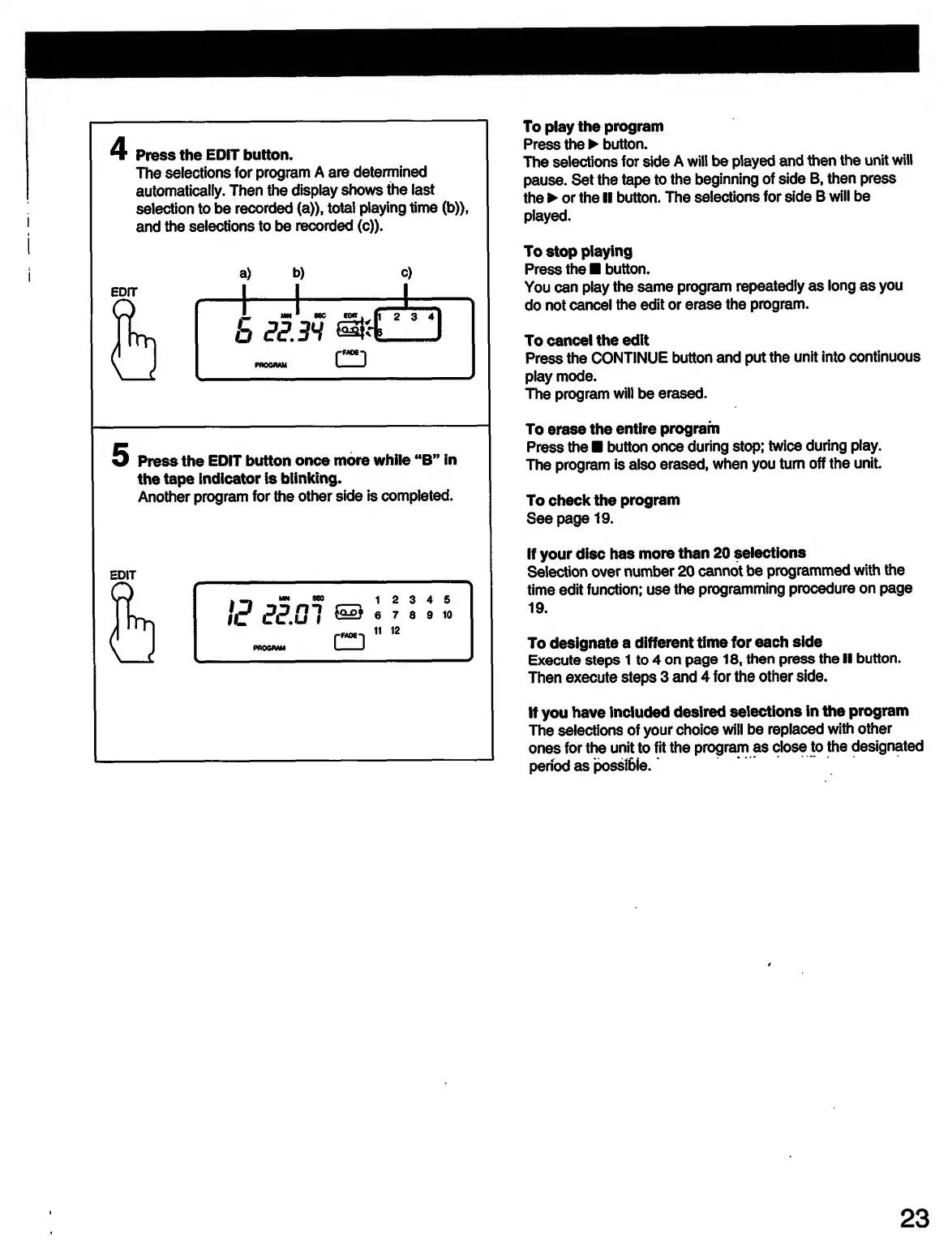
Press
the
EDIT
button.
The
selections
for
program
A
are
determined
automatically.
Then
the
display
shows
the
last
selection
to
be
recorded
(a)),
total
playing
time
(b)),
and
the
selections
to
be
recorded
(c)).
5
Press
the
EDIT
button
once
more
while
M
B”
in
the
tape
indicator
is
blinking.
Another
program
for
the
other
side
is
completed.
EDIT
I
2
3
4
5
6
7
8
9
10
II
12
To
play
the
program
Press
the
button.
The
selections
for
side
A
will
be
played
and
then
the
unit
will
pause.
Set
the
tape
to
the
beginning
of
side
B,
then
press
the
or
the
II
button.
The
selections
for
side
B
will
be
played.
To
stop
playing
Press
the
button.
You
can
play
the
same
program
repeatedly
as
long
as
you
do
not
cancel
the
edit
or
erase
the
program.
To
cancel
the
edit
Press
the
CONTINUE
button
and
put
the
unit
into
continuous
play
mode.
The
program
will
be
erased.
To
erase
the
entire
program
Press
the
button
once
during
stop;
twice
during
play.
The
program
is
also
erased,
when
you
turn
off
the
unit
To
check
the
program
Seepage
19.
If
your
disc
has
more
than
20
selections
Selection
over
number
20
cannot
be
programmed
with
the
time
edit
function;
use
the
programming
procedure
on
page
19.
To
designate
a
different
time
for
each
side
Execute
steps
1
to
4
on
page
18,
then
press
the
II
button.
Then
execute
steps
3
and
4
for
the
other
side.
If
you
have
included
desired
selections
in
the
program
The
selections
of
your
choice
will
be
replaced
with
other
ones
for
the
unit
to
fit
the
program
as
close
to
the
designated
period
as
possible.
23

Related product manuals