EasyManua.ls Logo

Sony LBT-D117CD - Tape Editing Tips; Fading Out at Desired Time; Time Fade Functionality; Fade In;Out Duration

Sony LBT-D117CD
31 pages
Print Icon
To Next Page IconTo Next Page
To Previous Page IconTo Previous Page
Loading...
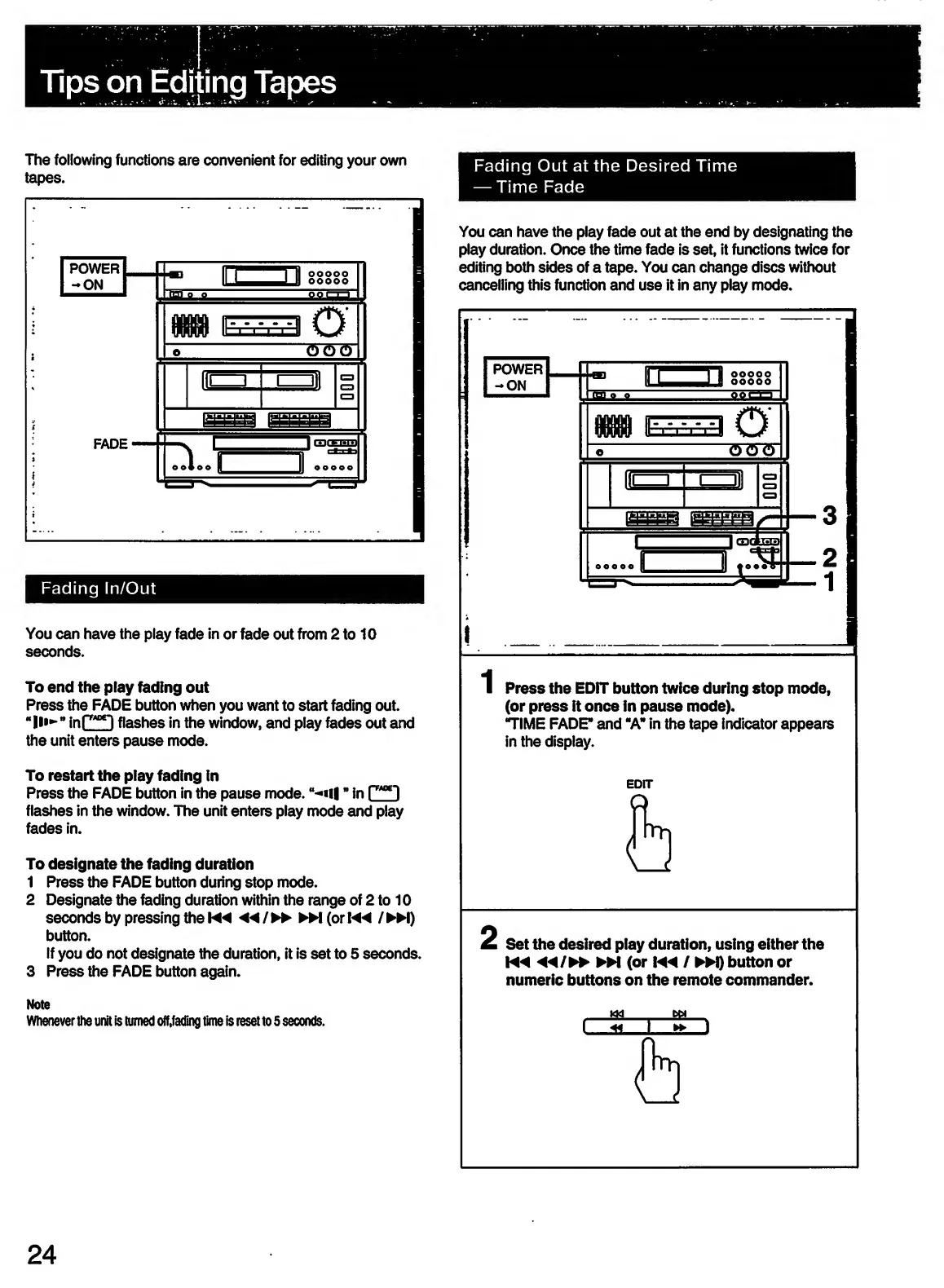
The
following
functions
are
convenient
for
editing
your
own
tapes.
Fading
In/Out
You
can
have
the
play
fade
in
or
fade
out
from
2
to
10
seconds.
To
end
the
play
fading
out
Press
the
FADE
button
when
you
want
to
start
fading
out.
"
in
f
*!
flashes
in
the
window,
and
play
fades
out
and
the
unit
enters
pause
mode.
To
restart
the
play
fading
in
Press
the
FADE
button
in
the
pause
mode.
“-*«U
*
in
r*”1
flashes
in
the
window.
The
unit
enters
play
mode
and
play
fades
in.
To
designate
the
fading
duration
1
Press
the
FADE
button
during
stop
mode.
2
Designate
the
fading
duration
within
the
range
of
2
to
10
seconds
by
pressing
the
Wd
◄◄
/
*
(or
/
M)
button.
If
you
do
not
designate
the
duration,
it
is
set
to
5
seconds.
3
Press
the
FADE
button
again.
Note
Whenever
the
unit
is
turned
off,fading
time
is
reset
to
5
seconds.
Fading
Out
at
the
Desired
Time
Time
Fade
You
can
have
the
play
fade
out
at
the
end
by
designating
the
play
duration.
Once
the
time
fade
is
set,
it
functions
twice
for
editing
both
sides
of
a
tape.
You
can
change
discs
without
cancelling
this
function
and
use
it
in
any
play
mode.
i
Press
the
EDIT
button
twice
during
stop
mode,
(or
press
it
once
in
pause
mode).
TIME
FADE*
and
“A"
in
the
tape
indicator
appears
in
the
display.
EDIT
2
Set
the
desired
play
duration,
using
either
the
M4
W
(or
/
►►
!)
button
or
numeric
buttons
on
the
remote
commander.
24

Related product manuals