25
NetAV Basic Window
Watching Video Remotely
Pre-release version
NetAV Basic Window
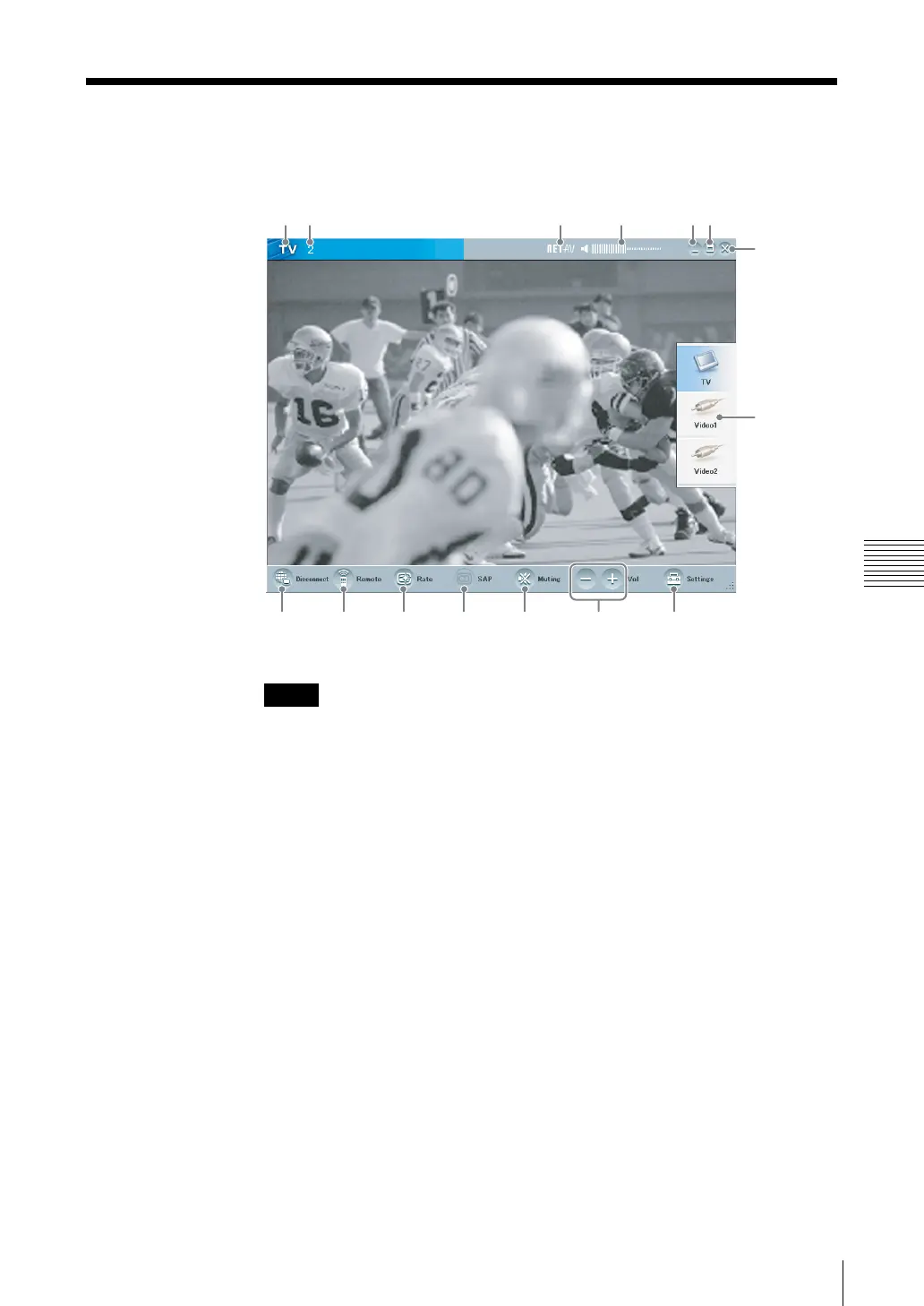
Overview of the LocationFree Player Window
If the desired button does not appear, enlarge the window until it does appear.
(1) TV/Video display
(2) TV channel
(3) NetAV indicator
This indication appears here when a connection is established with the base
station and you are using the NetAV function.
(4) Volume indicator
(5) Minimize button
To minimize the LocationFree Player window, use the Minimize button.
(6) Maximize/Restore button
To maximize the LocationFree Player window to fill the screen, use the
Maximize button. When the window fills the screen, use the Restore button
to restore it to its original size.
(7) Close button
To quit LocationFree Player, use this button.
(8) Index (1 page 28)
To select [TV], [Video 1] or [Video 2].
(9) Settings
To display the screen allowing you to display the [Settings] screen, use this
button.
Note
(1) (2) (3) (4) (5)(6)
(7)
(9)
(8)
(10)(11)(12)(13)(14)(15)



 To Next Page