21
GB
Using M-crew
This section provides a short description of basic functionality and
usage of bars and windows available in M-crew.
For more information on using M-crew, refer to the Help (page 26).
Main bar
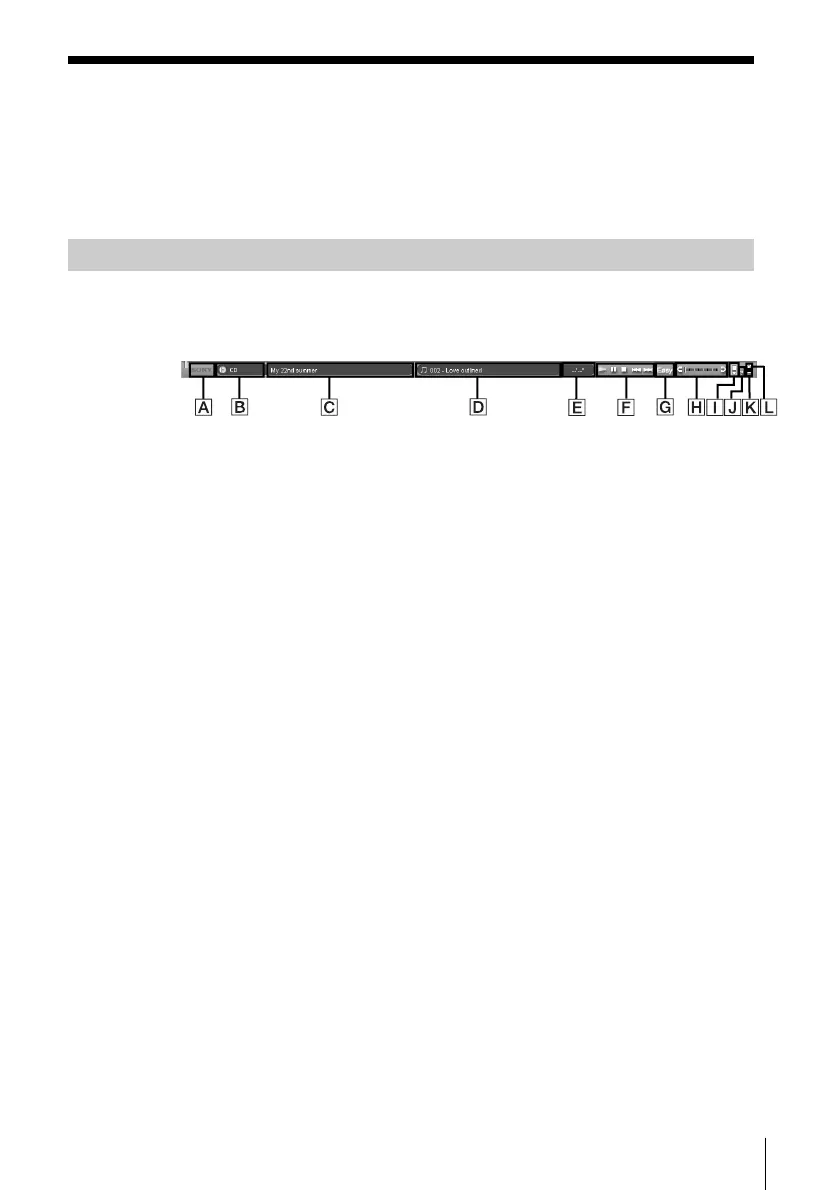
The Main bar provides basic functions for playing a CD/MD and
operating the tuner.
A SONY logo
Drag the logo with the left mouse button to move the Main bar up
or down.
Right-click the logo to display a pop-up menu.
B Function Name display
Click to display and select a function (CD, MD, TUNER, etc).
C Disk Information (Radio Band) display
Displays the name of the selected CD/MD or the selected radio
band depending on which function of CD/MD or TUNER is
selected in the Function name display.
D Track Number/Track Name (Preset Number/Broadcasting Station
Name) display
Displays the track number/track name or the preset number/
broadcasting station name depending on which function of CD/MD
or TUNER is selected in the Function name display.
(continued)



 To Next Page