6
MV-700HR
SECTION 2
GENERAL
This section is extracted from
instruction manual.
MV-700HR
1 2 3 4 5 6 7
8
9
qa
ux >
>
S-MENU VOLUME
POWER SOURCE
0
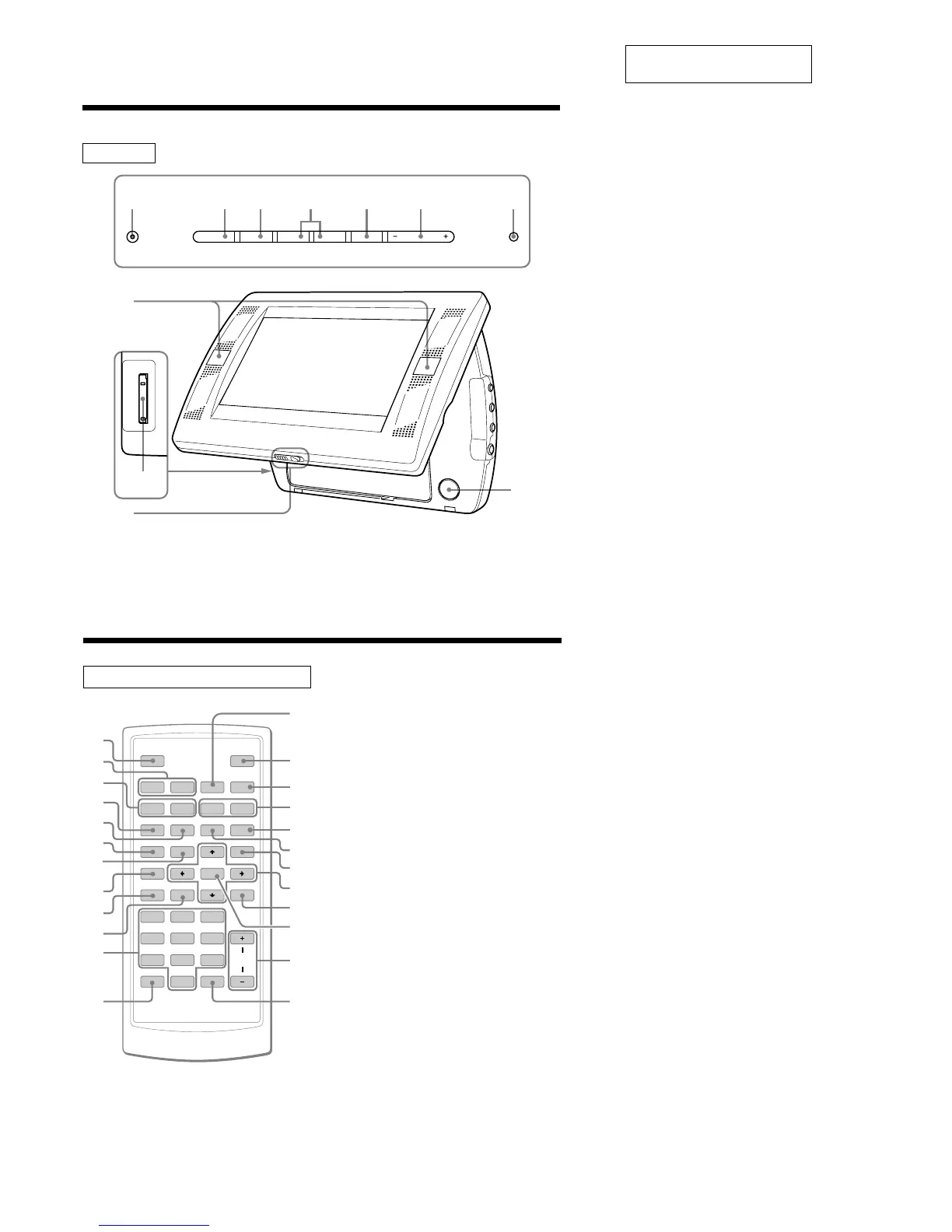
1 POWER (on/off) button
To turn on/off the monitor.
2 u (play/pause) button
3 x (stop) button
4 . (previous)/> (next) buttons
5 S-MENU button
To make various display settings.
6 VOLUME–/+ buttons
To turn up or down the volume or to select
the item during menu operation.
7 SOURCE button
To select the input source.
8 Receptor for the card remote
commander/Transmitter for the cordless
headphones
9 “Memory Stick” slot
0 Release lever
qa PUSH OPEN
Location of controls
Card remote commander RM-X707
SOURCE
AUDIO
`/1
VOL
1
4
7
2
5
8
0
3
6
9
ENTER
SUBTITLE
SETUP
CLOCK
MENU
TOP MENU
SEARCH
O
PROGRAM
ANGLE
CLEAR DSPL
REP
ux>.
y
y
Mm
qa
qs
qg
wd
wa
8
9
0
wf
qj
ws
qk
ql
w;
qh
qf
qd
5
2
6
4
3
1
7
1 SOURCE button
To select the input source.
2 ./> (previous/next) buttons
3 m (fast reverse)/M (fast forward)
buttons
4 AUDIO button
To change the audio output/audio
language.
5 SUBTITLE button
To change the subtitle language while
playing a DVD.
6 SETUP button
Used to perform menu operations.
7 TOP MENU button
To display the top menu of a recorded
DVD.
8 CLOCK button
To display the calendar or clock.
9 SEARCH button
To specify a desired point on a disc by
chapter, title or track.
0 PROGRAM button
To enter the program Playback Mode.
qa Number buttons
qs CLEAR button
qd x (stop) button
qf [/1 (power on/off) button
qg u (play/pause) button
qh t (slow reverse)/T (slow forward)
buttons
qj REP button
To select the repeat mode (DVD/Video
CD/Audio CD), or playback mode (MP3/
JPEG/DivX).
qk ANGLE button
To select the multiple angles of view while
playing a DVD.
ql MENU button
To display the recorded DVD menu.
w; M/m/</, buttons
wa O (return) button
ws ENTER button
To enter a setting.
wd VOL (+/–) buttons
wf DSPL button
To display the time information of the disc.
The corresponding buttons of the card
remote commander control the same
functions as those on the player.
Instructions in this manual describe how to use
the player by mainly using the card remote
commander.
Tip
Refer to “Replacing the lithium battery of the card
remote commander” for details on how to replace
the battery.














 To Next Page