14
Right
2
5
4
1
3
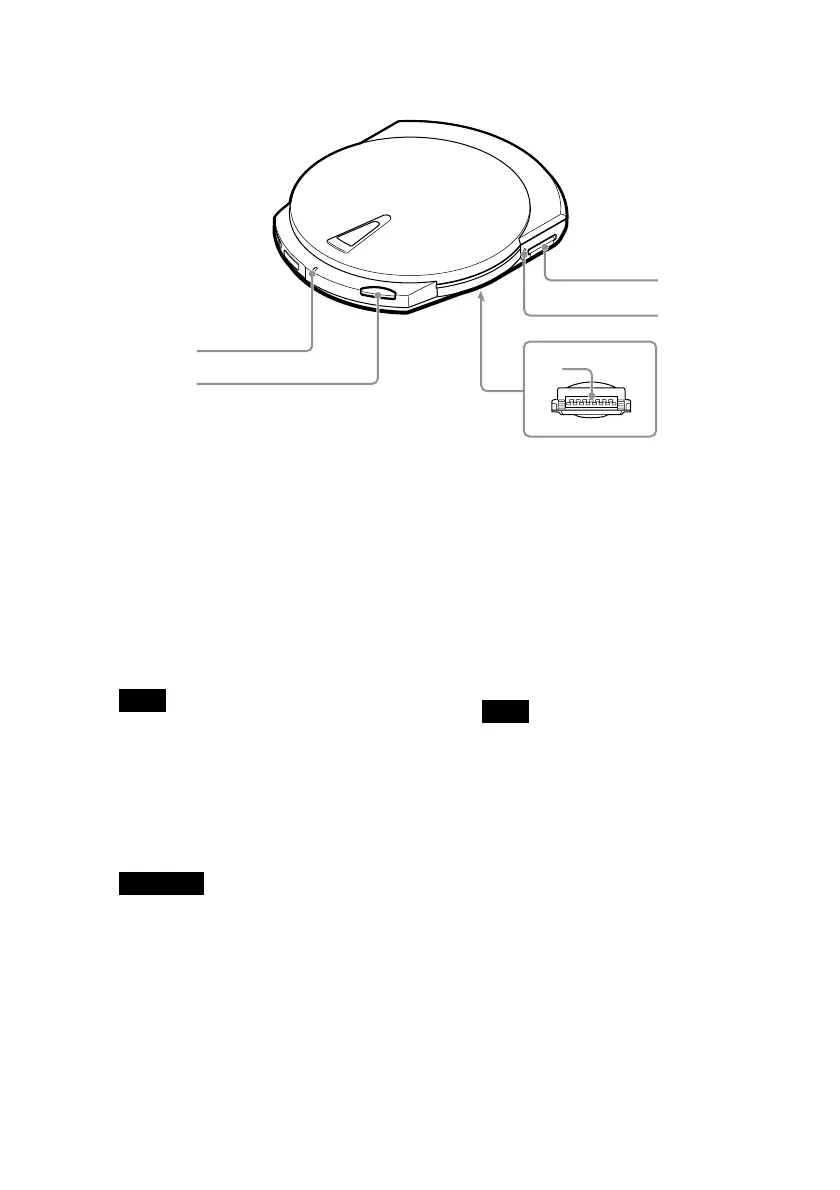
1 CHARGE/BUSY indicator
The CHARGE/BUSY indicator
changes color as follows according
to the drive status.
• Drive connected to computer
Power on, idle:.................. Green
During disc access: ......... Orange
• Drive not connected to computer
Battery charging: .................. Red
Note
The drive is not equipped with a power
button. The drive automatically manages its
power status depending on its state (i.e. on,
off, recharge). For details, see “Power”
(page 34).
2 EJECT button
Used to open the cover.
Important
To prevent the cover from being accidentally
opened during operation, the drive is
equipped with a powered ejection
mechanism. Therefore, when the drive is off,
the cover does not open. Also, depending on
the software that you are using, when you
press the EJECT button, there may be a lag
of a few seconds before the cover opens. For
details, see “Ejecting a disc from the drive”
(page 23).
3 Cradle connector (located on
the bottom of the drive)
Used to connect to the cradle.
A cover protects the connector.
4 “Memory Stick” busy
indicator
The indicator lights orange when
the drive is accessing data on a
“Memory Stick”.
Note
Do not eject the “Memory Stick” from the
drive when the indicator above is lit.
5 “Memory Stick” slot
Used to insert “Memory Stick”.



 To Next Page