17
Continued
Preparation
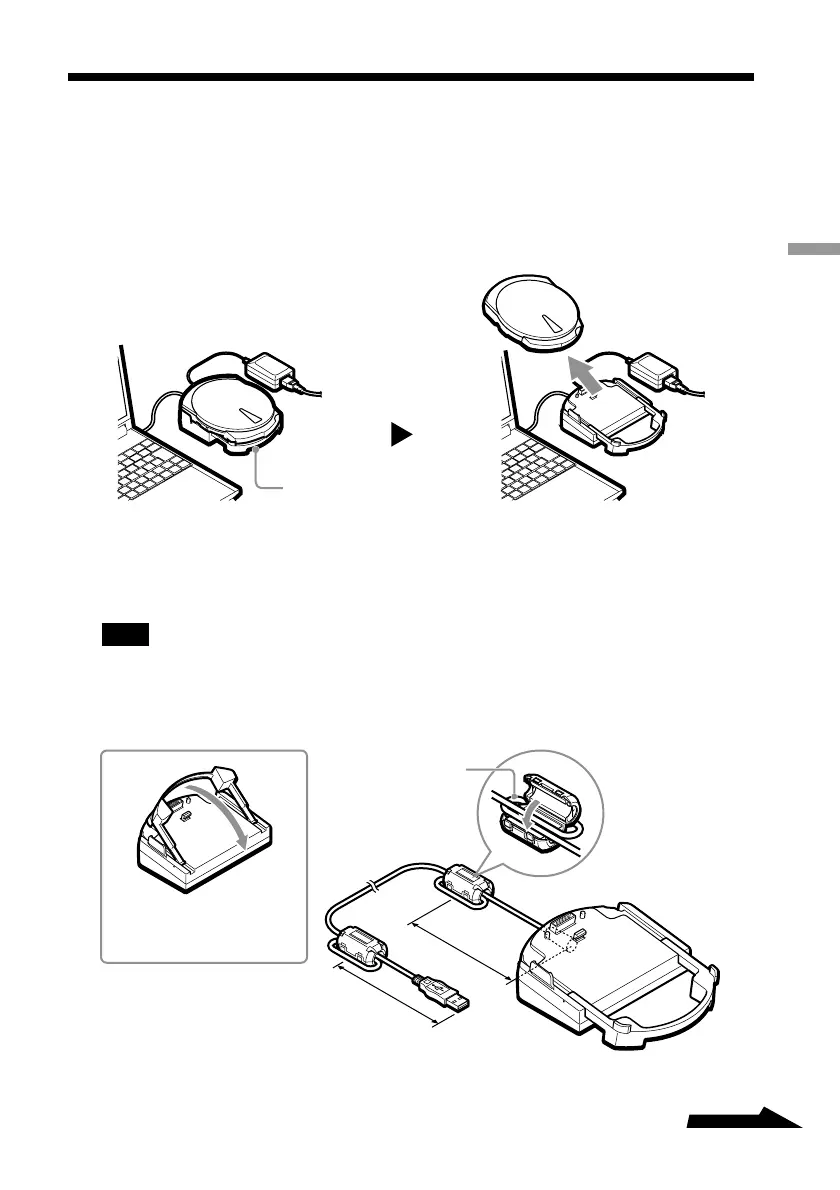
Using the Drive on the Cradle
If you carry the drive with you as well as use it with your computer often, using the
cradle is extremely convenient. If you connect your computer and the drive through
the cradle, you can take the drive with you whenever you want. Then, all you need to
do is set the drive on the cradle when you want to use it with your computer – no
reconnections necessary.
1 Attaching the ferrite clamp
You need to attach the provided ferrite clamps at both ends of the cradle’s USB
cable.
Note
Ferrite clamps serve to reduce the noise generated by cables in compliance with local standards.
Make sure that the clamps are properly attached.
Cradle
Wind once
8 cm
Close firmly until
you hear a click
Open the extension when
setting the drive on the
cradle.
8 cm



 To Next Page