28
Selecting a file from the folder
list
You can select a desired file for playback or
editing from the HOME menu.
1
Press and hold the HOME/BACK
button for 1 second or more.
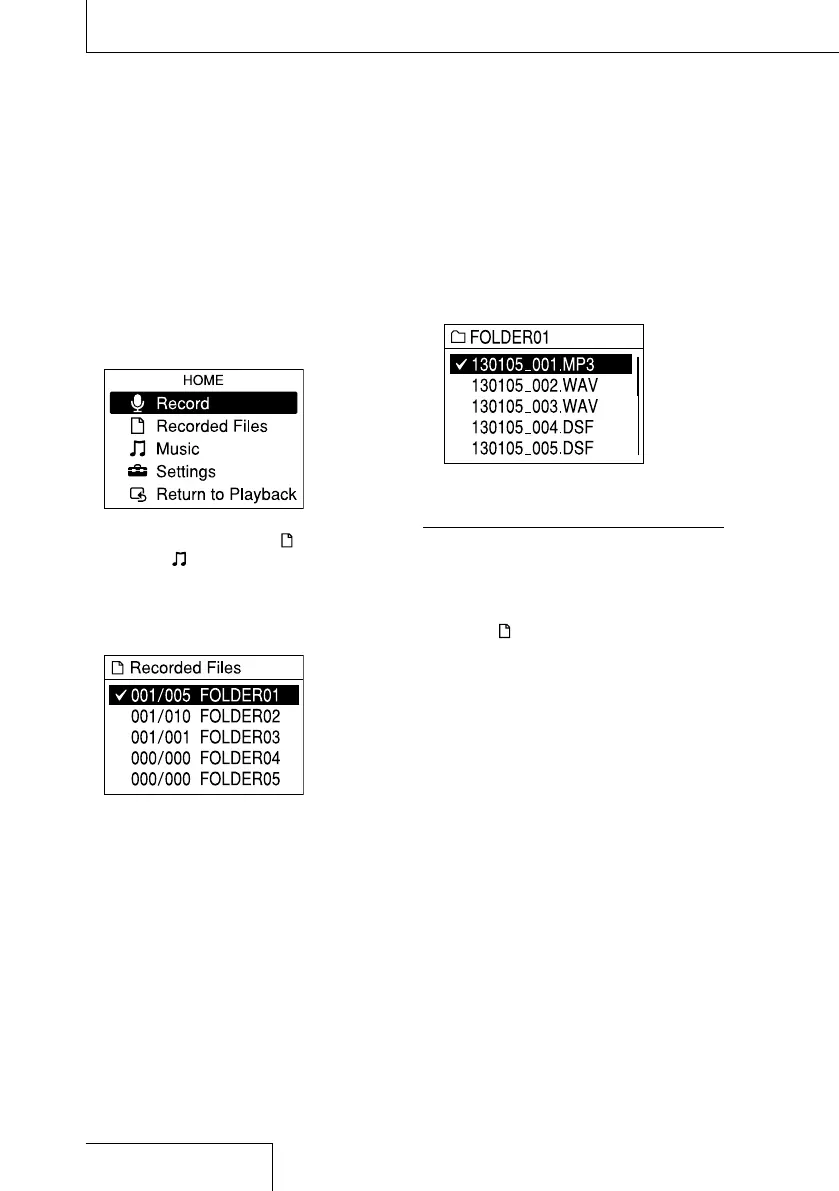
The HOME menu is displayed.
2
Press and to select “ Recorded
Files” or “
Music,” and then press the
button.
The folder list is displayed. If multiple pages
exist, you can move to the next page or the
previous page by pressing
or .
3
Press and to select a desired
folder, and then press the
button.
The file list is displayed.
4
Press and to select a desired file,
and then press the
button.
Notes
In the stop mode window, you can switch files by
pressing
and .
At the time of purchase, there are 5 folders
(FOLDER01 to FOLDER05) in the folder selection
window of “
Recorded Files.”
To select the memory (Built-In Memory or Memory
Card), see “Switching the memory” on page 26.
Selecting a file


 To Next Page