40
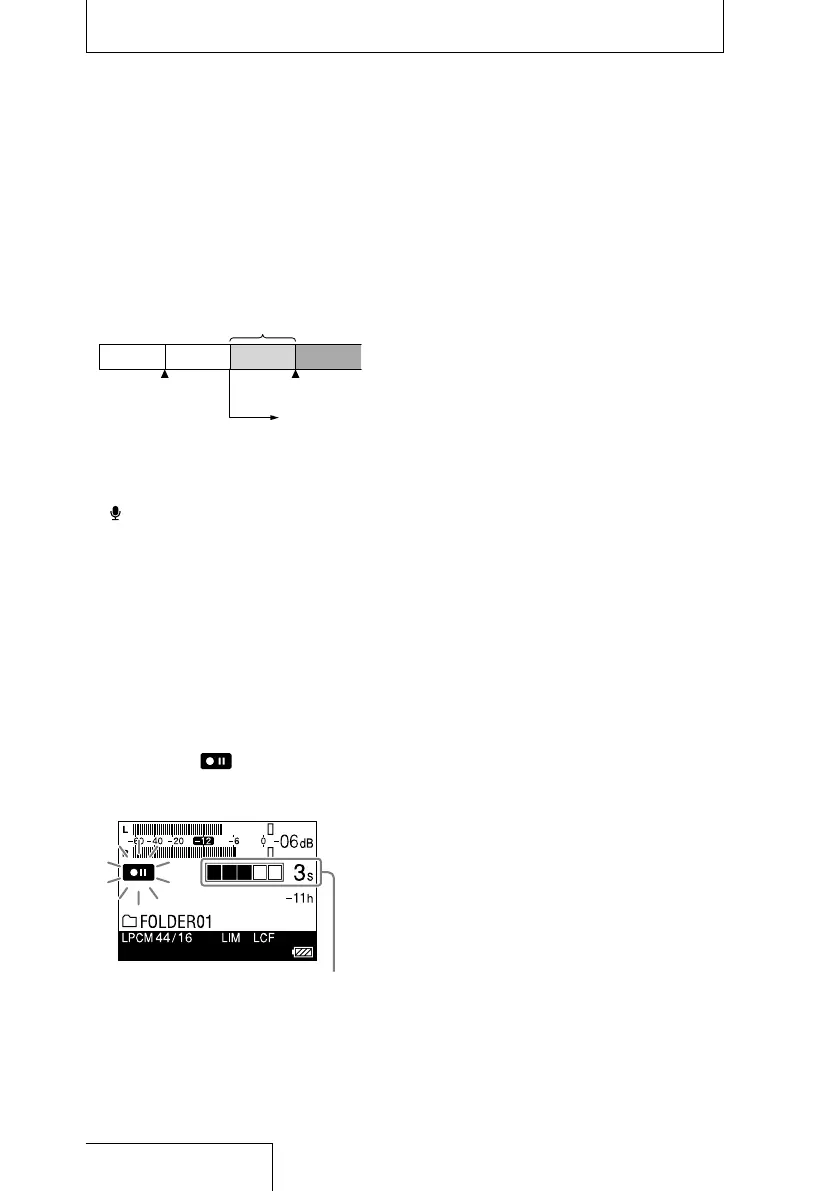
The Pre-Recording feature allows you to
record sound sources for a maximum of five
seconds prior to the point when the recording
is started.
5 seconds of sound
is buffered in the
memory
Press
REC to enter
the recording standby
mode.
Press PAUSE (or ).
Recording
starts.
1
Press and hold the HOME/BACK
button for 1 second or more, select
“
Record”, and then press the
button.
The recording stop mode window is
displayed.
2
Press the OPTION button to display an
option menu, select “Pre-Recording,”
and then press the
button.
The “Pre-Recording” window is displayed.
3
Press and to select “ON,” and
press the
button to fix the setting.
4
Press the REC button.
The linear PCM recorder stands by for
recording, and
flashes on the display.
The last 5 seconds of sound is buffered in
the memory.
Number of seconds to be buffered
in the memory
5
Press the PAUSE (or ) button.
The standby for recording mode is released,
and recording starts. Sound is saved from
a maximum of 5 seconds prior to the point
when the button is pressed.
Notes
When the remaining recordable time is less than 10
seconds, the Pre-Recording function is disabled.
During digital recording, the Pre-Recording function
is disabled.
If the time between steps 4 and 5 is less than 5
seconds, pre-recording is done only for that number
of seconds.
Recording a few seconds in advance, before
starting to record (Pre-Recording)


 To Next Page