67
Menu Operations
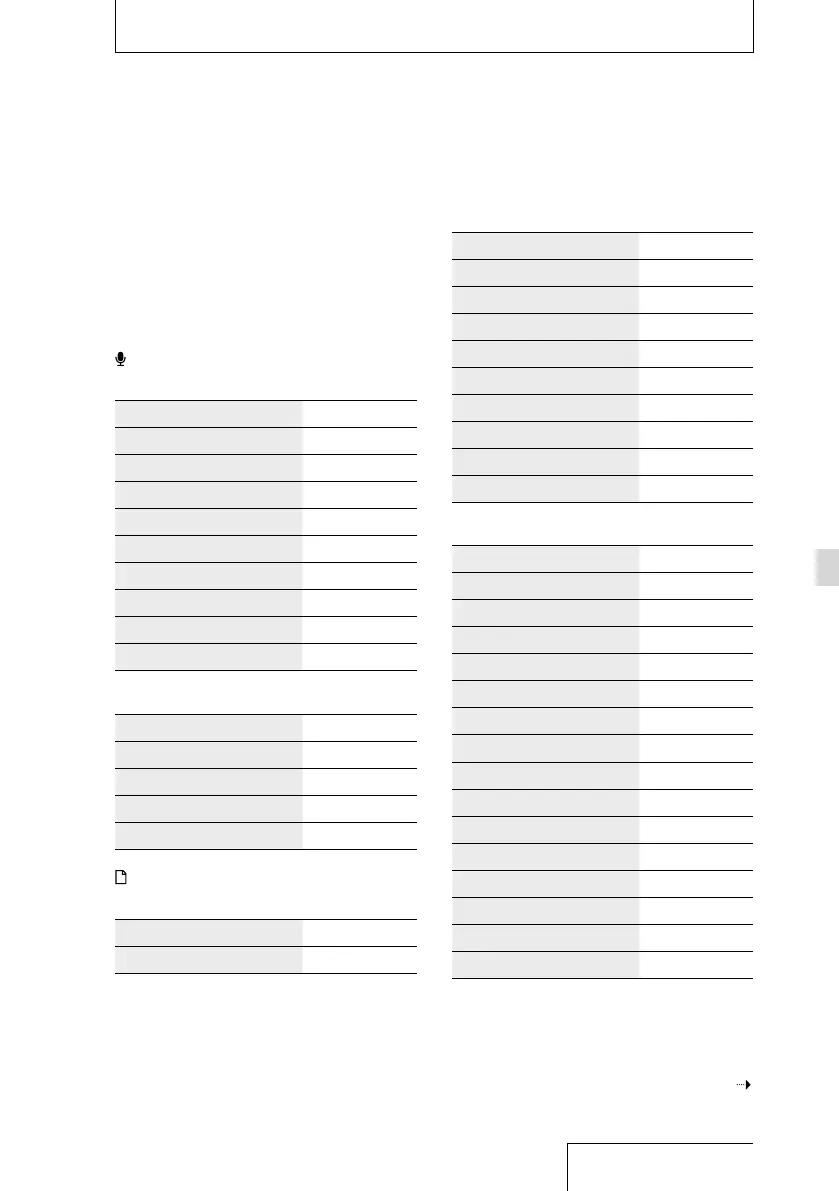
OPTION menu items
Menu Operations
After you have selected a function from the
HOME menu, you can display the OPTION
menu by pressing the OPTION button.
The OPTION menu items displayed differ
depending on the display on the window:
Folder selection window, file selection
window, or stop or record window.
Record
In stop mode
OPTION menu item See page:
Recording Folder 36
REC Mode 69
SBM(Super Bit Mapping) 70
Peak Hold 70
LIMITER 71
S/N 100dB 72
LCF(Low Cut) 72
Pre-Recording 40
Erase a File 59
In recording mode
OPTION menu item See page:
Peak Hold 70
LIMITER 71
S/N 100dB 72
LCF(Low Cut) 72
Recorded Files
In folders/calendar display
OPTION menu item See page:
File Selection 29
In file list display
OPTION menu item See page:
File Selection 29
Sort File Names 53
Protect 60
Erase a File 59
Erase All Files 59
Combine 58
Fade 55
Move/Copy File 52, 53
File Information 47
In file selection display
OPTION menu item See page:
Go to REC —
Start A-B Repeat Mode 48
DPC(Speed Control) 50
Key Control 49
Effect 49
Easy Search 48
Play Mode 74
Protect 60
Erase a File 59
Erase Track Mark 54
Divide 56
Combine 58
Fade 55
Move/Copy File 52, 53
File Information 47
Continued on the next page



 To Next Page