Basic Operations
Basic Operations
9
GB
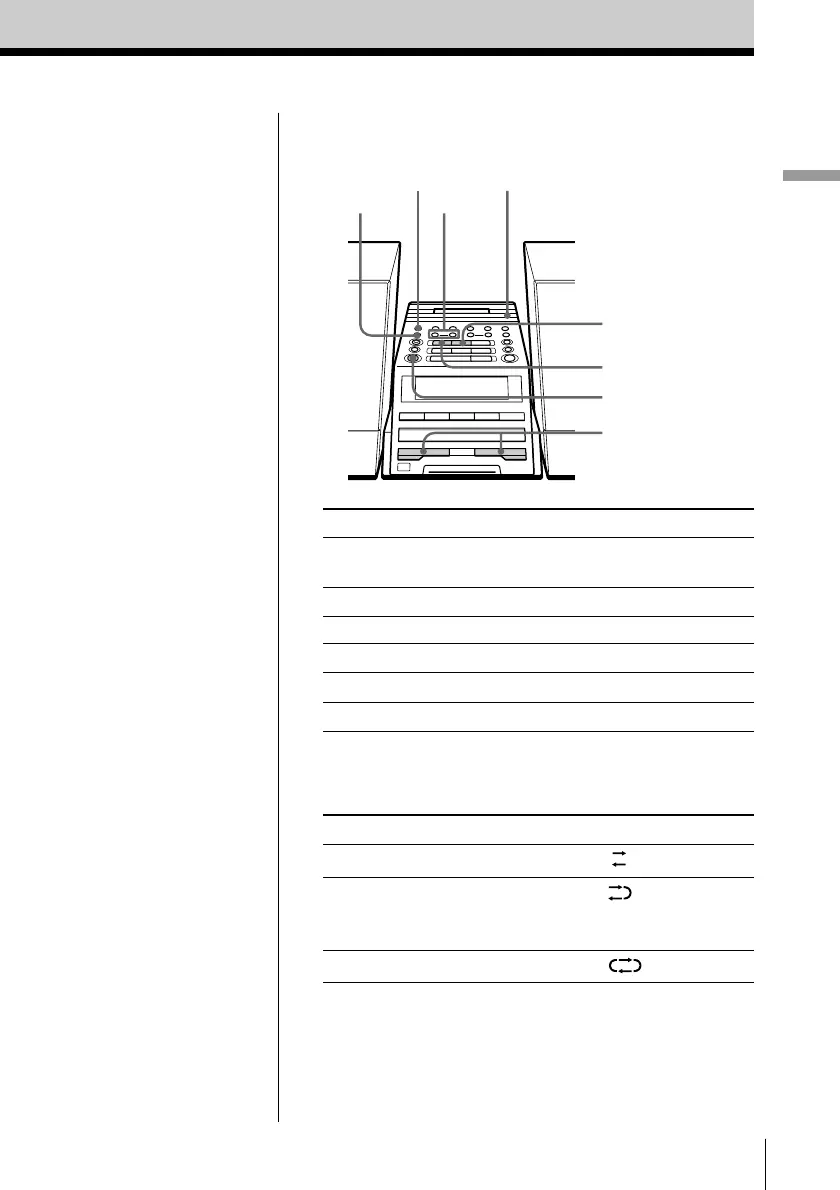
Use these buttons for additional operations
To Press
adjust the volume VOLUME +, –
(VOL +, – on the remote)
stop playback x
play the reverse side n
fast-forward or rewind the tape M or m
eject the cassette Z PUSH OPEN/CLOSE
turn on/off the player OPERATE
To select the direction mode of the tape
Press DIR MODE repeatedly.
To play Display shows
one side of the tape
both sides of the tape
from the upper side to reverse
side only
both sides of the tape repeatedly
Tips
• Press COUNTER RESET
to reset the counter to
“000”.
• Next time you want to
listen to a tape, just
press N or n. The
player turns on
automatically and starts
playing the tape.
DIR MODE
n
x
VOLUME –, +
m, M
COUNTER RESET
OPERATE
Z PUSH
OPEN/CLOSE


 To Next Page