7-6. DC IN +12 V Adjustment
7-6-1. Adjustment Procedure
Tools/Fixtures
• Constant-voltage power supply unit
A power supply unit that can output 12 V, 10 A or higher
• Digital voltmeter
Advantest TR6845 or equivalent
Preparations
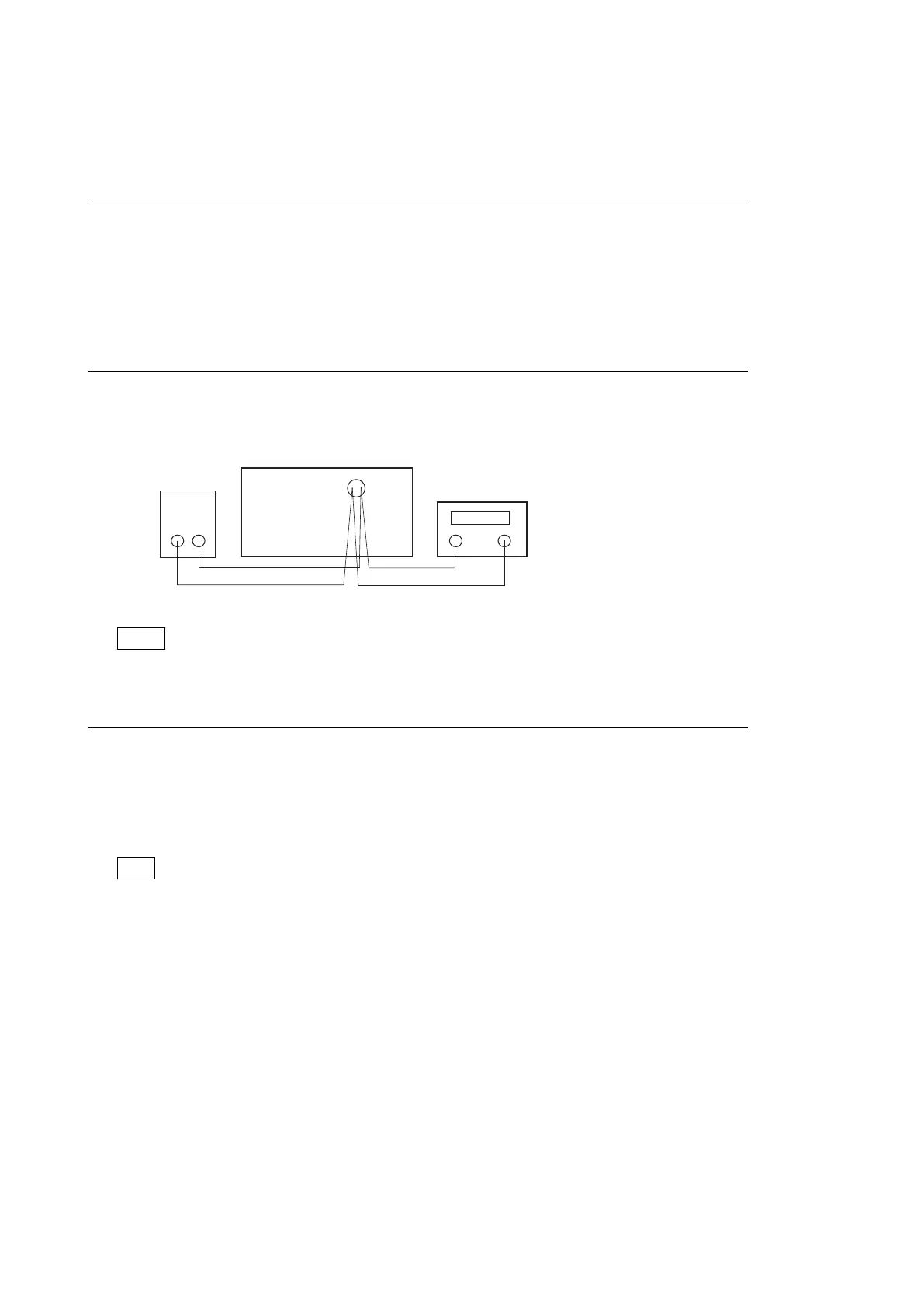
1. Connect a constant-voltage power supply unit and a digital voltmeter to the unit.
PMW-1000
Constant-voltage
power supply unit
Digital voltmete
2. Turn on the power of the unit and the tools.
Note
Apply power to the unit and the tools to allow warm up of 10 minutes or longer.
DC IN +12 V adjustment
1. Supply voltage +12 V to the DC IN 12 V connector.
Specification: 12.00 ±0.01 V
2. Display the Maintenance menu. (Refer to Section 4-1-2.)
3. Select "A2E : BATTERY".
Tip
Maintenance menu → M1 : ADJUST → A2 : AUDIO/VIDEO/BATTERY → A2E : BATTERY
4. Select "DC-IN +12".
PMW-1000
7-15


 To Next Page