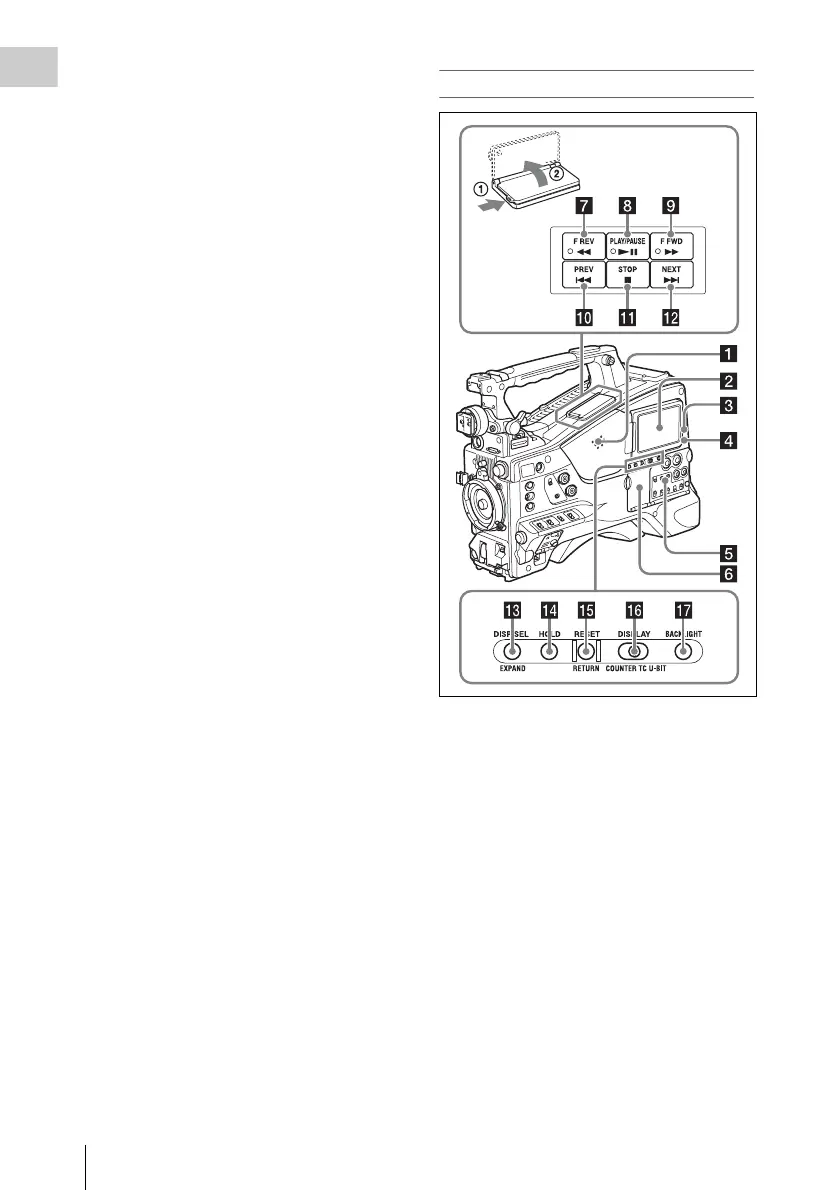
Locations and Functions of Parts and Controls
18
Chapter 1 Overview
Use the switch in the following way when the
menu is not displayed.
CANCEL/PRST: Each time this switch is
pushed upward, a window to confirm the
menu settings and status of the camcorder
appears on the viewfinder screen (see
page 64). The window consists of five pages,
which are switched each time the switch is
pushed upward. Each page is displayed for
about 10 seconds.
ESCAPE: To clear the page immediately after
display, push this switch down to the OFF
position.
Use the switch in the following way when the
menu is displayed.
CANCEL/PRST: Pushing this switch up to this
position after a setting is changed in the setup
menu displays the message to confirm
whether the previous settings are cancelled.
Pushing this switch up to this position again
cancels the previous settings.
Pushing this switch up to this position before
a setting is changed in the setup menu or after
a setting change is cancelled in the setup
menu displays the message to confirm
whether the setting is reset to the initial
value.
Pushing this switch up to this position again
resets the settings to the initial value.
ESCAPE: Use this switch when the menu page,
which has a hierarchical structure, is opened.
Each time the switch is pushed to this
position, the page returns to one stage higher
in the hierarchy.
l Cover
Open this cover to use the MENU ON/OFF
switch or the MENU CANCEL/PRST/ESCAPE
switch.
Right side (near the rear)
a Built-in speaker
The speaker can be used to monitor E-E
1)
sound
during recording, and playback sound during
playback. The speaker also sounds alarms to
reinforce visual warnings (see page 175).
If you connect earphones to the EARPHONE
jack, the speaker output is suppressed
automatically.
1) E-E: Abbreviation of “Electric-to-Electric”. In E-E
mode, video and audio signals input to the camcorder
are output after passing through internal electric
circuits only. This can be used to check input signals.
b LCD monitor
Displays remaining battery capacity, remaining
media capacity, audio levels, time data, and so on
(see page 24).
Also allows you to check camera and playback
pictures.



 To Next Page