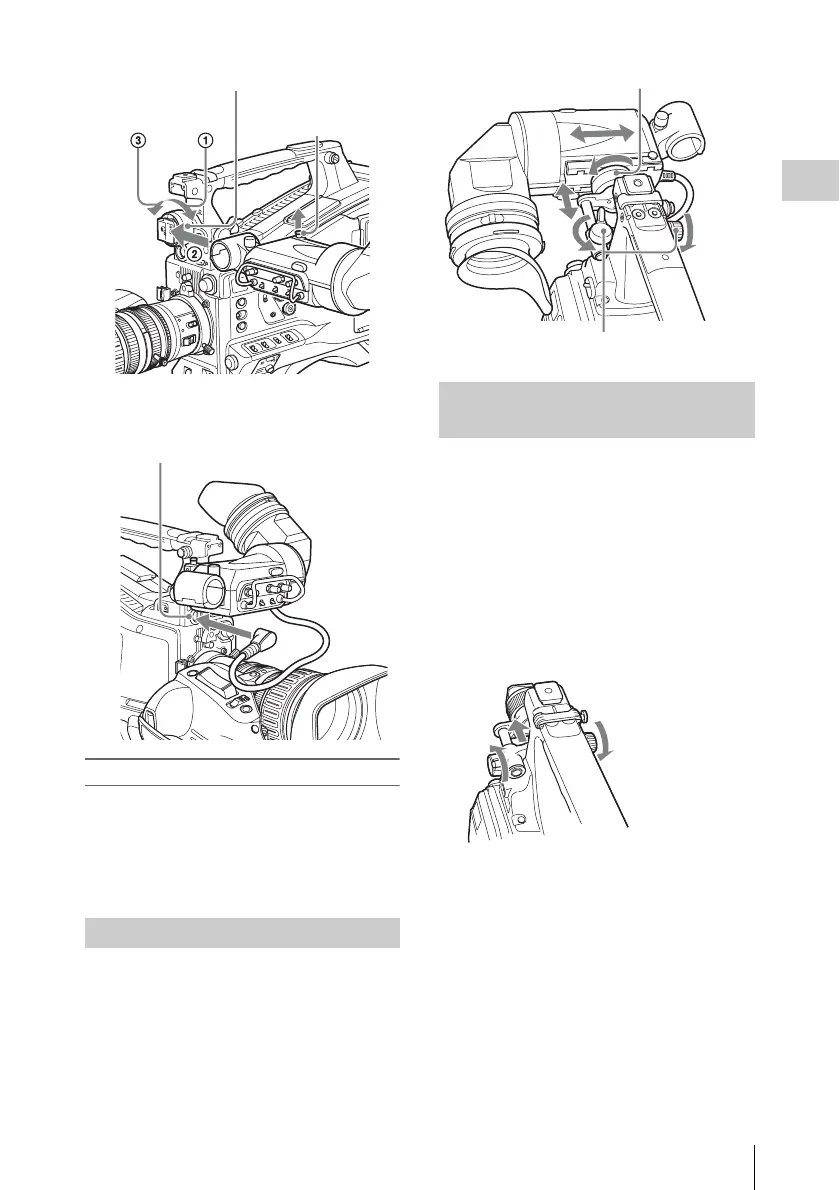
Attaching the Viewfinder
35
Chapter 2 Preparations
2 Couple the viewfinder connector to the
VF connector (20-pin).
Detaching the viewfinder
You can carry out this by following the attaching
procedure in reverse order, but there is an
additional action to take: when detaching the
viewfinder from the fitting shoe, pull up the
stopper.
To adjust the viewfinder left-right position,
loosen the left-right positioning ring, and to adjust
the front-back position, loosen the front-to-back
positioning knob.
By fitting an optional BKW-401 Viewfinder
Rotation Bracket, you can rotate the viewfinder
out of the way so that your right leg does not hit
the viewfinder while you are carrying the
camcorder.
1 Loosen the front-to-back viewfinder
positioning levers and the front-to-back
viewfinder positioning knobs, and then
pull the viewfinder slide assembly
forward.
2 Using a 2.5 mm diameter hexagonal
wrench, detach the viewfinder slide
assembly.
Adjusting the Viewfinder Position
Stopper
Viewfinder left-to-right positioning ring
VF connector (20-pin)
Using the BKW-401 Viewfinder
Rotation Bracket
Viewfinder front-to-back positioning knob
Viewfinder left-to-right positioning ring



 To Next Page