Attaching the Viewfinder
36
Chapter 2 Preparations
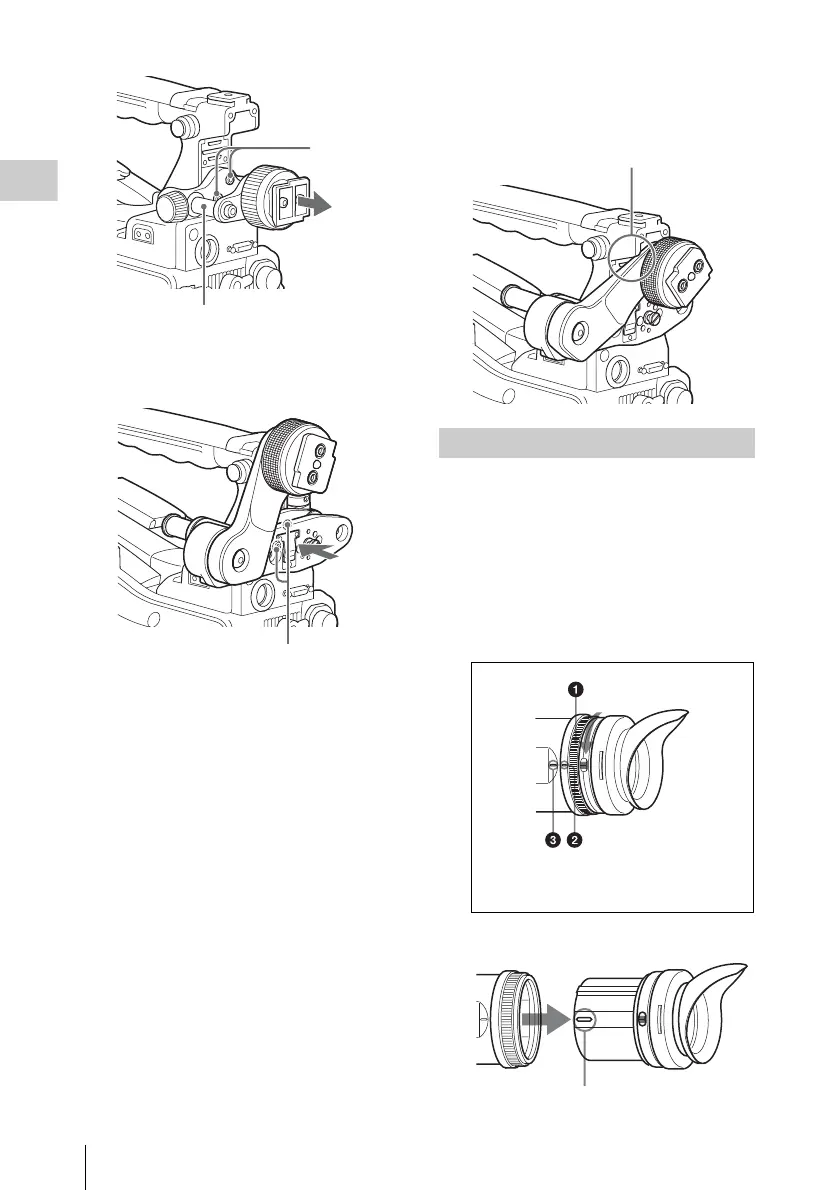
3 Attach the BKW-401 with the supplied
bolts.
4 Adjust the front-to-back position so
that the arm of the BKW-401 does not
touch the handle when it is raised.
Removing the eyepiece gives a clearer view of the
screen from further away. It is also easy to
remove dust from the viewfinder screen and
mirror when the eyepiece is detached.
1 Turn the eyepiece locking ring fully
counterclockwise, to align the red
marks on the locking ring and the
viewfinder barrel.
2 Detach the eyepiece.
Bolts with
hexagonal
hole
Viewfinder slide assembly
Bolts supplied with the BKW-401
Detaching the Eyepiece
Adjust position so that arm
does not touch handle
1 Locking ring
2 Locking ring match mark
3 Match mark on the viewfinder barrel
Match mark on end of eyepiece



 To Next Page