Clip Playback
91
Chapter 5 Clip Operations
j Clip duration
k Timecode
This is the timecode of the index picture.
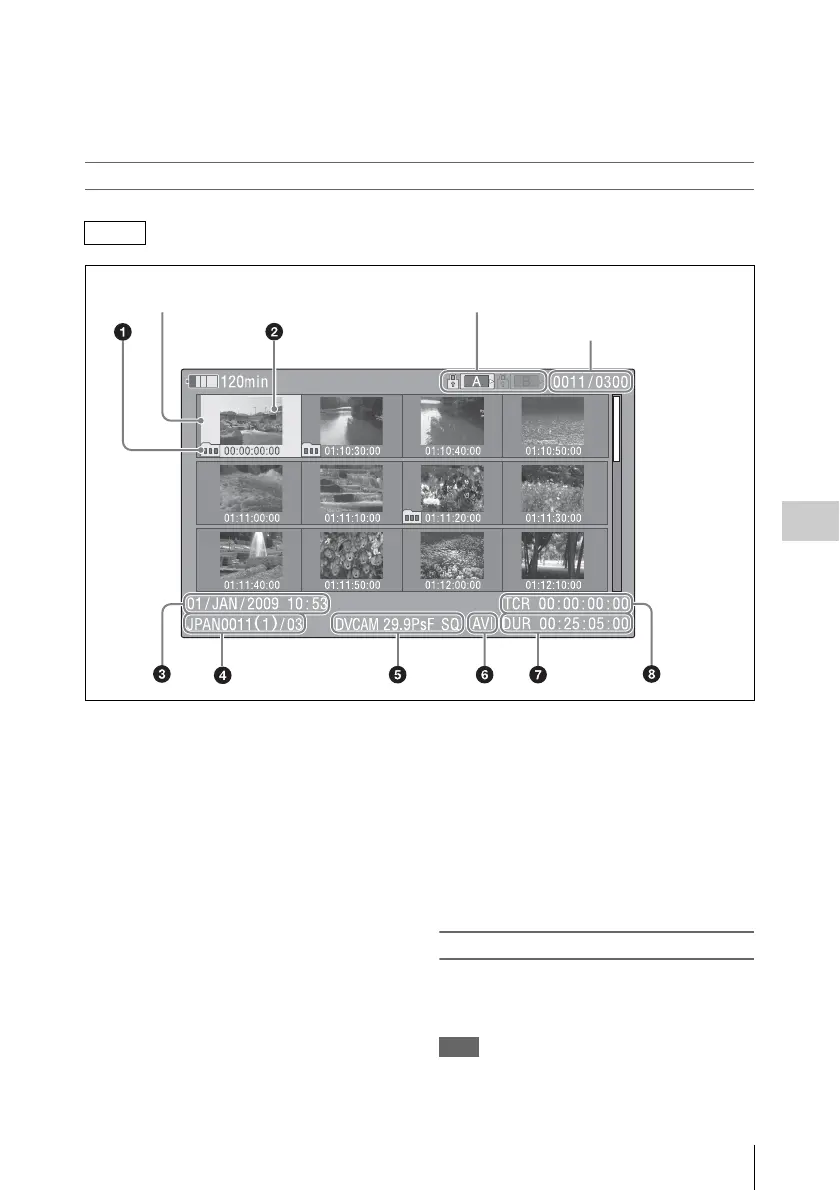
FAT-SD mode thumbnail screen
a Take mark
Indicates that the file size is larger than 2 GB, and
that the clip has been split before being saved.
You can check the segment files on the expand
thumbnail screen (see page 102).
b Index picture
When a clip is recorded, its first frame is set
automatically as the index picture.
c Date and start time of recording
d Clip name/Number of components
The number after the clip name (delimited by /) is
the number of components. This appears only for
clips larger than 2 GB in size, which have been
split into smaller files for storage.
e Video format of recording
f File format
Indicates the file format of the selected clip
(AVI).
g Clip duration
h Timecode
This is the timecode of the index picture.
To switch between SxS memory cards
When two SxS memory cards are loaded, you can
switch between them by pressing the SLOT
SELECT button.
Note
While an expand thumbnail screen (see page 102) or an
essence mark thumbnail screen (see page 103) is
displayed, SxS memory cards cannot be switched.
FAT-SD
Clip number/Number of components
Cursor (yellow)
The icon of the currently selected SxS memory card is highlighted.
(If the card is write protected, a lock appears on the left.)



 To Next Page