Adjusting the Lens
35
Preparations
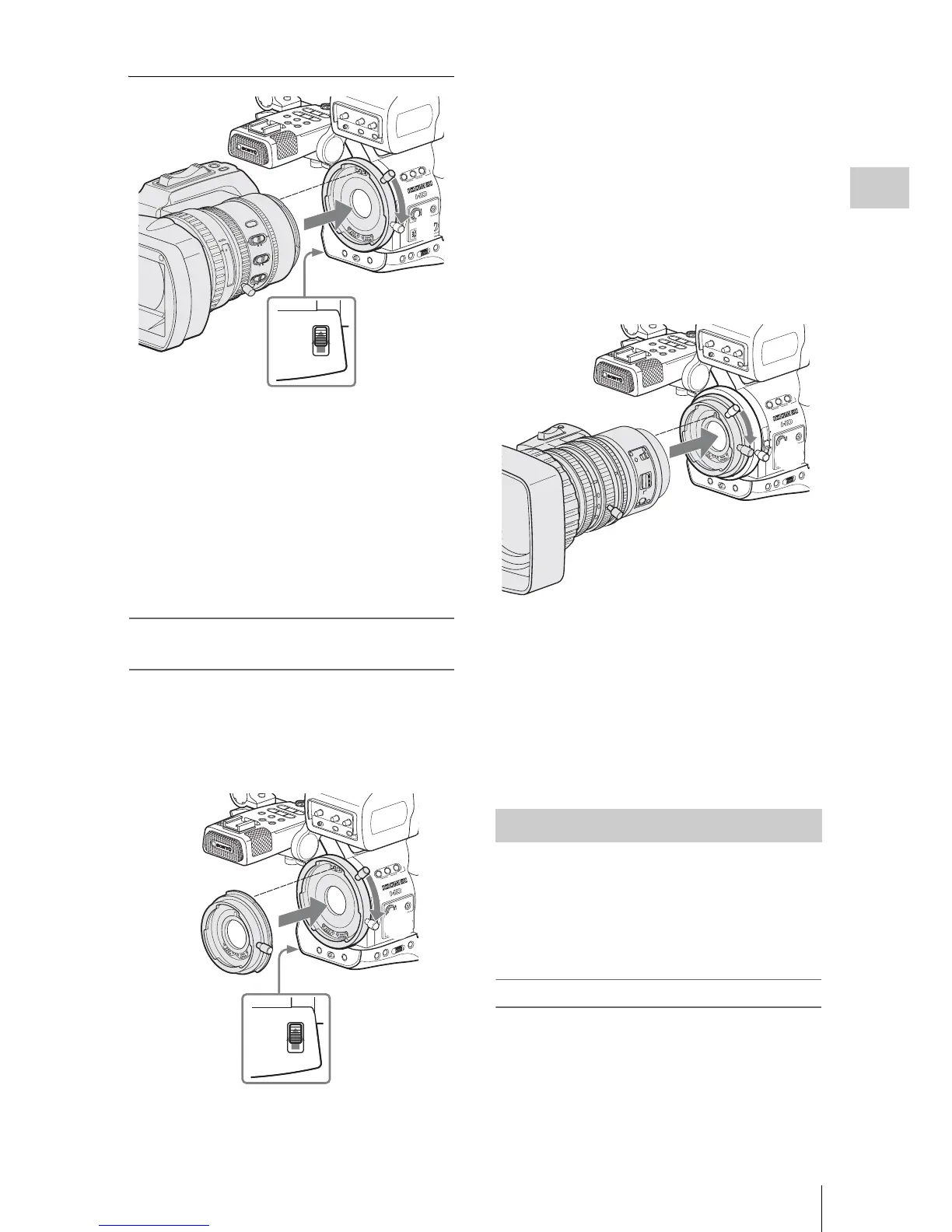
1 Align the alignment pin of the lens with
the recess at the top of the mount section
of the camcorder and set the lens in
place.
2 Turn the lens mount lever downward.
3 Return the lens mount stopper switch to
the LOCK position.
Attaching a Sony 1/2-inch Bayonet Mount
lens
Use the lens adaptor supplied with the camcorder.
1 Attach the lens adaptor to the
camcorder.
1 Align the alignment pin of the lens
adaptor with the recess at the top of the
mount section and set the adaptor in
place.
2 Turn the lens mount lever of the
camcorder downward. (Keep the lens
mount lever of the lens adaptor in the
upper position.)
3 Return the lens stopper switch to the
LOCK position.
2 Attach the lens.
1 Align the alignment pin of the lens with
the recess of the adaptor and set the lens
in place.
2 Turn the lens mount lever of the adaptor
downward.
To detach the lens, reverse the above procedure.
By your storing the data (such as compensation
data) specific to the lenses in files, required
adjustments and compensation can be performed
merely by retrieving the appropriate file when
changing lenses.
When using an exclusive lens
The optimum compensation data for the two
e
xclusive lenses are stored in the corresponding
lens files at the factory to be automatically
retrieved (with LENS menu “Auto Recall: On”).
ASSIGN 4
OFF ON
SHUTTER
WH
T B
AL
12
3
L
EN
S I
NFO
BR
T
D
ISP
HIS
TOG
RA
M
A
SS
IG
N
OFF
2
1
ND
FILTE
R
-
+
F
RA
M
E
GA
IN
STATUS MENU SEL/SE
T
CANCEL
B
A
PAST
L
ATW
M
H
W
HITE B
AL
BA
RS/C
AM
F
U
LL
A
U
T
O
S
H
O
T
T
R
A
N
S
ITIO
N
A
B
T
C
/U
-
BIT
/D
U
R
A
T
IO
N
RE
C
START
/S
T
O
P
H
OL
D
THU
MN
A
IL
F REV
PREV
S
EL/SET
PLAY/PAUSE
S
TOP
C
AN
CE
L
F
FWD
N
E
XT
l
sL
j
G
/S
J
M
ONITOR
VOL
H
L
O
F
F
MIRROR IMAGE
OFF ON
DISPLAY/BA
TT INFO
ZEBRA
PEAKING CONTRAST BRIGHT
8
5.6
4
2.8
1.9
16
C
mm
ft
M
A
N
U
A
F
/M
F
Fu
ll
M
F
MAC
R
O
STEADY
SHOT
ON
A
UT
O
OFF
FOCUS
A
U
T
O
IRIS
30
10
15
5
10
3
7
2
T
W
LOCK
RELEASE
3
2
1
ASSIGN
4
OFF
ON
SHUTTER
W
HT BAL
1 2
3
L
EN
S IN
FO
BR
T
D
ISP
HIS
TO
G
RAM
ASS
IGN
OFF
2
1
ND
F
IL
TER
-
+
F
R
A
M
E
GAIN
S
TATUS MENU SEL
/SE
T
CANCEL
B
A
PAST
L
ATW
M
H
WH
ITE BAL
BARS/CAM
F
U
LL
A
U
T
O
SH
O
T
TR
A
N
SIT
IO
N
A
B
T
C
/U
-
BIT/
D
U
R
AT
IO
N
R
EC
S
T
AR
T/S
T
O
P
HO
LD
TH
U
MN
AIL
F REV
P
R
EV
SE
L/S
ET
P
LAY/P
AUSE
STOP
C
AN
CE
L
F FW
D
N
EX
T
l sL
j
G
/S J
MON
ITOR
VO
L
H
L
OFF
MIRROR IM
AGE
OFF ON
DIS
PLAY/BA
TT INFO
ZEBRA
PEAKING CONTRAST BRIGHT
LOCK
RELEASE
2
1
3
Lens adaptor
(supplied)
Retrieving the Lens File
ASS
IG
N 4
OFF ON
SHUTTER
WHT
BAL
12
3
LEN
S INF
O
B
RT DIS
P
H
IST
OG
RA
M
A
SSIGN
OFF
2
1
N
D
FILT
E
R
-
+
FR
A
M
E
GA
IN
STATUSMENU
SEL
/SET
CANCEL
B
A
PAST
L
ATW
M
H
WHITE BA
L
BA
RS/CAM
F
U
L
L
A
U
T
O
SH
O
T
TR
A
N
SIT
IO
N
A
B
T
C
/
U
-B
I
T/D
U
R
A
T
IO
N
R
EC
S
T
AR
T/STO
P
H
OLD
TH
UMN
AIL
F RE
V
PR
EV
S
EL/S
ET
PLAY/PAUSE
S
TOP
C
AN
C
EL
F FW
D
N
EXT
l sL
j
G
/S J
M
ONIT
OR
VOL
H
L
OFF
MIRR
OR IM
AGE
OFF ON
DISPLAY/BA
TT INFO
ZEBRA
PEAKING CONTRAST BRIGHT
2
1
Sony 1/2-inch Bayonet
Mount lens (optional)



 To Next Page