EasyManua.ls Logo

Sony PMW-EX3 - Displaying the Time Data; Recording Audio Signals; Using the Built-In Stereo Microphones

Sony PMW-EX3
161 pages
Print Icon
To Next Page IconTo Next Page
To Previous Page IconTo Previous Page
Loading...
Recording Audio Signals
67
Recording
Setting eight digits as desired
1 Set “Mode” of “Users Bit” to “Fix.”
2 Specify the values on the Setting line
and select “SET.”
You can set hexadecimal digits A to F with
the corresponding alphabetics.
Recording the current date as the user
bits
Set “Mode” of “Users Bit” to “Date.”
The current date is displayed on the Setting line.
In Camera mode, pressing the DISPLAY/BATT
INFO button displays the time data on the screen.
The indication is switched among the timecode,
user bits, and recording duration each time you
press the TC/U-BIT/DURATION button.
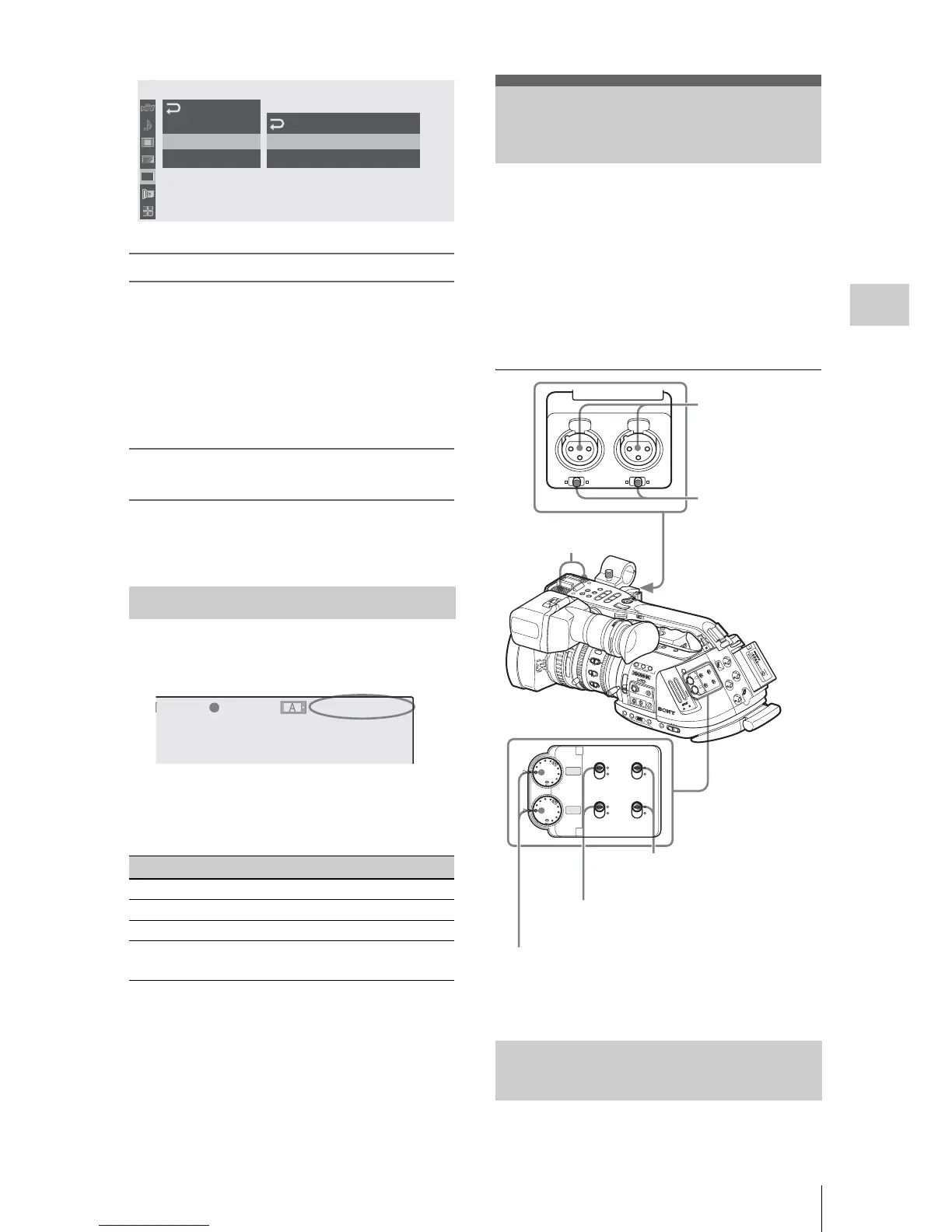
Two channels (CH-1/CH-2) of audio can be
recorded (Linear PCM recording) in
synchronization with video recording.
You can use the built-in stereo microphones
(omni-directional electret condenser
microphones) or 2-channel external audio inputs
to the AUDIO IN connectors by switching with
the AUDIO IN switches.
Set the AUDIO IN switches, both CH-1 and
CH-
2, to INT.
Displaying the Time Data
Display Contents
TCG **:**:**:** Tmecode
CLK **:**:**:** Timecode (Clock mode)
UBG ** ** ** ** User bits
DUR **:**:** Duration from the beginning of
recording
00:00
Ti
m
ecode
U
sers
Bit
TC
For
m
at:
DF
TC/UB
SET
M
ode
:
Fix
Setting:
20 07 12 08
B
B
TCG 00:00:00:00
H
Q
1080/24P

T
BY
REC
Recording Audio Signals
Using the Built-in Stereo
Micr
ophones
15
25
40
10
3
10
mm
5
10
30
ft
15
5.8
8
5.6
4
2.8
1.9
16
C
MANU
AUTO
M
A
NU
A
UT
O
PU
S
H A
F
FOCUS
IRIS
MAC
R
O
OFF
ON
SDI OUT
GENLOCK IN
REMOTE
TC OUT
TC IN
HDV
O
FF
2
1
ND
FILTER
-
+
F
R
A
ME
GAIN
STATU
S
MENU
SEL/SET
CAN
CEL
P
IC
TURE
P
R
OF
IL
E
CA
MER
A
O
FF
ME
DIA
B
A
P
RS
T
L
AT
W
M
H
WHITE BAL
B
ARS/C
AM
F
U
LL A
U
T
O
PMW
-E
X3
C
H-1
AU
T
O
MA
N
UA
L
IN
EX
T
A
UTO
MA
N
UAL
IN
E
X
T
C
H
-2
AUD
IO
LE
VE
L
SL
O
T SE
LE
CT
AU
D
IO
SELEC
T
AUDIO
IN
A
B
O
PEN
A
CC
E
SS
1
2
3
A
SS
IG
N
L
EN
S INFO
BR
T D
IS
P
H
IS
TO
G
R
AM
B
T
C/U
-B
IT/D
U
RAT
ION
THUMNAIL
F REV
PREV
SEL/SET
P
L
A
Y
/P
A
U
S
E
STOP
CANCEL
F FWD
NEXT
REC
START/STOP
H
OLD
l
s
L
j
G
/
S
J
MONITOR
VOL
L
R
H
L
O
F
F
16:9 W
IDE
SCR
EEN
CH-1
AUTO
MANUAL
INT
EXT
AUTO
MANUAL
INT
EXT
CH-2
AUDIO
LEVEL
AUDIO
SELECT
AUDIO
IN
AUDIO IN
CH-1
MIC
LINE MIC+48V
MIC
LINE MIC+48V
CH-2
AUDIO IN switches:
To select the source
LINE/MIC/+48V
switches:
To select the type
external source
AUDIO SELECT switches:
To select the recording level
adjustment mode
Built-in stereo
microphones
AUDIO IN
connectors:
To input external
sources
AUDIO LEVEL controls:
To adjust the recording levels

Table of Contents

Other manuals for Sony PMW-EX3

Related product manuals