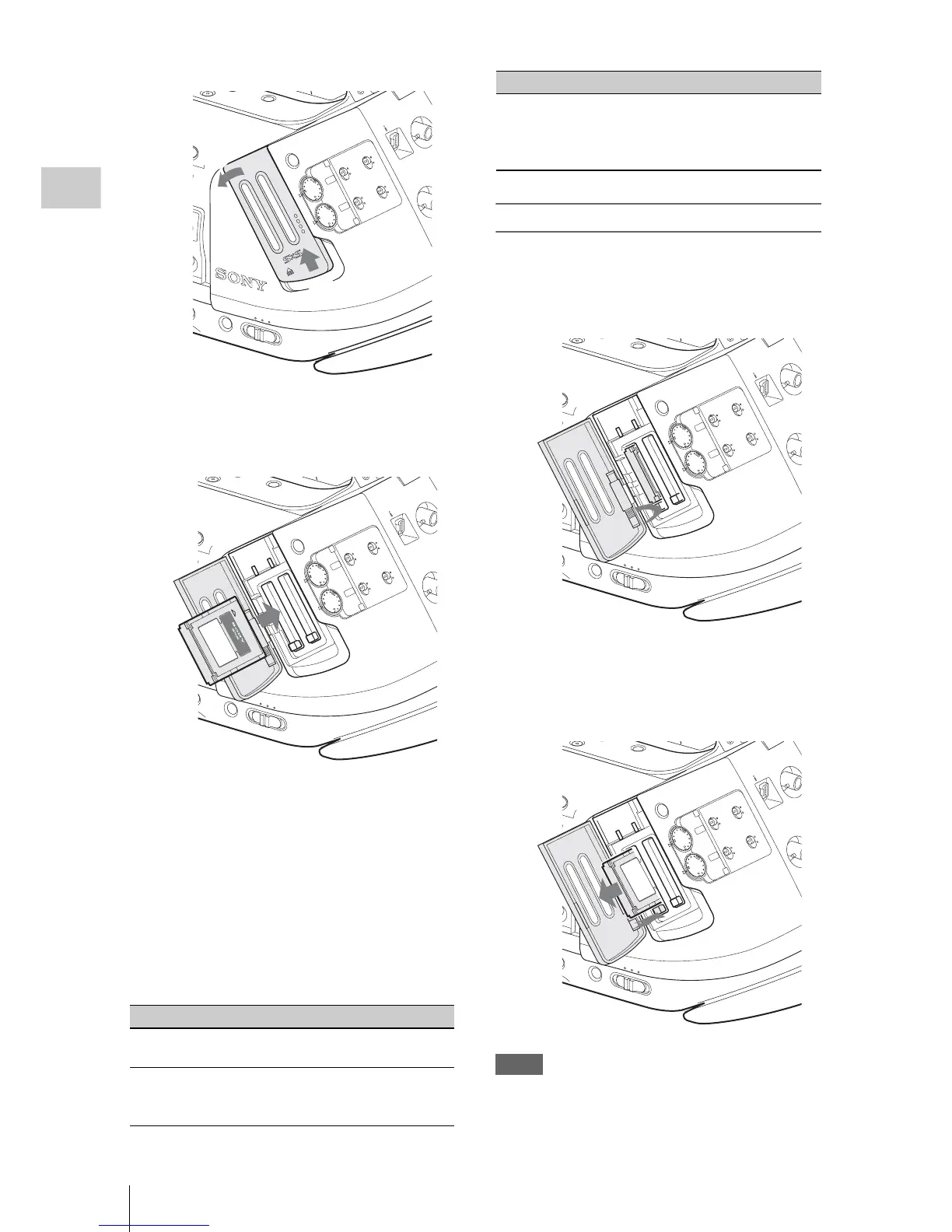
Handling SxS Memory Cards
42
Preparations
2 Insert the SxS memory card into the
slot.
The ACCESS lamp lights in red then changes
to green once the memory card is ready for
use.
3 Close the cover.
Status indications by the ACCESS lamps
Card slots A and B are accompanied by the
respective ACCESS lamps to indicate their
statuses.
Removing an SxS memory card
1 Open the cover, once press the EJECT
button to release the lock, then pull the
button out.
2 Press the EJECT button again to
remove the card.
Notes
• Data are not guaranteed if the power is turned
off or
a memory card is removed while the card
is being accessed. All data on the card may be
Lamp Slot statuses
Lights in
red
Accessing the loaded SxS memory card
(writing/reading data)
Lights in
green
Standby (ready for recording or
playback using the loaded SxS memory
card)
SDI OUT
TC/U-BIT/DURATION
SxS PRO
8
GB
With the label
facing right
Off • No SxS memory card is loaded.
• The loaded card is invalid.
• An SxS memory card is loaded, but
another slot is active.
Lamp Slot statuses
SDI OUT



 To Next Page