PRS-T2
11
OPERATION OF EACH MODE
1. Test Panel
The panel can be checked.
Procedure:
1. Touch the “Test Panel” in the test mode menu.
2. The image fi les of in the directly as “/testmode/images/” are
displayed.
The all image fi les are transformed into the 600 x 800 size, and
the linear interpolation processing of pixel is done.
Note 1: The format that can be treated is “.bmp”, “.jpeg” , “.gif” and
“.png” in this mode.
3. Press the [<]/[>] keys, the image fi les are chenged.
Note 2: If there are no image fi les, the screen changes into grayscale color.
Press the [<]/[>] keys, the grayscale color changes sequentially as
shown in the fi gure below.
WHITELIGHT
GRA
Y
DARK GRA
YBLACK
>
<
>
>
<
>
<
<
Releasing method:
Press the [ ] key, return to the test mode menu.
2. Drawing with Points
This mode is not used in servicing.
3. TP Coordinate
This mode is not used in servicing.
4. Test All Key
This mode is not used in servicing.
5. Test Battery Life
This mode is not used in servicing.
6. Version confi rmation
This mode is not used in servicing.
7. Check Battery
This mode is not used in servicing.
8. Set Sleep Timeout
This mode is not used in servicing.
9. Factory Initialize
This unit can be returned to the state of the factory shipment.
Procedure:
1. Touch the “Factory Initialize” in the test mode menu.
Factory Initialize
Would you like to execute
‘Factory Initialize’ ?
Yes No
(Screen display)
2. When “Yes” is touched, the deletion of all histories and reset of
all settings are executed, then this unit turn the power off.
10. Update Waveform
LUT rewriting and the LUT update confi rmation can be executed.
As for ELEMENT INK INDICATOR 6inch, the parameter that
rewrites the screen of each FPL lot number and TFT vender are
different. This parameter is called LUT (Look Up Table).
Therefor, you need to rewrite the LUT when replacing the com-
plete MAIN board or CHASSIS ASSY (including ELEMENT INK
INDICATOR 6inch).
However, rewriting is not required if the FPL lot number and TFT
vender are the same.
Note 1: LUT is written in IC2001 on the MAIN board.
Confi rmation:
The LUT confi rm method is different according to replaced parts.
When the complete MAIN board is replaced:
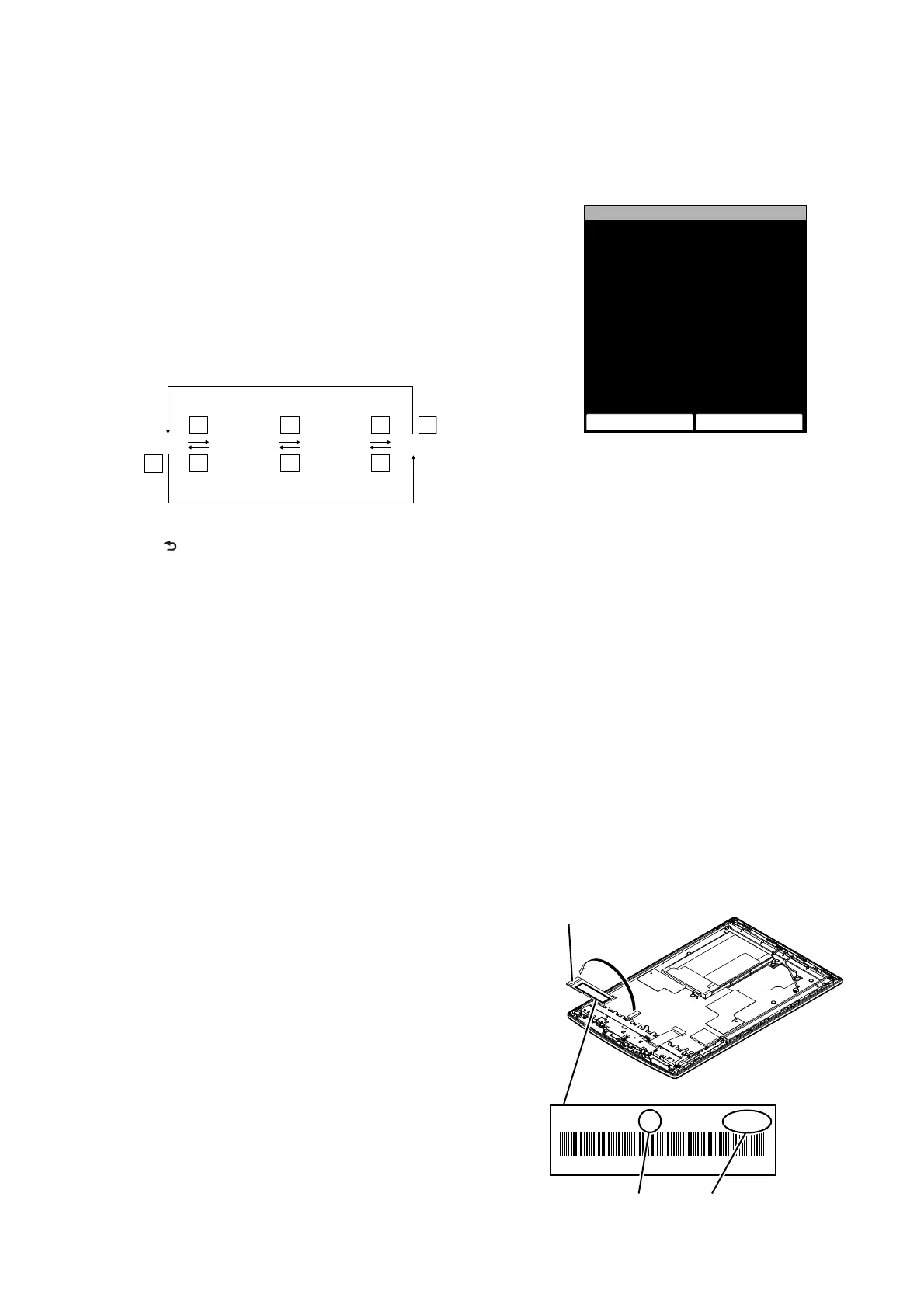
Disassemble this unit until the FPL lot number and TFT vender are
seen (Refer to “2. DISASSEMBLY” (pages 4 to 9)), and confi rm
the FPL lot number and TFT vender referring to the fi gure below.
Record the confi rmed the FPL lot number and TFT vender by tak-
ing the memo etc..
E4KR28C01L5V00111AT
ED060SCE(LF)C1 FME60B5060(E120)
FPL lot numberTFT vender
Flexible board of ELEMENT
INK INDICATOR 6inch














 To Next Page