16
Step 3: Connecting to Your TV
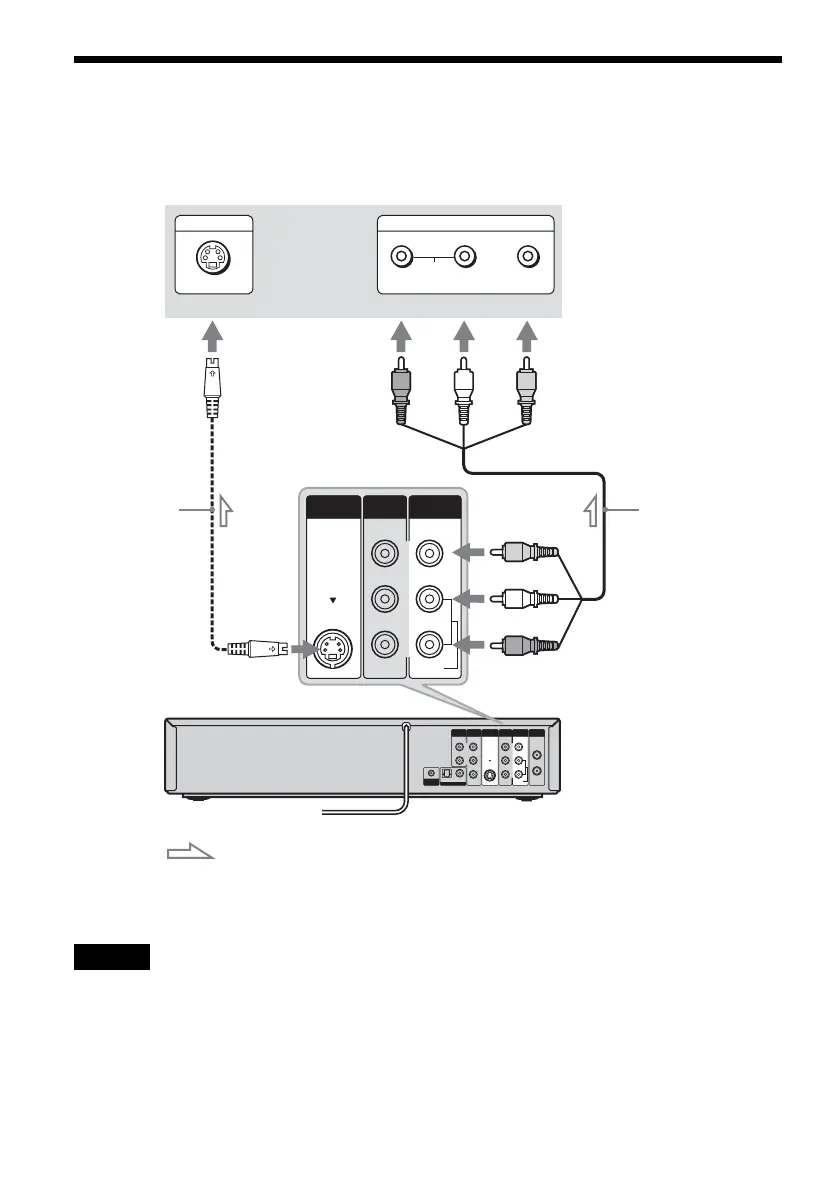
Connect the supplied audio/video cord to the LINE OUT (VIDEO/AUDIO L/R) jacks of the recorder.
To enjoy higher quality images, connect an S video cord (not supplied) instead of the yellow (video) plug.
When using this connection, be sure to connect the audio cord to the LINE OUT (AUDIO L/R) jacks.
When playing “wide screen” images
Some recorded images may not fit your TV screen. To change the picture size, see page 100.
Notes
• Do not connect to the S VIDEO OUT and yellow LINE OUT (VIDEO) jacks at the same time.
• During DVD recording, you cannot watch VHS pictures by pressing VIDEO, as the S VIDEO OUT jack will output
DVD video signals only.
• Do not connect your TV’s audio output jacks to the LINE IN (AUDIO L/R) jacks at the same time. This will cause
unwanted noise to come from your TV’s speakers.
IN
L
R
VIDEO
AUDIO
OUT
VHF/UHFLINE OUT
VIDEO
YL
P
B
R
P
R
AUDIO
LINE 1 IN
AUDIO OUT S VIDEO OUT
COMPONENT
VIDEO OUT
SET TOP BOX
CONTROL
DIGITAL AUDIO OUT
OPTICAL COAXIAL
L
R
VIDEO
AUDIO
LINE OUT
VIDEO
AUDIO
LINE 1 IN
S VIDEO OUT
AUDIO
INPUT
R L VIDEO
INPUT
S VIDEO
VCR-DVD recorder
: Signal flow
S video cord
(not supplied)
Audio/video cord
(supplied)
to S VIDEO OUT
to LINE OUT
(VIDEO/AUDIO L/R)
(red) (white) (yellow)
(yellow)
(white)
(red)
TV or projector














 To Next Page