35
DVD Playback
DVD Playback
Playing
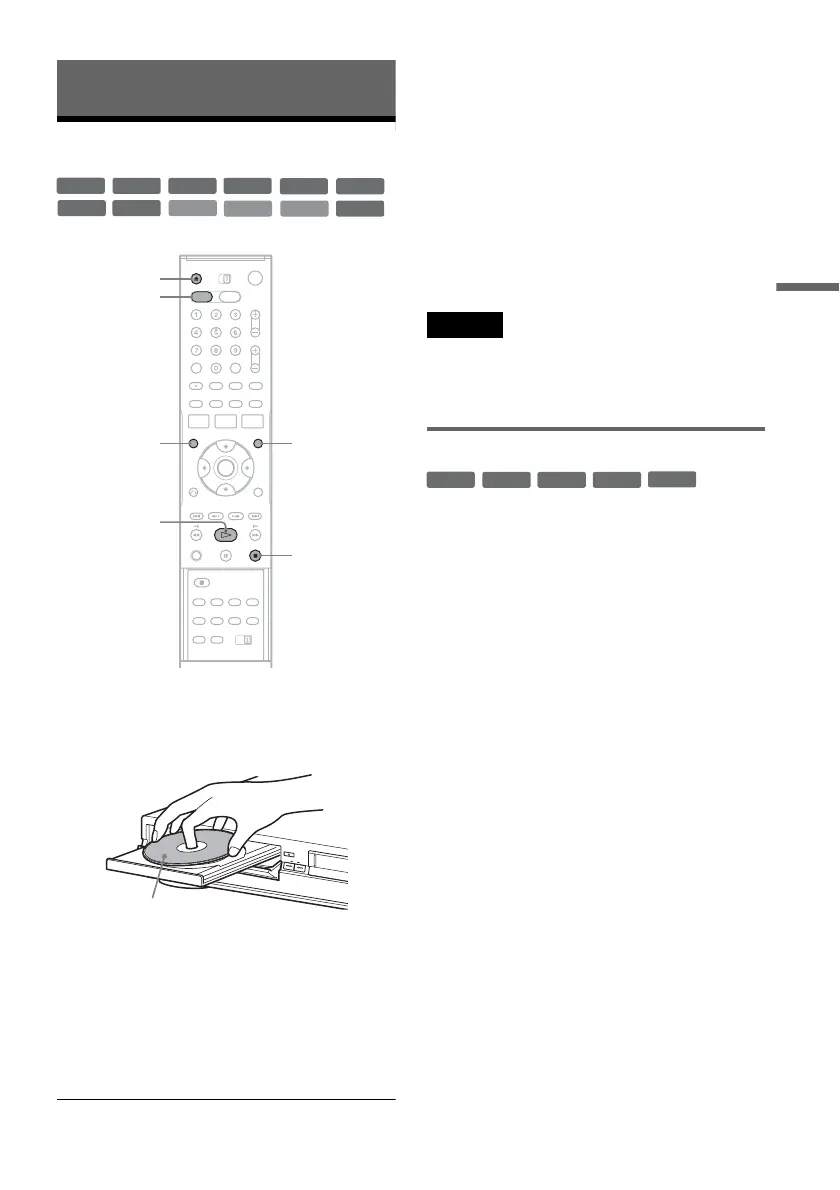
1 Press DVD to operate the DVD recorder.
2 Press Z OPEN/CLOSE, and place a disc on
the disc tray.
3 Press Z OPEN/CLOSE to close the disc
tray.
Wait until “LOAD” disappears from the front
panel display.
4 Press H PLAY.
Playback starts.
To stop playback
Press x STOP.
z Hints
• You can play DATA CDs or DATA DVDs with MP3
audio tracks or JPEG image files (pages 43 or 44).
• If you insert a DVD VIDEO, VIDEO CD, or CD,
playback starts automatically depending on the disc.
• When playing a DVD+RW, DVD-RW, DVD+R,
DVD-R, and DVD-RAM, you can select the title from
the Title List menu (page 40).
• When using a DVD-RAM with a cartridge, remove the
disc from the cartridge.
Notes
• To play a disc recorded with other equipment on this
recorder, finalize the disc on the recording equipment
first.
• For simultaneous VHS and DVD operation, see page 9.
Using the DVD’s Menu
When you play a DVD VIDEO, or a finalized
DVD+RW, DVD-RW (Video mode), DVD+R, or
DVD-R (Video mode), you can display the disc’s
menu by pressing TOP MENU or MENU.
+
RW
+
R
DVD
VCD
CD
-
RWVR
-
RW
Video
DATA DVD
DATA CD
-
RVR
-
R
Video
RAM
x STOP
Z OPEN/
CLOSE
MENU
H PLAY
DVD
TOP MENU
Playback side facing down
+
RW
+
R
DVD
-
RW
Video
+
R
-
R
Video














 To Next Page