66
Editing a Playlist
You can edit Playlist titles or scenes within them,
without changing the actual recordings.
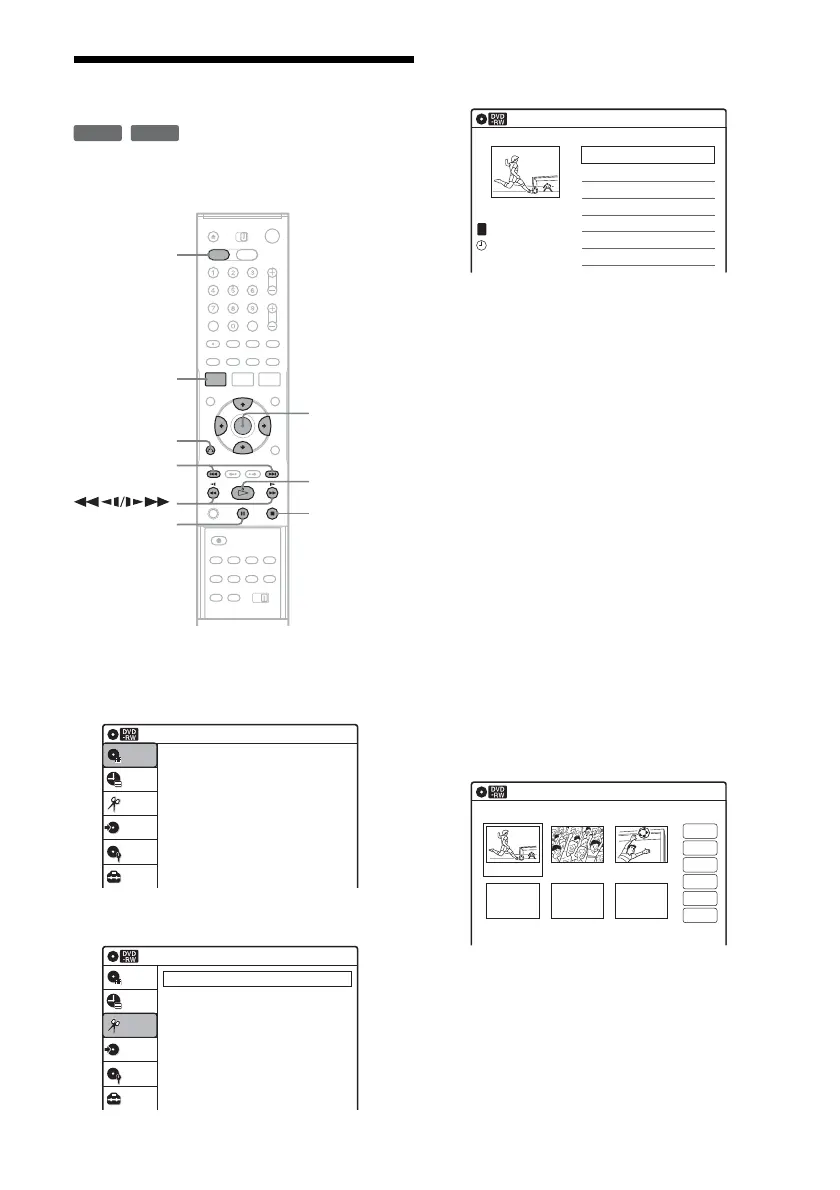
1 Press DVD to operate the DVD recorder.
2 Press SYSTEM MENU while the recorder is
in stop mode.
3 Select “Edit,” and press ENTER.
4 Select “Edit Playlist,” and press ENTER.
The “Playlist” Title List appears.
5 Select a Playlist title, and press ENTER.
The sub-menu appears.
6 Select an option, and press ENTER.
Select from the following options. For details,
see the pages in parentheses.
“Title Erase”: Erases the title. Select “OK”
when asked for confirmation.
“Chapter Erase”: Allows you to select
chapters in the Playlist title to erase (page 60).
“Title Name”: Allows you to rename the title
(page 63).
“A-B Erase”: Allows you to select sections in
the title to erase (page 60).
“Edit Scene”: Allows you to re-edit scenes in
the Playlist title. Go to step 7.
“Divide Title”: Divides the title in two at a
desired point (page 61).
“Combine Titles”: Allows you to combine
two titles into one (page 67).
7 Select “Edit Scene,” and press ENTER.
The display for editing scenes appears.
“Check”: Allows you to preview a scene.
Starts playback of the selected scene when
you press ENTER. The display returns to the
“Edit Scene” display when the playback
finishes or when you press O RETURN.
“Erase”: Erases a scene (page 67).
“Modify”: Allows you to change the start and
end point of a scene (page 67).
-
RWVR
-
RVR
SYSTEM
MENU
DVD
M/m/</,,
ENTER
H PLAY
x STOP
X PAUSE
O RETURN
./>
Press ENTER :
Title Menu for DVD Title List.
10:10 AM
Title List (Original)
Setup
Disc Setting
Edit
Title List
Timer
Dubbing
10:10 AM
Create Playlist
Edit Playlist
Edit
Setup
Disc Setting
Edit
Title List
Timer
Dubbing
Playlist
10:10 AM
01 Ch 32 >00:05:04
02 Ch 96 >00:00:51
Ch 32
03:25 PM
May/02/2006
T
No. Title Length Edit1/2
Edit Scene
10:10 AM
Scene No.1 / 3 Playlist No.01
03 00:04:2002 00:00:1001 00:00:34
Check
Erase
Modify
Move
Add
Copy














 To Next Page