EasyManua.ls Logo

Sony RM-E300 - Locating Cut-in;Cut-out Points

Sony RM-E300
73 pages
Print Icon
To Next Page IconTo Next Page
To Previous Page IconTo Previous Page
Loading...
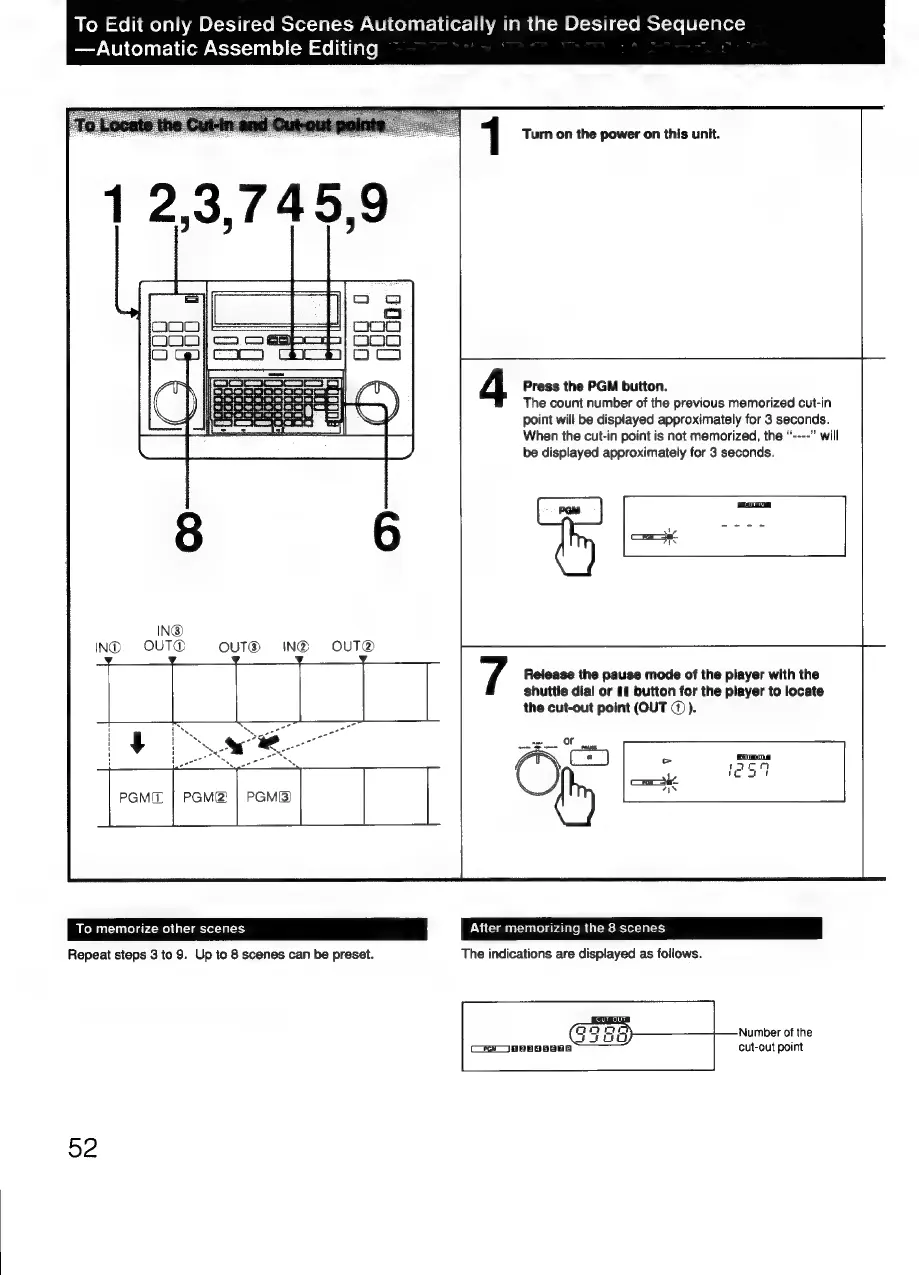
To
Edit
only
Desired
Scenes
Automatically
in
the
Desired
Sequence
—Automatic
Assemble
Editing
1
Turn
on
the
power
on
this
unit.
4
Press
the
PGM
button.
The
count
number
of
the
previous
memorized
cut-in
point
will
be
displayed
approximately
for
3
seconds.
When
the
cut-in
point
is
not
memorized,
the
“----”
will
be
displayed
approximately
for
3
seconds.
IN@
IND
OUT®
OUT®
IN@
OUT@
/
Release
the
pause
mode
of
the
player
with
the
shuttle
dial
or
11
button
for
the
player
to
locate
the
cut-out
point
(OUT
@)).
mS
ee
Oe
PGMIL
=
PGM(2!
|
PGM{&3)
To
memorize
other
scenes
After
memorizing
the
8
scenes
Repeat
steps
3
to
9.
Up
to
8
scenes
can
be
preset.
The
indications
are
displayed
as
follows.
Number
of
the
Cay
pp808oEa
cut-out
point
52

Related product manuals