EasyManua.ls Logo

Sony RM-E300 - Changing Editing Points

Sony RM-E300
73 pages
Print Icon
To Next Page IconTo Next Page
To Previous Page IconTo Previous Page
Loading...
To
Edit
only
Desired
Scenes
Automatically
in
the
Desired
Sequence
—Automatic
Assemble
Editing
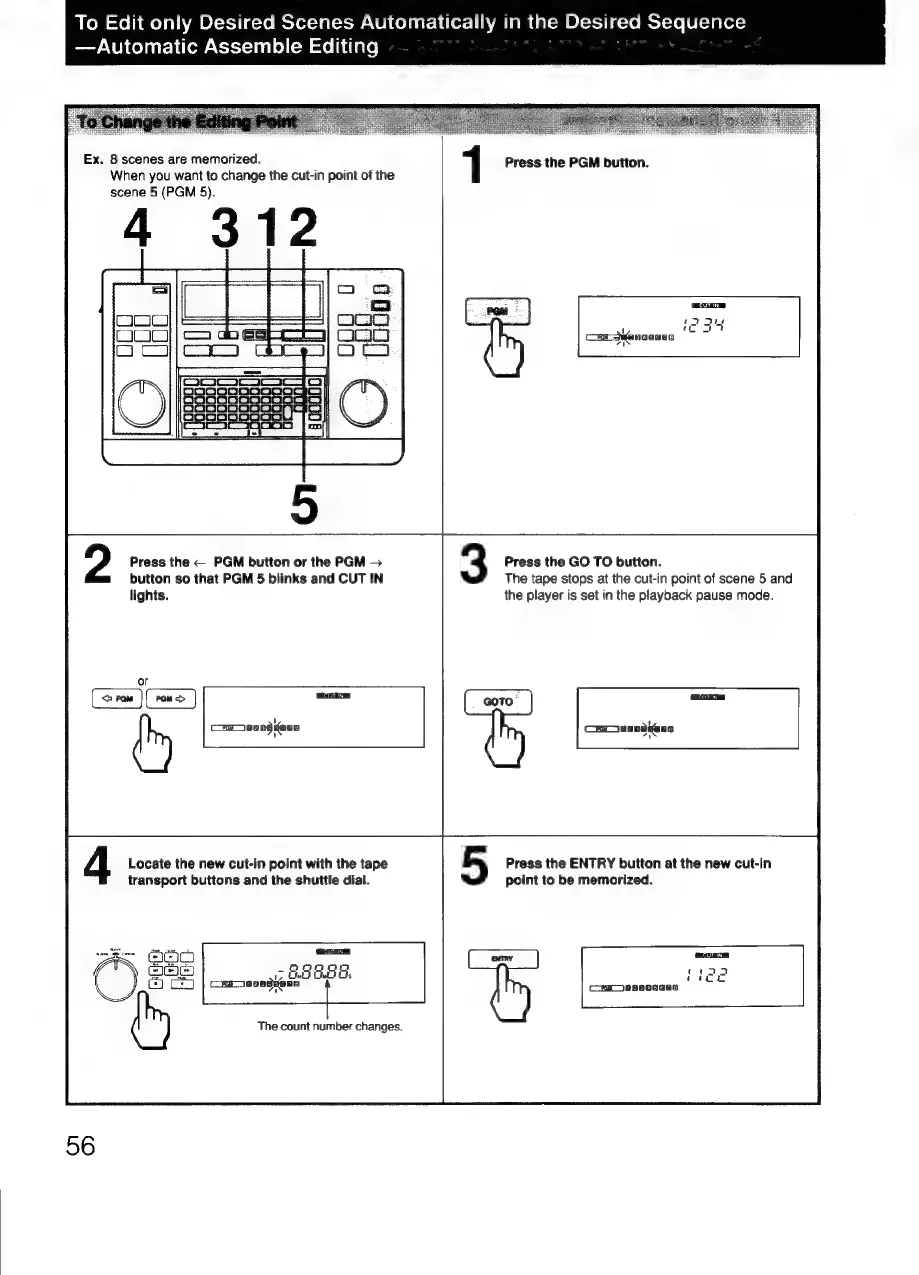
Ex.
8
scenes
are
memorized.
When
you
want
to
change
the
cut-in
point
of
the
scene
5
(PGM
5).
1
Press
the
PGM
button.
Press
the
PGM
button
or
the
PGM
>
button
so
that
PGM
5
blinks
and
CUT
IN
lights.
ca
aungfeun
3
Press
the
GO
TO
button.
The
tape
stops
at
the
cut-in
point
of
scene
5
and
the
player
is
set
in
the
playback
pause
mode.
Fi
Car
anndiens
4
Locate
the
new
cut-in
point
with
the
tape
transport
buttons
and
the
shuttle
dial.
CUTAN,
Gu
G48
Gs
cmravaguenn
f
The
count
number
changes.
56
5
Press
the
ENTRY
button
at
the
new
cut-in
point
to
be
memorized.
4
Cas
ee80seeo

Related product manuals